
and. A field is represented by one of the following possibilities according to its simple type:
Built-in RESTful services
Related information
Introduction
The architecture used is called ROA (Resource-Oriented Architecture), it can be an alternative to SOA (Service-Oriented Architecture). The chosen resources are readable and/or writable by third-party systems, according to the request content.
The HATEOAS approach of the built-in RESTful services also allows for an intuitive and straightforward navigation, which implies that the data details could be obtained through a link.
Note:
All operations are stateless.
Request
This chapter describes the elements to use in order to build a conform REST request, such as: the HTTP method, the URL format, the header fields and the message body.
See also:
HTTP method
Considered HTTP methods for built-in RESTful services, are:
-
GET: used to select master data defined in the URL (the size limit of the URL depends on the application server and on the browser; it must be lower than or equal to 2kB). -
POST: used to insert records in a table, or to select the master data defined in the URL (the size limit is 2MB or more, depending on the application server. Each parameter is limited to a value containing 1024 characters). -
PUT: used to update the master data defined in the URL. -
DELETE: used to delete either the record defined in the URL, or multiple records defined by the table URL and the record keys in the message body.
URL
REST URL contains:
http[s]://<host>[:<port>]/<ebx-dataservices>/rest/{category}/{categoryVersion}/{specificPath}[:{extendedAction}]?{queryParameters}
Where:
-
<ebx-dataservices>corresponds to the 'ebx-dataservices.war' web application's path. The path is composed by multiple, or none, URI segments followed by the web application's name. -
{category}corresponds to the operation category. -
{categoryVersion}corresponds to the category version: current value isv1. -
{specificPath}corresponds to a specific path inside the category. -
{extendedAction}corresponds to the extended action name (optional). -
{queryParameters}corresponds to common or dedicated operation parameters passed in the URL.
Operation category
Specializes the operation; it is added in the path of the URL in
{category}, and takes one of the following values:
admin
|
Administration operations reserved to administrators.
See Administration operations for more information.
|
auth
|
Manages token authentication method.
See Token authentication operations and Token Authentication Scheme for more information.
|
data or data-compact
|
Lists dataset content; requests a table, a record or a field record content, including modified operations on dataset node, table, record and record field. A compact format is available, to ease interaction in simple use cases.
Manages dataspace and snapshot life cycle.
|
data-bo or data-compact-bo
|
Requests a table, a record, or a field record content enables navigation through defined business objects. A compact format is available to ease interaction in simple use cases.
Deletes a record with its related records under other tables defined on business object relationships.
See Data operations for more information.
|
form-data or form-data-compact
|
Validates incoming data, and returns a report before inserting or updating a dataset node, record or record field. (A compact format is available to ease interaction for simple use cases.)
See Form data operations and Compact format limitations for more information.
|
health
|
Server health information returns information for a monitoring tool or container probes.
See Health operations for more information.
|
history
|
Lists the content of a history dataset; requests a history table, a history of a record or a history record.
See Data operations for more information.
See also:
|
api
|
Generates the OpenAPI document of the selected resource.
See OpenAPI operations for more information.
|
Header fields
These header field definitions are used by TIBCO EBX®.
Accept
|
Used to specify (by order of preference) content types to be used in the response: the first supported one will be chosen and specified in the response header
Content-Type. Currently, the only supported one is application/json. If none is supported, the result depends on property ebx.dataservices.rest.request.checkAccept:
See also:
|
Accept-Language
|
Used to specify the preferred locale for the response. The supported locales are defined in the schema model.
If none of the preferred locales is supported, the default locale for the current model is used.
|
Authorization
|
Supported authentication schemes include 'Basic Authentication Scheme' and 'Token Authentication Scheme'; if another scheme is used, the request is rejected.
See also:
|
Content-Type
|
Used to specify the request body media type. The supported types are
application/json and application/x-www-form-urlencoded. If the request value is not supported, then an HTTP error message is returned with the code 415(Unsupported media type).
See also:
|
X-Requested-With
|
If present and in case of authentication failure, prevents from adding the
WWW-Authenticate header in the response.
See also:
|
See RFC2616 for more information about HTTP Header Field Definitions.
Common parameters
These optional parameters are available for all data service operations.
|
Parameter
|
Description
|
|---|---|
disableRedirectionToLastBroadcast
|
This parameter only has impact in a D3 architecture.
If
true, access to a delivery dataspace on a D3 primary node is not redirected to the last broadcast snapshot. Otherwise, access to such a dataspace is always redirected to the last broadcast snapshot.
If the specified dataspace is not a delivery dataspace on a D3 primary node, this parameter is ignored.
Boolean type value. If this parameter is not present, the default is false (redirection to a D3 master enabled), unless the configuration property ebx.dataservices.disableRedirectionToLastBroadcast.default has been set.
See also:
|
ebx-indent
indent (Deprecated since 6.0.0)
|
Specifies whether the response should be indented, to be easier to read for a human.
Boolean type, default value is false.
|
ebx-channel
|
Specifies the session channel.
String type, possible values are:
The default value is
dataServices.
See also:
|
Message body
It contains the request data using the JSON format, see Extended JSON request body and Compact JSON request body.
Note:
Requests may define a message body only when using
POST or PUT HTTP methods.
Response
This chapter describes the responses returned by built-in RESTful services.
-
See Exception handling for details on standard error handling (where the HTTP code is greater than or equal to
300).
Header fields
These header field definitions are used by EBX®.
Content-Language
|
Indicates the locale used in the response for labels and descriptions.
|
Content-Type
|
Indicates the response body content type.
|
Location
|
If a new record has been successfully inserted, the query URL for this record is returned by this field.
|
WWW-Authenticate
|
This header field is added to the HTTP response when authentication fails with the 401 (Unauthorized) HTTP code. Its value consists of a list with at least one authentication method applicable to the request URI. It is present if and only if the following conditions are verified:
If the client is able to interpret the authentication method, it is possible to resubmit the request providing the appropriate credentials.
The administration property ebx.dataservices.rest.auth.tryBasicAuthentication must be set to
true.
|
HTTP codes
|
HTTP code
|
Description
|
|---|---|
200 (OK)
|
The request has been successfully handled.
|
201 (Created)
|
A new record has been created, in this case, the header field Location is returned with its resource URL.
|
204 (No content)
|
The request has been successfully handled but no response body is returned.
|
400 (Bad request)
|
The request URL or body is not well-formed or contains invalid content.
|
401 (Unauthorized)
|
Authentication has failed.
|
403 (Forbidden)
|
Permission was denied to read or modify the specified resource for the authenticated user.
This error is also returned when the user:
|
404 (Not found)
|
The resource specified in the URL cannot be found.
|
406 (Not acceptable)
|
Content type defined in the request's Accept parameter is not supported. This error can be returned only if the EBX® property ebx.rest.request.checkAccept is set to true.
|
409 (Conflict)
|
A concurrent modification has occurred.
See also:
|
415 (Unsupported media type)
|
The request content is not supported, the request header value Content-Type is not supported by the operation.
|
422 (Unprocessable entity)
|
The new resource's content cannot be accepted for semantic reasons.
|
500 (Internal error)
|
Unexpected error thrown by the application. Error details can usually be found in EBX® logs.
|
Message body
The response body content's format depends on the HTTP code value:
-
HTTP codes from
200included to300excluded: the content format depends on the associated request (Extended JSON and Compact JSON samples).With the exception of code204(No content). -
HTTP codes greater than or equal to
300: the content describes the error. See JSON for details on the format.
Administration operations
Administration operations are related to:
-
the administration category.
-
the administration dataspaces accessible through the
datacategory.
Note:
administration category and administration dataspaces can only be used by administrators.
Directory operations
The EBX® default directory configuration is manageable with built-in RESTful services. The users and roles tables, the mailing lists and other objects are concerned. For more information, see Users and roles directory.
Note:
Triggers are present on the directory's tables, ensuring the data consistency.
The URL format is:
http[s]://<host>[:<port>]/<ebx-dataservices>/rest/data/v1/Bebx-directory/ebx-directory
Directory configuration operations
Mailing lists operations
Directory users operations
Users can be manipulated like records of the
data category using the operations of the latter. For security purposes, an administrator cannot delete himself. The user's salutation must be chosen among the ones available in the 'salutations' table.
Directory roles operations
Roles are records of the
data category and can be managed with its operations. EBX® roles are assigned to users through the 'usersRoles' association table. 'usersRoles' is automatically fed when the directory is administered through the user interface. However, it is not the case through data services and role assignments require manual operations. Roles inclusions are specified in the 'rolesInclusions' association table. As for the 'usersRoles' table, the management of roles inclusions requires manual operations. Each table is self-descriptive when metamodel is requested.
User interface operations
The EBX® user interface can be opened or closed to users for maintenance needs. Handled information is similar to what is contained in the UI tab 'Administration' > 'User interface configuration' > 'Advanced perspective' > 'Graphical interface configuration' > 'Application locking'.
The URL format is:
http[s]://<host>[:<port>]/<ebx-dataservices>/rest/data/v1/Bebx-manager/ebx-manager/domain/toolStatus
See also:
Retrieve user interface state
User interface status and the unavailability message are accessible like dataset nodes.
Open or close user interface
User interface status and the unavailability message can be modified like dataset nodes using the update operation. To open the user interface set the content of
toolStatus to true, or to false to close it.
System information operation
This operation returns system information on the EBX® server. This is accepted for
GET and POST HTTP methods. Warning: no update will be possible in the POST HTTP method because the request body is ignored. The information returned is the same as the information contained in the log header kernel.log or in the UI tab 'Administration' > 'System Information'. The response contains several keys, labels, and values representing the configuration and status of EBX®. The mode of representation of the response may be flat or hierarchical.
http[s]://<host>[:<port>]/<ebx-dataservices>/rest/admin/v1/systemInformation
See also:
Parameters
The following parameter is applicable.
|
Parameter
|
Description
|
|---|---|
systemInformationMode
|
Specifies the returned mode:
String type, default value is flat.
|
HTTP codes
|
HTTP code
|
Description
|
|---|---|
200 (OK)
|
The system information was successfully returned.
|
400 (Bad request)
|
The request is not correct, it contains one of the following errors:
|
403 (Forbidden)
|
The user is not an administrator.
|
Response body
Token authentication operations
These operations allow to create or revoke an authentication token. Authentication tokens have a timeout period. If a token is not used to access the EBX® server within this period, it will automatically be revoked. This timeout period is refreshed on each access to EBX® server.
Note:
The token timeout is modifiable through the administration property ebx.dataservices.rest.auth.token.timeout (the default value is 30 minutes).
Create token operation
This operation requires using the
POST HTTP method with a request containing the user's credentials and, optionally, session parameters.
The URL format is:
http[s]://<host>[:<port>]/<ebx-dataservices>/rest/auth/v1/token:create
Message body
A message body must be defined in the HTTP request. It necessarily contains one of the following set of data:
-
A
loginand apasswordvalue. Both JSON attributes are mandatory and ofStringtypes.SeeDirectory.authenticateUserFromLoginPasswordfor more information. -
The
specificJSON attribute set totrue. When activated, this flag allows to performed a user authentication against the whole HTTP request. Warning, even ifloginandpasswordattributes are defined in the JSON request's body, settingspecifictotruelead to a specific user authentication.SeeDirectory.authenticateUserFromHttpRequestfor more information.
See the JSON examples of a token creation request.
HTTP codes
|
HTTP code
|
Description
|
|---|---|
200 (OK)
|
The token was successfully created.
|
400 (Bad request)
|
For one of the following reasons:
|
401 (Unauthorized)
|
For one of the following reasons:
|
422 (Unprocessable entity)
|
For one of the following reasons:
|
Response body
If the HTTP code is
200 (OK), the body holds the token value and its type.
See the JSON example of a token creation response.
The token can later be used to authenticate a user by setting the HTTP-Header
Authorization accordingly.
See also:
Change password operation
This operation modifies the password of an existing user account. It can be used in an authenticated context:
login parameter, if present, is checked against the current session or taken from it, if absent. It could also be used in an unauthenticated context, for example when the Create token operation aborts with the HTTP code 422 (Unprocessable entity) with reason: PasswordMustChange.
It requires the use of:
-
the EBX® default directory
-
the
POSTHTTP method -
the message body containing the structure specified below
The URL format is:
http[s]://<host>[:<port>]/<ebx-dataservices>/rest/auth/v1/user:changePassword
Message body
The message body must be defined in the request. It necessarily contains a
password and a passwordNew, the login is optional (all are String).
See the JSON example of a password change and token creation request.
HTTP codes
|
HTTP code
|
Description
|
|---|---|
204 (No content)
|
The password has been changed.
|
400 (Bad request)
|
For one of the following reasons:
|
401 (Unauthorized)
|
For the following reason:
|
422 (Unprocessable entity)
|
For one of the following reasons:
|
Response body
If HTTP code
204 (No content) is returned, then the password has been modified.
Revoke token operation
This operation requires using the
POST HTTP method. No message body is needed.
The URL format is:
http[s]://<host>[:<port>]/<ebx-dataservices>/rest/auth/v1/token:revoke
Header fields
Authorization
|
This field is required, tokenType and accessToken fields must have the values returned from the "token create" operation.
> Authorization: <tokenType> <accessToken> |
HTTP codes
|
HTTP code
|
Description
|
|---|---|
204 (No content)
|
The token has been revoked successfully.
|
400 (Bad request)
|
For one of the following reasons:
|
401 (Unauthorized)
|
Authentication has failed.
|
Data operations
The
data category operations concern the datasets, the dataset fields, tables, records or record fields.
The
data-compact category operations concern the dataset fields, tables, records or record fields.
The
data-bo category operations concern data category operations with features to navigate through business objects.
The
data-compact-bo category operations concern data-compact category operations with features to navigate through business objects.
The
history category operations concern historized content from datasets, tables, records or record fields.
The
form-data category operations concern the dataset fields, records or record fields when constraints must remain valid on content creation or update.
The
form-data-compact category operations concern the dataset fields, records or record fields when constraints must remain valid on content creation or update.
See Form data operations for more information.
Select operation
Select operation returns hierarchical content. This operation may use one of the following methods:
-
GETHTTP method, -
POSTHTTP method without message body or -
POSTHTTP method with a message body, with:selectURL extended action and optionally session parameters.URL formats are: -
Dataset tree, depending on operation category:The
data, ordata-compact, category returns the hierarchy of the selected dataset which includes group and table nodes.Thehistorycategory returns the hierarchy of the selected history dataset which includes the pruned groups for history table nodes only.http[s]://<host>[:<port>]/<ebx-dataservices>/rest/{category}/v1/{dataspace}/{dataset}Note:Terminal nodes and sub-nodes are not included. -
Dataset node: the
data, ordata-compact, category returns the terminal nodes contained in the selected node.http[s]://<host>[:<port>]/<ebx-dataservices>/rest/{category}/v1/{dataspace}/{dataset}/{pathInDataset}[:select]Note:Not applicable with thehistorycategory. -
Table, depending on operation category:the
data, ordata-compact, category returns the table content and/or metamodel, current page records and URLs for pagination.Thehistorycategory returns the history table content and/or metamodel, current page records and URLs for pagination.http[s]://<host>[:<port>]/<ebx-dataservices>/rest/{category}/v1/{dataspace}/{dataset}/{pathInDataset}[:select]See also: -
Record, depending on operation category:the
data, ordata-compact, category returns the record content and/or metamodel.Thehistorycategory returns history record content and/or metamodel.http[s]://<host>[:<port>]/<ebx-dataservices>/rest/{category}/v1/{dataspace}/{dataset}/{pathInDataset}/{encodedPrimaryKey}[:select]http[s]://<host>[:<port>]/<ebx-dataservices>/rest/{category}/v1/{dataspace}/{dataset}/{pathInDataset}[:select]?primaryKey={xpathExpression}Note:The record access by the primary key (primaryKeyparameter) is limited to its root node. It is recommended to use the encoded primary key, available in thedetailsfield in order to override this limitation. Similarly, for a history record, use the encoded primary key, available in thehistoryDetailsfield. -
Field, depending on operation category:the
data, ordata-compact, category returns the field record content where structure depends on its type.Thehistorycategory returns the field history record content where structure depends on its type.http[s]://<host>[:<port>]/<ebx-dataservices>/rest/{category}/v1/{dataspace}/{dataset}/{pathInDataset}/{encodedPrimaryKey}/{pathInRecord}[:select]Note:The field must be either an association node, a selection node, a terminal node or above.Where: -
{category}corresponds to the operation category (possible values are:data,data-compact,data-bo,data-bo-compactorhistory). -
{dataspace}corresponds toBfollowed by the dataspace identifier or toVfollowed by the snapshot identifier. -
{dataset}corresponds to the dataset identifier. -
{pathInDataset}corresponds to the path of the dataset node, that can be a group node or a table node. -
{encodedPrimaryKey}corresponds to the percent encoded representation of the primary key (see RFC-3986 Uniform Resource Identifier ). -
{xpathExpression}corresponds to the record primary key, using the XPath expression. -
{pathInRecord}corresponds to the path starting from the table node. -
:selectextended action is required when POST HTTP method is used with a body message.Business object categories (data-boanddata-compact-bo) enrich the responses ofTable,Record, andFieldrequests by adding data from other tables. -
A
One To Onerelation ship will be directly included in the structure of the response. -
A
One To Manyrelation ship will be navigable throughHATEOASlinks.
Parameters
The following parameters are applicable to the select operation.
|
Parameter
|
Description
|
|---|---|
includeContent
|
Includes the
content field with the content corresponding to the selection.
Boolean type, default value is true.
|
includeDetails
|
Includes the
details field in the metamodel and in the content, for each indirect reachable resource. The returned value corresponds to its URL resource.
Type
Boolean, default value is true.
See also:
|
includeHistory
|
Includes those fields for a historized content:
Boolean type, default value is false.
Note:
The
includeHistory parameter is ignored in the history category, the default value is true.
See also:
|
includeLabel
|
Includes the
label field associated with each simple type content.
Possible values are:
String type, default value is yes.
Note:
The
label field is not included if it is equal to the content field.
|
includeMeta
|
Deprecated since 6.1.0, replaced by includeMetamodel.
|
includeMetadata
|
The response contains the specified metadata. Each returned record contains additional elements called steps under the
ebx-metadata root element.
For instance, the 'system' step value will contain technical data. See optimistic locking for more information.
String value (default value is empty) steps must be separated by a comma:
system, teamUp. All steps can be returned using the ebx-all value.
See also:
|
includeMetamodel
|
Includes the
meta field corresponding to the description of the structure returned in the content field.
Boolean type, default value is false.
See also:
|
includeMergeInfo
|
Includes the
merge_info corresponding to a field of the technical data of an history transaction and has a potentially high access cost.
Boolean type, default value is true.
Note:
This parameter is ignored with the
data category.
See also:
|
includeOpenApiDetails
|
Includes the OpenAPI specification URL for each describable node.
Type
Boolean, default value is false.
Note:
This query parameter is ignored if the includeDetails one is set to
false.
See also:
|
includeSelector
|
Includes the
selector field in the response, for each indirect reachable resource. The returned value corresponds to its URL resource.
Type
Boolean, default value is true.
See also:
|
includeSortCriteria
|
Includes the
sortCriteria field corresponding to the list of sort criteria applied.
The sort criteria parameters are added by using:
Boolean type, default value is false.
Example JSON
|
includeTechnicals
|
Deprecated since 6.1.0, replaced by
includeMetadata.
Note:
This parameter is ignored with the
history category.
|
includeValidation
|
Includes the validation report corresponding to the selection.
Boolean type, default value is false.
Note:
This parameter is ignored with the
history category.
See also:
|
Table parameters
The following parameters are applicable to tables, associations and selection nodes.
|
Parameter
|
Description
|
|---|---|
filter
|
Quick search predicate or complete XPath predicate expression defines the field values to which the request is applied. If empty, all records will be retrieved.
String type value.
Note:
The history code operation value is usable with
ebx-operationCode path field from the meta section associated with this field.
See also:
See also:
|
historyMode
|
Specifies the filter context applied on table.
String type, possible values are:
The default value is
CurrentDataSpaceOnly.
See also:
Note:
This parameter is ignored with the
data category.
|
includeOcculting
|
Includes the records in occulting mode.
Boolean type, default value is false.
See also:
|
primaryKey
|
Search a record by a primary key, using the XPath expression. The XPath predicate expression should only contain field(s) of the primary key and all of them. Fields are separated by the operator
Example with a composed primary key:
./pk1i=1 and date-equal(./pk2d,'2015-11-13')
The response will only contain the corresponding record, otherwise an error is returned. Consequently, the other table parameters are ignored (as filter, viewPublication, sort, etc.)
String type value.
|
pageFirstRecordFilter
|
Deprecated since 5.9.0, replaced by pageRecordFilter
|
pageRecordFilter
|
Specifies a server side built filter, for pagination, pointing to a record. This filter is strongly linked to the
pageAction value and should not be modified on the client side. The filter takes the form of a record XPath predicate expression used to figure out the pagination contexts.
String type.
See also:
|
pageAction
|
Specifies the pagination action to perform from the identifier held by
pageRecordFilter.
String type, default value is first. The possible values are:
See also:
|
pageSize
|
Specifies the maximum number of records per page.
Integer type, default value is based on the user preferences. If the specified value is 0, selects with the maximum recommended page size, default is 10000.
Note:
If the specified page size value exceeds the maximum page size, the maximum page size is selected.
|
sort
|
Specifies that the operation result will be sorted according to the specified criteria. The criteria are composed of one or more criterion, the result will be sorted by priority from the left. A criterion is composed of the field path and, optionally, the sorting order (ascending or descending, on value or on label). This parameter can be combined with:
The value structure is as follows:
<path1>:<order>;...;<pathN>:<order>
Where:
String type, the default value orders according to the primary key fields (ascending order on value).
Note:
The history code operation value is usable with the
ebx-operationCode path field from the meta section associated with this field.
Note:
This parameter is ignored when the sort by relevancy is activated.
See also:
|
sortByRelevancy
|
Specifies that the operation result will be sorted by relevancy, only if these conditions are fulfilled:
If the sort by relevancy is activated, the following parameters are ignored: sort, sortOnLabel, sortPriority and sort criteria defined through the viewPublication.
See also:
|
sortOnLabel
|
Specifies that the operation result will be sorted according to the record label. This parameter can be combined with:
The value structure is as follows:
<order>
Where:
The behavior of this parameter is described in the section defaultLabel.
String type value.
See also:
Note:
This parameter is ignored when the sort by relevancy is activated.
|
sortPriority
|
Overrides the default priority of sort groups:
Comma separated
String type, default value is: sort,sortOnLabel,sortFromView.
Note:
This parameter is ignored when the sort by relevancy is activated.
|
viewPublication
|
Specifies the name of the published view. This parameter can be combined with:
The behavior of this parameter is described in the section EBX® as a Web Component.
String type value.
Note:
The sort criteria, defined through this parameter, is ignored when the sort by relevancy is activated.
See also:
|
Selector parameters
The following parameters are only applicable to fields that return an enumeration, foreign key or
osd:resource (Example JSON). By default, a pagination mechanism is always enabled. Some selector's select operations require input values. Thus, the uses of POST HTTP method message body allows to provide a record content.
|
Parameter
|
Description
|
|---|---|
selector
|
Specifies whether:
Boolean type, default value is false.
Note:
This parameter is ignored with the
history category.
|
firstElementIndex
|
Specifies the index of the first element returned. It must be an integer higher than or equal to
0.
Integer type, default value is 0.
|
pageSize
|
Specifies the maximum number of elements per page.
Integer type, default value is based on the user preferences. If the specified value is 0, selects with the maximum recommended page size, default is 10000.
Note:
If the specified page size value exceeds the maximum page size, the maximum page size is selected.
|
selectorFilter
|
Specifies the filter of the selector.
String type value, the syntax complies with the Quick Search.
|
HTTP codes
|
HTTP code
|
Description
|
|---|---|
200 (OK)
|
The selected resource is successfully retrieved.
|
400 (Bad request)
|
The request is incorrect. This occurs when:
|
403 (Forbidden)
|
The selected resource is hidden for the authenticated user.
|
404 (Not found)
|
The selected resource is not found.
|
Response body
After a successful dataset, table, record or field selection, the result is returned in the response body. The content depends on the provided parameters and selected data.
Examples: Extended JSON, Compact JSON.
Prepare operations
Prepare for creation or duplication operations are used to create a new transient record with an initial content or with the content of a record to duplicate. A transient record corresponds to a content that is not persisted yet. Default values and fields, initialized by table triggers, are considered. Only field values with, at least, read-only access permissions are returned. These operations can optionally return metamodel to improve and assist data capture on the client side. Auto-incremented fields are only returned in the metamodel. By enabling the selector parameter, a transient record's field can be queried to the retrieve possible values of an enumerated field, a foreign key, etc. Furthermore, selector's select operations allows to provide input record data to manage use cases like getting metamodel on a custom programmatic enumeration, etc.
See also:
See also:
After being modified on the client side, the record can be submitted to be persisted using the built-in Form insert operation or Insert operation operations.
These prepare operations may use one of the following methods:
-
GETHTTP method, -
POSTHTTP method without message body or -
POSTHTTP method with a message body and optionally session parameters.Available URL formats are: -
Prepare for creation
-
Record:
http[s]://<host>[:<port>]/ebx-dataservices/rest/{category}/v1/{dataspace}/{dataset}/{tablePath}:prepareForCreation -
Record field:
http[s]://<host>[:<port>]/ebx-dataservices/rest/{category}/v1/{dataspace}/{dataset}/{tablePath}:prepareForCreation/{pathInRecord}
-
-
Prepare for duplication
-
Record:
http[s]://<host>[:<port>]/ebx-dataservices/rest/{category}/v1/{dataspace}/{dataset}/{tablePath}/{encodedPrimaryKey}:prepareForDuplication -
Record field:
http[s]://<host>[:<port>]/ebx-dataservices/rest/{category}/v1/{dataspace}/{dataset}/{tablePath}/{encodedPrimaryKey}:prepareForDuplication/{pathInRecord}
Where: -
-
{dataspace}corresponds toBfollowed by the dataspace identifier. -
{dataset}corresponds to the dataset identifier. -
{tablePath}corresponds to the table path node. -
{encodedPrimaryKey}corresponds to the percent encoded representation of the primary key (see RFC-3986 Uniform Resource Identifier ). -
{pathInRecord}corresponds to the path starting from the table node.
Parameters
The following parameters are applicable to the prepare operations:
|
Parameter
|
Description
|
|---|---|
includeDetails
|
Includes the
details field in the metamodel and the content, for each indirect reachable resource. The returned value corresponds to its URL resource.
Type
Boolean, default value is true.
See also:
|
includeMeta
|
Deprecated since 6.1.0, replaced by includeMetamodel.
|
includeMetamodel
|
Includes the
meta field holding the description of the structure returned in the content field.
Boolean type, default value is false.
See also:
|
includeSelector
|
Includes the
selector field in the content, for each indirect reachable resource. The returned value corresponds to its URL resource.
Type
Boolean, default value is true.
See also:
|
Selector parameters
HTTP codes
|
HTTP code
|
Description
|
|---|---|
200 (OK)
|
The selected resource has been successfully retrieved.
|
400 (Bad request)
|
The request is incorrect. This occurs when:
|
401 (Unauthorized)
|
Authentication has failed.
|
403 (Forbidden)
|
The selected resource is hidden from the authenticated user.
|
404 (Not found)
|
The selected resource could not be found.
|
Response body
After a successful prepare for a creation or duplication request, the transient record is returned in the response body. The content depends on the provided parameters and selected data. However, it takes a format similar to the select operation record.
Examples: Extended JSON, Compact JSON.
Insert operation
Insert operation uses the
POST HTTP method. A body message is required to specify data. This operation supports the insertion of one or more records in a single transaction. Moreover, it is also possible to update record(s) through parameterization.
-
Record: insert a new record or modify an existing one in the selected table.
-
Record table: insert or modify one or more records in the selected table, while securing a consistent answer. Operations are executed sequentially, in the order defined on the client side. When an error occurs during a table operation, all updates are cancelled and the client receives an error message with detailed information.
http[s]://<host>[:<port>]/<ebx-dataservices>/rest/{category}/v1/{dataspace}/{dataset}/{pathInDataset}[:mass]
Where:
-
{dataspace}corresponds toBfollowed by the dataspace identifier or toVfollowed by the snapshot identifier. -
{dataset}corresponds to the dataset identifier. -
{pathInDataset}corresponds to the path of the table node. -
:massextended action is required when updating a filtered set of records (see filter parameter).
Parameters
The following parameters are applicable with the insert operation.
|
Parameter
|
Description
|
|---|---|
includeDetails
|
Includes the
details field in the content to access to the details of the data. The returned value corresponds to its URL resources.
Type
Boolean, the default value is false.
Note:
Only applicable on the record table.
See also:
|
includeForeignKey
|
Includes the
foreignKey field in the answer for each record. The returned value corresponds to the value of a foreign key field that was referencing this record.
Boolean type, the default value is false.
Note:
Only applicable on the record table.
See also:
|
includeLabel
|
Includes the
label field in the answer for each record.
Possible values are:
String type, the default value is no.
Note:
Only applicable on the record table.
See also:
|
updateOrInsert
|
Specifies the behavior when the record to insert already exists:
Boolean type value.
|
byDelta
|
Specifies the behavior for setting value of nodes that are not defined in the request body. This is described in the Update modes section.
Boolean type, the default value is true.
Note:
Applicable on record in update mode and if the updateOrInsert parameter is
true.
|
filter
|
Determines the records updated using a quick search predicate, or a complete XPath predicate expression when a large number of records are updated. The request body must be a record structure with the fields to update. This parameter must use the :mass extended action. Otherwise, an error is returned.
Use the ebx-all value to select all records.
When the viewPublication query parameter is used, the scope is limited to the filtered view.
String type value that must not be empty. Otherwise, an error is returned.
Note:
When using the query parameters includeDetails, includeLabel or includeForeignKey, only the first 1000 report entries are returned in the report.
|
viewPublication
|
Specifies the name of the published view to be considered during a massive update.
The behavior of this parameter is described in the EBX® as a Web Component section.
String type value.
|
blockingConstraintsDisabled
|
Specifies whether blocking constraints are ignored. If they are, the operation is committed regardless of the validation error created. Otherwise, the operation is aborted.
Boolean type with a default value of false.
See Blocking and non-blocking constraints for more information.
|
Message body
The request must define a message body. The format depends on the inserted object type:
-
Record: similar to the select operation of a record but without the record's header (example Extended JSON, Compact JSON).
-
Record table: Similar to the select operation on a table but without the pagination information (example Extended JSON, Compact JSON).
See also:
HTTP codes
|
HTTP code
|
Description
|
|---|---|
200 (OK)
|
If the request relates to a record table.
The insert request was applied successfully, an optional report is returned in the response body.
|
201 (Created)
|
If the request relates to a record.
A new record has been created, in this case, the header field Location is returned with its resource URL.
|
204 (No content)
|
If the request relates to a record.
Only available if updateOrInsert is true, an existing record has been successfully updated, in this case, the header field Location is returned with its resource URL.
|
400 (Bad request)
|
The request is incorrect. This occurs when the body message structure does not comply with what was mentioned in Message body.
|
403 (Forbidden)
|
Authenticated user is not allowed to create a record or the request body contains a read-only field.
|
404 (Not found)
|
The selected resource is not found.
|
409 (Conflict)
|
Concurrent modification, only available if updateOrInsert is true, the Optimistic locking is activated and the content has changed in the meantime, it must be reloaded before update.
|
422 (Unprocessable entity)
|
The request cannot be processed. This occurs when:
|
Response body
The response body format depends on the inserted object type:
-
Record: is empty if the operation was executed successfully. The header field
Locationis returned with its URL resource. -
Record table: (optional) contains a table of element(s), corresponding to the insert operation report (example JSON). This report is automatically included in the response body, if at least one of the following options is set:
-
includeForeignKey -
includeLabel -
includeDetails
-
See also:
Update operation
This operation allows the modification of a single dataset or record. The
PUT HTTP method must be used. Available URL formats are:
-
Dataset node: modifies the values of terminal nodes contained in the selected node.
http[s]://<host>[:<port>]/<ebx-dataservices>/rest/{category}/v1/{dataspace}/{dataset}/{pathInDataset} -
Record: modifies the content of selected record.
http[s]://<host>[:<port>]/ebx-dataservices/rest/{category}/v1/{dataspace}/{dataset}/{pathInDataset}/{encodedPrimaryKey}Note:Also available forPOSTHTTP method. In this case, the URL must point to the table and the parameterupdateOrInsertmust be set totrue.Note:Use Insert operation withupdateOrInsert=trueandbyDelta=trueparameters to modify the content of several records. -
Field: update of a single field of the selected record.
http[s]://<host>[:<port>]/<ebx-dataservices>/rest/{category}/v1/{dataspace}/{dataset}/{pathInDataset}/{encodedPrimaryKey}/{pathInRecord}Note:The field must be either a terminal node or above.Where: -
{dataspace}corresponds toBfollowed by the dataspace identifier or toVfollowed by the snapshot identifier. -
{dataset}corresponds to the dataset identifier. -
{pathInDataset}corresponds to the path of the dataset node:-
For dataset node operations, this must be any terminal node or above except table node,
-
For record and field operations, this corresponds to the table node.
-
-
{encodedPrimaryKey}corresponds to the percent encoded representation of the primary key (see RFC-3986 Uniform Resource Identifier ). -
{pathInRecord}corresponds to the path starting from the table node.
Parameters
Here are the parameters applicable with the update operation.
| Parameter | Description |
|---|---|
blockingConstraintsDisabled |
Specifies whether blocking constraints are ignored, if so, the operation is committed regardless of the validation error created, otherwise, the operation would be aborted. Boolean type, default value is false. See Blocking and non-blocking constraints for more information. |
byDelta |
Specifies the behavior for setting value of nodes that are not defined in the request body. This is described in the Update modes section. Boolean type, the default value is true. |
checkNotChangedSinceLastUpdateTime |
Timestamp in datetime format used to ensure that the record has not been modified since the last read. Also see the Optimistic locking section. DateTime type value. |
Message body
The request must define a message body.
The structure is the same as for:
-
the dataset node (sample Extended JSON, Compact JSON),
-
the record (sample Extended JSON, Compact JSON),
-
the record fields (sample Extended JSON, Compact JSON),
depending on the updated scope, by only keeping the
content entry.
See also:
HTTP codes
|
HTTP code
|
Description
|
|---|---|
204 (No content)
|
The record, field or dataset node has been successfully updated.
|
400 (Bad request)
|
The request is incorrect. This occurs when the body request structure does not comply.
|
403 (Forbidden)
|
Authenticated user is not allowed to update the specified resource or the request body contains a read-only field.
|
404 (Not found)
|
The selected resource is not found.
|
409 (Conflict)
|
Concurrent modification, the Optimistic locking is activated and the content has changed in the meantime, it must be reloaded before the update.
|
422 (Unprocessable entity)
|
The request cannot be processed. This occurs when:
|
Delete operation
The operation uses the
DELETE HTTP method.
Two URL formats are available:
-
Record: delete a record specified in the URL.
http[s]://<host>[:<port>]/<ebx-dataservices>/rest/data/v1/{dataspace}/{dataset}/{pathInDataset}/{encodedPrimaryKey} -
Record table: deletes several records in the specified table, while providing a consistent answer. This mode requires a body message containing a record table. The deletions are executed sequentially, according to the order defined in the table. When an error occurs during a table operation, all deletions are cancelled and an error message is displayed with detailed information.
http[s]://<host>[:<port>]/<ebx-dataservices>/rest/data/v1/{dataspace}/{dataset}/{pathInDataset}[:mass]Where: -
{dataspace}corresponds toBfollowed by the dataspace identifier or toVfollowed by the snapshot identifier. -
{dataset}corresponds to the dataset identifier. -
{pathInDataset}corresponds to the path of the table node. -
{encodedPrimaryKey}corresponds to the percent encoded representation of the primary key (see RFC-3986 Uniform Resource Identifier ). -
:massextended action is required when deleting a filtered set of records (see filter parameter).In a child dataset context, this operation modifies theinheritanceModeproperty value of the record as follows: -
A record with inheritance mode set to
inheritoroverwritebecomesoccult. -
A record with inheritance mode set to
occultbecomesinheritif theinheritIfInOccultingModeoperation parameter is set totrueor is undefined, otherwise there is no change. -
A record with inheritance mode set to
rootis simply deleted.
See also:
Business object categories (
data-bo and data-compact-bo) will do cascade deletion of all related records to the record to delete through business object relations.
Parameters
Here are the following parameters applicable with delete operation.
| Parameter | Description |
|---|---|
includeOcculting |
Includes occulted records. Boolean type, the default value is false. |
inheritIfInOccultingMode |
Deprecated since 5.8.1 While it remains available for backward compatibility reasons, it will eventually be removed in a future version. Inherits the record if it is in occulting mode. Boolean type, the default value is true. |
checkNotChangedSinceLastUpdateTime |
Timestamp in datetime format used to ensure that the record has not been modified since the last read. Also see the Optimistic locking section. DateTime type value. |
blockingConstraintsDisabled |
Specifies whether blocking constraints are ignored, if so, the operation is committed regardless of the validation error created, otherwise, the operation would be aborted. Boolean type, default value is false. See Blocking and non-blocking constraints for more information. |
filter |
Quick search predicate or complete XPath predicate expression that defines the records to which the massive delete is applied. This parameter must imperatively be used with :mass extended action otherwise an error would be returned. The ebx-all value is used to select all records. When the viewPublication query parameter is used, the scope is limited to the filtered view. String type value, it must not be empty otherwise an error would be returned. |
viewPublication |
Specifies the name of the published view to be considered during the massive delete. The behavior of this parameter is described in the section EBX® as a Web Component. String type value. |
Message body
The request must define a message body only when deleting several records without using
filter or deleteAll query parameter:
-
Record table: The message contains a table of elements related to a record, with for each element one of the following properties:
-
details: corresponds to the record URL, it is returned by the select operation. -
primaryKey: corresponds to the primary key of the record, using the XPath expression. -
foreignKey: corresponds to the value that a foreign key would have if it referred to a record.
See also:Examples: Extended JSON, Compact JSON. -
HTTP codes
|
HTTP code
|
Description
|
|---|---|
200 (OK)
|
The operation has been executed successfully. A report is returned in the response body.
|
400(Bad request)
|
The request is incorrect. This occurs when:
|
403 (Forbidden)
|
Authenticated user is not allowed to delete or occult the specified record.
|
404 (Not found)
|
The selected record is not found. In the child dataset context, it should be necessary to use the includeOcculting parameter.
|
409 (Conflict)
|
Concurrent modification, The Optimistic locking is activated and the content has changed in the meantime, it must be reloaded before deleting the record.
The parameter value checkNotChangedSinceLastUpdateTime exists but does not correspond to the actual last update date of the record.
|
422 (Unprocessable entity)
|
Only available if blockingConstraintsDisabled is false, the operation fails because of a blocking validation error.
|
Response body
After a successful record deletion or occulting, a report is returned in the response body. It contains the number of deleted, occulted and inherited record(s).
Example JSON.
Count operation
Count operation may use one of the following methods:
-
GETHTTP method, -
POSTHTTP method without message body or -
POSTHTTP method with message body but withoutcontentfield on root.The URL formats are: -
Dataset node: the
datacategory returns the number of terminal nodes contained in the selected node.http[s]://<host>[:<port>]/<ebx-dataservices>/rest/{category}/v1/{dataspace}/{dataset}/{pathInDataset}:countNote:Not applicable with thehistorycategory. -
Table depending on the operation category:the
datacategory returns the number of table records.Thehistorycategory returns the number of table history records.http[s]://<host>[:<port>]/<ebx-dataservices>/rest/{category}/v1/{dataspace}/{dataset}/{pathInDataset}:count -
Field depending on the operation category:the
datacategory counts the record fields.Thehistorycategory counts the history record field.http[s]://<host>[:<port>]/<ebx-dataservices>/rest/{category}/v1/{dataspace}/{dataset}/{pathInDataset}/{encodedPrimaryKey}/{pathInRecord}:countNote:The field must be either an association node, a selection node, a terminal node or above.Where: -
{dataspace}corresponds toBfollowed by the dataspace identifier or toVfollowed by the snapshot identifier. -
{dataset}corresponds to the dataset identifier. -
{pathInDataset}corresponds to the path of the dataset node, that can be a group node or a table node. -
{encodedPrimaryKey}corresponds to the percent encoded representation of the primary key (see RFC-3986 Uniform Resource Identifier ). -
{pathInRecord}corresponds to the path starting from the table node.
Parameters
The following parameters are applicable to the count operation.
| Parameter | Description |
|---|---|
count |
Deprecated since 6.0.0, replaced by the extended action from the URL. It is used to specify whether this is a count operation or a selection operation. Boolean type, default value is false. |
Table parameters
The following parameters are applicable to tables, associations and selection nodes.
|
Parameter
|
Description
|
|---|---|
filter
|
Quick search predicate or complete XPath predicate expression defines the field values to which the request is applied. If empty, all records will be considered.
String type value.
Note:
The history code operation value is usable with the
ebx-operationCode path field from the meta section associated with this field.
|
historyMode
|
Specifies the filter context applied on table.
String type, possible values are:
The default value is
CurrentDataSpaceOnly.
See also:
Note:
This parameter is ignored with the
data category.
|
includeOcculting
|
Includes the records in occulting mode.
Boolean type, default value is false.
|
viewPublication
|
Specifies the name of the published view to be considered during the count execution. This parameter can be combined with:
The behavior of this parameter is described in the section EBX® as a Web Component.
String type value.
|
Selector parameters
The following parameters are only applicable to fields that return an enumeration, foreign key or
osd:resource.
|
Parameter
|
Description
|
|---|---|
selector
|
Specifies whether:
Boolean type, default value is false.
Note:
This parameter is ignored with the
history category.
|
selectorFilter
|
Specifies the filter of the selector.
String type value, the syntax complies with the Quick Search.
|
HTTP codes
|
HTTP code
|
Description
|
|---|---|
200 (OK)
|
The selected resource is successfully counted.
|
400 (Bad request)
|
The request is incorrect. This occurs when:
|
403 (Forbidden)
|
The selected resource is hidden for the authenticated user.
|
404 (Not found)
|
The selected resource is not found.
|
Optimistic locking
To prevent an update or a delete operation on a record that was previously read but may have changed in the meantime, an optimistic locking mechanism is provided.
To enable optimistic locking, a select request must set the
includeMetadata parameter including the system value.
See Technical data for more information.
The
update_time property value must be included in the following request. If the record has been changed since the specified time, the update or delete operation will be cancelled.
-
Record: update whole or partial content of the selected record.The
update_timevalue should be added to the request body to prevent update of a modified record.See the JSON example of a record. -
Field: update of a single field of the selected record.The
update_timevalue must be declared in the request URL by thecheckNotChangedSinceLastUpdateTimeparameter to prevent the update of a modified record.
The
update_time property value can also be used in the request URL checkNotChangedSinceLastUpdateTime parameter to prevent deletion on a modified record.
Note:
The
checkNotChangedSinceLastUpdateTime parameter may be used more than once but only on the same record. This implies that if the request URL returns more than one record, the request will fail.
Inheritance
EBX® inheritance features are supported by built-in RESTful services using specific properties and automatic behaviors. In most cases, the inheritance state will be automatically computed by the server according to the record and field definition or content. Every action that modifies a record or a field may have an indirect impact on those states. In order to fully handle the inheritance life cycle, direct modifications of the state are allowed under certain conditions. Forbidden or incoherent explicit alteration attempts are ignored.
See also:
Record inheritance life cycle in built-in RESTful services
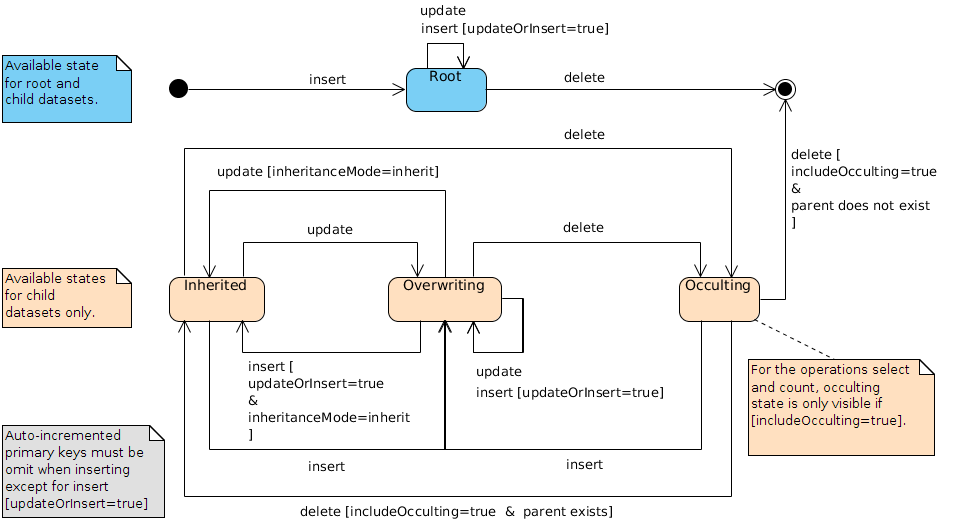
Inheritance properties
The following table describes properties related to the EBX® inheritance features.
|
Property
|
Location
|
Description
|
|---|---|---|
inheritance
|
record or table metamodel
|
Specifies if dataset inheritance is activated for the table. The value is computed from the data model and cannot be modified through built-in RESTful services.
See also:
|
inheritedField
|
field metamodel
|
Specifies the field's value source. The source data are directly taken from the data model and cannot be modified through built-in RESTful services.
See also:
|
inheritanceMode
|
record in child dataset
|
Specifies the record's inheritance state. To set a record's inheritance from
overwrite to inherit, its inheritanceMode value must be explicitly provided in the request. In this specific case, the content property will be ignored if present. occult and root explicit values are always ignored. An overwrite explicit value without a content property is ignored.
Note:
Inherited record's fields are necessarily
inherit.
Note:
Root records in child dataset will always be
root.
Possible values are: root, inherit, overwrite, occult. For more information, see Record lookup mechanism.
|
|
field in overwrite record
|
Specifies the field's inheritance state. To set a field's inheritance to
inherit, its inheritanceMode value must be explicitly provided in the request. The content property will be ignored in this case. overwrite an explicit value without a content property is ignored.
Note:
inheritanceMode at field level is not available for root, inherit and occult records, primary keys, and read-only fields.
Note:
inheritedFieldMode and inheritanceMode properties cannot be both set on the same field.
Possible values are: inherit, overwrite. For more information, see Inheritance and value resolution.
|
|
inheritedFieldMode
|
inherited field
|
Specifies the inherited field's inheritance state. To set a field's inheritance to
inherit, its inheritedFieldMode value must be explicitly provided in the request. The content property will be ignored in this case. overwrite explicit values without a content property are ignored.
Note:
inheritedFieldMode is not available for read-only fields.
Note:
inheritedFieldMode and inheritanceMode properties cannot be both set on the same field.
Note:
inheritedFieldMode has priority over the inheritanceMode property.
|
Look up table views operation
The "look up published views" operation may use one of the following methods:
-
GETHTTP method or -
POSTHTTP method without message body.The URL format is:
http[s]://<host>[:<port>]/<ebx-dataservices>/rest/data/v1/{dataspace}/{dataset}/{tablePath: [^:]*}:publishedViews
Where:
-
{dataspace}corresponds toBfollowed by the dataspace identifier or toVfollowed by the image identifier. -
{dataset}corresponds to the dataset identifier. -
{tablePath: [^:]*}corresponds to the table path.
Parameters
No specific parameter for this operation.
Codes HTTP
| HTTP code | Description |
|---|---|
200 (OK) |
Information successfully returned. |
400 (Bad request) |
Incorrect request, contains an error. |
401 (Unauthorized) |
Authentication has failed. |
403 (Forbidden) |
The specified resource read permission has been denied to the authenticated user. |
404(Not found) |
The selected resource cannot be found. |
Response body
It contains a collection of authorized view information (including the access URI).
Example: JSON.
Form data operations
The form-data category operations concern the dataset fields, records or record fields when creating or modifying content must comply with constraints on user form submit. They are intended to be used in a user form management context.
The request body of an operation is very similar to the equivalent operation of the
data category in the sens that an incoming data validation feature and a result report has been added to the response. The data validation can not be deactivated, a parameter blockingConstraintsDisabled from the data category operations is not applicable. The validation phase fails when, at least, one constraint with a blocksCommit level set to onInsertUpdateOrDelete or onUserSubmit-checkModifiedValues is violated.
See Blocking and non-blocking constraints for more information.
Form insert operation
Insert form uses the
POST HTTP method and requires a message body holding the data. This operation supports one or multiple records in a single transaction. Moreover, it is also possible to update record(s).
-
Record: validate and insert a new record or modify an existing one in the selected table.
-
Record table: validate and insert or modify one or more records in the selected table, while securing a consistent response. Operations are executed sequentially, in the order defined on the client side. When an error occurs during a table operation, all updates are cancelled and the client receives an error message with detailed information. The maximum number of records is limited to 100.
http[s]://<host>[:<port>]/ebx-dataservices/rest/{category}/v1/{dataspace}/{dataset}/{pathInDataset}[:mass]
Where:
-
{category}corresponds to the operation category (possible values are:form-dataorform-data-compact). -
{dataspace}corresponds toBfollowed by the dataspace identifier or toVfollowed by the snapshot identifier. -
{dataset}corresponds to the dataset identifier. -
{pathInDataset}corresponds to the path of the table node. -
:massextended action is required when updating a filtered set of records (see filter parameter).
Parameters
The following parameters are applicable with this insert operation.
|
Parameter
|
Description
|
|---|---|
includeDetails
|
Includes the
details field in the answer to access the data details. The returned value corresponds to its URL resources.
Type
Boolean, the default value is false.
Note:
Only applicable for a multiple records insertion.
|
includeForeignKey
|
Includes the
foreignKey field in the answer for each record. The returned value corresponds to the value of a foreign key field that was referencing this record.
Boolean type, the default value is false.
Note:
Only applicable for a multiple records insertion.
|
includeLabel
|
Includes the
label field in the answer for each record.
Possible values are:
String type, the default value is no.
Note:
Only applicable for a multiple records insertion.
|
updateOrInsert
|
Specifies the behavior when the record to insert already exists:
Boolean type, default value is false.
|
filter
|
Determines the records updated using a quick search predicate, or complete XPath predicate expression when a large number of records are updated. The request body must be a record structure with the fields to update. This parameter must use the:mass extended action. Otherwise, an error is returned.
Use the ebx-all value to select all records.
When the viewPublication query parameter is used, the scope is limited to the filtered view.
String type value that must not be empty. Otherwise, an error is returned.
Note:
When using the query parameters includeDetails, includeLabel or includeForeignKey, only the first 1000 report entries are returned in the report.
|
viewPublication
|
Specifies the name of the published view used during a massive update.
The behavior of this parameter is described in the section EBX® as a Web Component.
String type value.
|
Message body
The request must define a message body. The format is similar to the
data category insert operation's message body.
HTTP codes
|
HTTP code
|
Description
|
|---|---|
200 (OK)
|
|
201 (Created)
|
The request body holds only one non-existing record: a new record has been created and the header field Location is returned with its resource URL. Moreover, a report is returned in the response body.
|
400 (Bad request)
|
The request is incorrect. This occurs when the body message structure:
|
403 (Forbidden)
|
Authenticated user is not allowed to create a record or the request body contains a read-only field.
|
404 (Not found)
|
The selected resource is not found.
|
409 (Conflict)
|
Concurrent modification, only available if updateOrInsert is true, the Optimistic locking is activated and the content has changed in the meantime, it must be reloaded before update.
|
422 (Unprocessable entity)
|
The request cannot be processed. This occurs when:
|
Response body
The response body will always hold a validation report. However in case of failure, the response body corresponds to a JSON
Exception handling response.
-
Record: The header field
Locationis returned with its URL resource. The validation report will be include in response body. -
Record table: (optional) Contains a list of validations report for each element, corresponding to the multiple validation report.
See also:
Form update operation
As for the
data or data-compact category update operation, it allows the modification of a single dataset or record and the PUT HTTP method must be used. Available URL formats are:
-
Dataset node: validates and modifies the values of terminal nodes contained in the selected node.
http[s]://<host>[:<port>]/ebx-dataservices/rest/{category}/v1/{dataspace}/{dataset}/{pathInDataset} -
Record: validates and modifies the content of the selected record.
http[s]://<host>[:<port>]/ebx-dataservices/rest/{category}/v1/{dataspace}/{dataset}/{pathInDataset}/{encodedPrimaryKey}Note:Also available forPOSTHTTP method. In this case, the URL must point to the table and the parameterupdateOrInsertmust be set totrue. -
Field: validates and update of a single field of the selected record.
http[s]://<host>[:<port>]/ebx-dataservices/rest/{category}/v1/{dataspace}/{dataset}/{pathInDataset}/{encodedPrimaryKey}/{pathInRecord}Note:The field must be either a terminal node or above.Where: -
{category}corresponds to the operation category (possible values are:form-dataorform-data-compact). -
{dataspace}corresponds toBfollowed by the dataspace identifier or toVfollowed by the snapshot identifier. -
{dataset}corresponds to the dataset identifier. -
{pathInDataset}corresponds to the path of the dataset node:-
for dataset node operations, this must be any terminal node or above except table node,
-
for record and field operations, this corresponds to the table node.
-
-
{encodedPrimaryKey}corresponds to the percent encoded representation of the primary key (see RFC-3986 Uniform Resource Identifier ). -
{pathInRecord}corresponds to the path starting from the table node.
Parameters
Here are the parameters applicable with the update operation.
| Parameter | Description |
|---|---|
byDelta |
Specifies the behavior for setting value of nodes that are not defined in the request body. This is described in the Update modes section. Boolean type, the default value is true. |
checkNotChangedSinceLastUpdateTime |
Timestamp in datetime format used to ensure that the record has not been modified since the last read. Also see the Optimistic locking section. DateTime type value. |
Message body
The request must define a message body. The format is the same as for the
data category update operation message body.
HTTP codes
|
HTTP code
|
Description
|
|---|---|
200(Ok)
|
The update request was applied successful and a report is returned in the response body.
|
400 (Bad request)
|
The request is incorrect. This occurs when the body request structure does not comply.
|
403 (Forbidden)
|
Authenticated user is not allowed to update the specified resource or the request body contains a read-only field.
|
404 (Not found)
|
The selected resource is not found.
|
409 (Conflict)
|
Concurrent modification, the Optimistic locking is activated and the content has changed in the meantime, it must be reloaded before the update.
|
422 (Unprocessable entity)
|
The request cannot be processed. This occurs when:
|
Response body
The response body has the same format and behavior as the Form Insert operation.
Dataset operations
Select datasets
Select operations can use the
GET or POST methods.
Note:
When
POST is used, the message body is always ignored.
URL formats are:
-
Root: returns the root datasets of a given dataspace.A pagination mechanism is always enabled.
http[s]://<host>[:<port>]/ebx-dataservices/rest/{category}/v1/{dataspace} -
Children: returns the children datasets of a given dataset.A pagination mechanism is always enabled.
http[s]://<host>[:<port>]/ebx-dataservices/rest/{category}/v1/{dataspace}/{dataset}:children -
Information: returns dataset information.
http[s]://<host>[:<port>]/ebx-dataservices/rest/{category}/v1/{dataspace}/{dataset}:informationWhere: -
{dataspace}corresponds toBfollowed by the dataspace's identifier or toVfollowed by the snapshot's identifier. -
{dataset}corresponds to the dataset identifier.
Parameters
The following query parameters are applicable to Root and Children operations.
| Parameter | Description |
|---|---|
includeLabel |
See includeLabel for more information. |
includeDetails |
See includeDetails for more information. |
includeOpenApiDetails |
See includeOpenApiDetails for more information. |
includeValidation |
See includeValidation for more information. |
includeHistory |
See includeHistory for more information. |
firstElementIndex |
See firstElementIndex for more information. |
pageSize |
See pageSize for more information. |
The following query parameters are applicable to Information operation.
| Parameter | Description |
|---|---|
includeLabel |
See includeLabel for more information. |
HTTP codes
|
HTTP code
|
Description
|
|---|---|
200 (OK)
|
The request has been successfully handled.
|
400 (Bad request)
|
The request is incorrect. This occurs when:
|
401 (Unauthorized)
|
Authentication has failed.
|
403 (Forbidden)
|
The selected resource is hidden from the authenticated user.
|
404 (Not found)
|
The selected resource could not be found.
|
Response body
After a successful selection, the result is returned in the response body. The content depends on the provided parameters and selected data.
The format is linked to the selected object type:
-
For Root and Children, see the extended JSON and compact JSON example.
-
For Information, see the extended JSON and compact JSON example.
Dataspace operations
Beta feature: Select dataspaces or snapshots
Select operation may use one of the following methods:
GET or POST. A pagination mechanism is always enabled.
URL formats are:
-
Root: returns root dataspaces
http[s]://<host>[:<port>]/ebx-dataservices/rest/data/v1/ -
Children: returns children dataspaces of a given dataspace
http[s]://<host>[:<port>]/ebx-dataservices/rest/data/v1/{dataspace}:children -
Snapshots: returns snapshots of a given dataspace
http[s]://<host>[:<port>]/ebx-dataservices/rest/data/v1/{dataspace}:snapshots -
Information: returns a dataspace, or a snapshot, information
http[s]://<host>[:<port>]/ebx-dataservices/rest/data/v1/{dataspace}:informationWhere: -
{dataspace}corresponds toBfollowed by the dataspace's identifier or toVfollowed by the snapshot's identifier.
Parameters
The following query parameters are applicable to Root, Children and Snapshots operations.
|
Parameter
|
Description
|
|---|---|
includeClosed
|
Includes the closed dataspaces to the selection.
Boolean type, default value is false.
|
includeAdministration
|
Includes the administration dataspaces to the selection.
Boolean type, default value is false.
|
pageRecordFilter
|
Specifies a server side built filter, for pagination, pointing to a record. This filter is strongly linked to the
pageAction value and should not be modified on the client side. The filter takes the form of a record XPath predicate expression used to figure out the pagination contexts.
String type.
See also:
|
pageAction
|
Specifies the pagination action to perform from the identifier held by
pageRecordFilter.
String type, default value is first. The possible values are:
See also:
|
pageSize
|
Specifies the maximum number of records per page.
Integer type, default value is based on the user preferences. The value should be between 2 and 100.
|
HTTP codes
|
HTTP code
|
Description
|
|---|---|
200 (OK)
|
The request has been successfully handled.
|
400 (Bad request)
|
The request is incorrect. This occurs when:
|
401 (Unauthorized)
|
Authentication has failed.
|
403 (Forbidden)
|
The selected resource is hidden from the authenticated user.
|
404 (Not found)
|
The selected resource could not be found.
|
Response body
Beta feature: Create a child dataspace or a snapshot
Creates the dataspace or snapshot as specified. This operation use the
POST method with a body request (with no specific query parameter).
See also:
URL format are:
-
Dataspace:
http[s]://<host>[:<port>]/.../data/v1/{dataspace}:createDataspace -
Snapshot:
http[s]://<host>[:<port>]/.../data/v1/{dataspace}:createSnapshotWhere: -
{dataspace}corresponds toBfollowed by the dataspace identifier.
Request body
The body specifies the features of the dataspace or the snapshot to create.
See also:
See the JSON example.
HTTP codes
| HTTP code | Description |
|---|---|
201 (Created) |
A new dataspace or snapshot has been created, in this case, the header field Location is returned with its resource URL. |
400 (Bad request) |
The request body is not well-formed or contains invalid content. |
401 (Unauthorized) |
Authentication has failed. |
403 (Forbidden) |
Permission was denied to create the specified resource for the authenticated user. |
404 (Not found) |
The resource specified in the request body cannot be found. |
500 (Internal error) |
Unexpected error thrown by the application. Error details can usually be found in EBX® logs. |
Beta feature: Locking a dataspace
Locks the specified dataspace. If the dataspace is already locked:
-
by the same user, then the lock is kept,
-
by another user and during the wait duration, then the lock is acquired,
-
otherwise, the lock is rejected.This operation uses the
POSTmethod and consumesContent-Typeheader set to: -
application/x-www-form-urlencoded: with HTTP parameters in the body or -
application/json: with HTTP parameters in the URL and Session parameters into JSON body.When it succeeds, no response body is returned.
See also:
The URL format is:
http[s]://<host>[:<port>]/.../data/v1/{dataspace}:lock
Where:
-
{dataspace}corresponds toBfollowed by the dataspace identifier.
Parameters
The following query parameters are applicable to the operation.
| Parameter | Description |
|---|---|
durationToWaitForLock |
When the dataspace is locked by another user, specifies the maximum duration to wait for acquiring the lock. The duration is specified in seconds. If the value is set to 0, then the locking attempt is perform immediately. Due to several reasons, the wait duration can not exceed 60 seconds. Otherwise, the value is overwritten with its maximum value. Integer type, default value is 0. |
HTTP codes
| HTTP code | Description |
|---|---|
204 (No content) |
The request has been successfully handled but no response body is returned. |
400 (Bad request) |
The request URL or body is not well-formed or contains invalid content. |
401 (Unauthorized) |
Authentication has failed. |
403 (Forbidden) |
Permission was denied to lock the specified resource for the authenticated user. |
404 (Not found) |
The resource specified in the URL cannot be found. |
409 (Conflict) |
The resource is already locked by another user, the lock is rejected after durationToWaitForLock parameter's value. |
500 (Internal error) |
Unexpected error thrown by the application. Error details can usually be found in EBX® logs. |
Beta feature: Unlocking a dataspace
Unlocks the specified dataspace. If the dataspace is:
-
locked by the same user, then the lock is released,
-
locked by another user, the current user is an administrator, and the
forceByAdministratorquery parameter is set totrue, then the lock is released, -
not locked, the lock status is unchanged,
-
otherwise, the unlock is rejected.This operation uses the
POSTmethod and consumesContent-Typeheader set to: -
application/x-www-form-urlencoded: with HTTP parameters in the body or -
application/json: with HTTP parameters in the URL and Session parameters into JSON body.When it succeeds, no response body is returned.
See also:
The URL format is:
http[s]://<host>[:<port>]/.../data/v1/{dataspace}:unlock
Where:
-
{dataspace}corresponds toBfollowed by the dataspace identifier.
Parameters
The following query parameters are applicable to the operation.
| Parameter | Description |
|---|---|
forceByAdministrator |
When the dataspace is locked by another user, an administrator can force the unlocking. Boolean type, default value is false. |
HTTP codes
| HTTP code | Description |
|---|---|
204 (No content) |
The request has been successfully handled but no response body is returned. |
400 (Bad request) |
The request URL or body is not well-formed or contains invalid content. |
401 (Unauthorized) |
Authentication has failed. |
403 (Forbidden) |
Permission was denied to unlock the specified resource for the authenticated user. |
404 (Not found) |
The resource specified in the URL cannot be found. |
409 (Conflict) |
The resource is already locked by another user, or the current user is administrator but forceByAdministrator parameter is false, the unlock is rejected. |
500 (Internal error) |
Unexpected error thrown by the application. Error details can usually be found in EBX® logs. |
Beta feature: Merge a dataspace
Merges the specified dataspace to its parent. It is possible to perform deletion, after the merge, on history and / or on data.
This operation uses the
POST method and consumes Content-Type header set to:
-
application/x-www-form-urlencoded: with HTTP parameters in the body or -
application/json: with HTTP parameters in the URL and Session parameters into JSON body.
When it succeeds, no response body is returned.
Note:
The merge decision step is bypassed for merges performed through data services. In such cases, the data in the child dataspace automatically overrides the data in its parent.
See also:
The URL format is:
http[s]://<host>[:<port>]/.../data/v1/{dataspace}:merge
Where:
-
{dataspace}corresponds toBfollowed by the dataspace identifier.
Parameters
The following query parameters are applicable to the operation.
| Parameter | Description |
|---|---|
deleteHistoryOnMerge |
Sets whether the history associated with the specified dataspace will be deleted upon merge. Boolean type, default value is false. When this parameter is not specified in the request, the default value is false. It is possible to redefine the default value by specifying the property ebx.dataservices.historyDeletionOnCloseOrMerge.default in the EBX® main configuration file. |
deleteDataOnMerge |
Sets whether the specified dataspace and its associated snapshots will be deleted upon merge. Boolean type, default value is false. When this parameter is not specified in the request, the default value is false. It is possible to redefine the default value by specifying the property ebx.dataservices.dataDeletionOnCloseOrMerge.default in the EBX® main configuration file. |
HTTP codes
| HTTP code | Description |
|---|---|
204 (No content) |
The request has been successfully handled but no response body is returned. |
400 (Bad request) |
The request URL contains invalid content. |
401 (Unauthorized) |
Authentication has failed. |
403 (Forbidden) |
Permission was denied to merge the specified resource for the authenticated user. |
404 (Not found) |
The resource specified in the URL cannot be found. |
500 (Internal error) |
Unexpected error thrown by the application. Error details can usually be found in EBX® logs. |
Beta feature: Close a dataspace or a snapshot
Closes the specified dataspace or snapshot. It is possible to perform deletion, after close, on history and / or on data.
This operation uses the
POST method and consumes Content-Type header set to:
-
application/x-www-form-urlencoded: with HTTP parameters in the body or -
application/json: with HTTP parameters in the URL and Session parameters into JSON body.When it succeeds, no response body is returned.
See also:
The URL format is:
http[s]://<host>[:<port>]/.../data/v1/{dataspace}:close
Where:
-
{dataspace}corresponds toBfollowed by the dataspace identifier or toVfollowed by the snapshot identifier.
Parameters
The following query parameters are applicable to the operation.
| Parameter | Description |
|---|---|
deleteHistoryOnClose |
Sets whether the history associated with the specified dataspace will be deleted upon close. Boolean type, default value is false. When this parameter is not specified in the request, the default value is false. It is possible to redefine the default value by specifying the property ebx.dataservices.historyDeletionOnCloseOrMerge.default in the EBX® main configuration file. |
deleteDataOnClose |
Sets whether the specified dataspace and its associated snapshots will be deleted upon close. Boolean type, default value is false. When this parameter is not specified in the request, the default value is false. It is possible to redefine the default value by specifying the property ebx.dataservices.dataDeletionOnCloseOrMerge.default in the EBX® main configuration file. |
HTTP codes
| HTTP code | Description |
|---|---|
204 (No content) |
The request has been successfully handled but no response body is returned. |
400 (Bad request) |
The request URL or body is not well-formed or contains invalid content. |
401 (Unauthorized) |
Authentication has failed. |
403 (Forbidden) |
Permission was denied to close the specified resource for the authenticated user. |
404 (Not found) |
The resource specified in the URL cannot be found. |
422 (Unprocessable entity) |
A blocking constraint has been violated. |
500(Internal error) |
Unexpected error thrown by the application. Error details can usually be found in EBX® logs. |
Health operations
Overview
Operations health helps monitor the EBX® server.
Started operation
Returns status code 200 (Ok) when EBX® is started and initialized, otherwise it returns 503 (Service unavailable).
The URL format is:
http[s]://<host>[:<port>]/.../health/v1/started
HTTP codes
| HTTP code | Description |
|---|---|
200 (OK) |
The request was successfully handled and a response body is returned. |
503 (Service unavailable) |
EBX® is not yet started and initialized. A message is returned to help with diagnostics. |
Response body
See the JSON example.
Check operation
Returns the status code 200 (Ok) when EBX® is started and checked, otherwise it returns 503 (Service unavailable).
The URL format is:
http[s]://<host>[:<port>]/.../health/v1/check
HTTP codes
| HTTP code | Description |
|---|---|
200 (OK) |
The request was successfully handled and a response body is returned. |
503 (Service unavailable) |
EBX® is not yet started and initialized. A message is returned to help with diagnostics. |
Response body
See the JSON example.
Stopped operation
Returns the status code 200 (Ok) when the EBX® repository is shutdown, otherwise it returns 503 (Service unavailable).
The URL format is:
http[s]://<host>[:<port>]/.../health/v1/stopped
HTTP codes
| HTTP code | Description |
|---|---|
200 (OK) |
The request was successfully handled and a response body is returned. |
503 (Service unavailable) |
EBX® is not yet started and initialized. A message is returned to help with diagnostics. |
Response body
See the JSON example.
OpenAPI operations
Overview
The
api category operations comply with the OpenAPI specification 3.0.X to generate JSON documents. These documents facilitate development and consumption by structuring and describing the available REST built-in resources and the operations associated with them.
OpenAPI document HATEOAS links are available through the select data operations when using the includeOpenApiDetails query parameter.
The REST OpenAPI services permissions are globally defined in Global permissions.
Making the proper types mapping for generating a client, in a specific language, is essential. The OpenAPI format can be used to validate the input or to map the value to a specific type, in the chosen programming language. See Content of simple type for more information.
Note:
Tools that do not support a specific format may default back to the
type alone.
Generate OpenAPI documents
The operations use the
GET or POST HTTP method to generate the OpenAPI document of a dataset, a table, or a schema node.
The URL formats are:
-
Dataset:
http[s]://<host>[:<port>]/ebx-dataservices/rest/api/v1/{category}/v1/{dataspace}/{dataset} -
Table and Schema node:
http[s]://<host>[:<port>]/ebx-dataservices/rest/api/v1/{category}/v1/{dataspace}/{dataset}/{pathInDataset}Where: -
{dataspace}corresponds toBfollowed by the dataspace identifier or toVfollowed by the snapshot identifier. -
{dataset}corresponds to the dataset identifier. -
{pathInDataset}corresponds to the path of:-
a table node,
-
a dataset terminal node or above.
-
Note:
The generated document will not depend on user permissions. The whole fields will be presented.
HTTP codes
| HTTP code | Description |
|---|---|
200(OK) |
The request has been successfully handled. |
401(Unauthorized) |
Authentication has failed. |
403(Forbidden) |
Permission was denied to read the specified resource. |
404(Not found) |
The resource, specified in the URL, cannot be found. |
Staging operations
The Staging REST API is designed to interact with source and target servers. It allows users to manage domains using export and import of staging archives.
The complete description of the services is available via OpenAPI on the following link:
http[s]://<host>[:<port>]/ebx-dataservices/rest/api/v1/staging/v1
In the development run mode, the Swagger UI is available on the following link.
http[s]://<host>[:<port>]/ebx-dataservices/rest/api/v1/staging/v1/ui
See also:
Domain management operations
The domains service allows the users to manage domains. The provided features are:
-
Select the list of available domains.
-
Select a domain by unique name.
-
Create a new domain.
-
Select the components of a domain.
-
Add a component to a domain.
-
Remove a component from a domain, the component is deleted.
Staging element navigation operations
The elements service is designed to display the whole elements of an instance in a hierarchical way. It is mainly designed for a UI interface that supports an hierarchical view with levels handling. The purpose of using query parameters instead of a structured body is to use links for easier navigation. The provided features are:
-
Expands the content of an element.
-
Expands the content of a specific type of elements under a selected element.
Archive manipulation operations
The archives service is designed for importing/exporting staging archives to/from a running instance in a single request. It is also used for uploading archives for asynchronous import. The provided features are:
-
Export the archive of a domain.
-
Import an archive to a running instance.
-
Upload an archive for an asynchronous import.
The easiest way to export a staging archive via cURL
curl --request GET 'http[s]://<host>[:<port>]/ebx-dataservices/rest/staging/v1/archives/<domain>?login=<login>&password=<password>'
The easiest way to import a staging archive via cURL
curl --request POST 'http[s]://<host>[:<port>]/ebx-dataservices/rest/staging/v1/archives?login=<login>&password=<password>'
 --header 'Content-Type: application/zip'
 --data-binary '@/<archive-path-on-disk>'
Export operations
The exports service is designed to handle advanced export features. The archive is exported and stored on the server for a predefined period. The user can retrieve information about the archive, and it will be available to download it until it expires. The provided features are:
-
Initiate an export.
-
Get the status of an initiated export.
-
Download an exported archive.
This endpoint can work in both synchronous and asynchronous modes.
Synchronous mode
A blocking mode that responds after exporting the whole archive on the server. The Archive will be immediately downloadable.
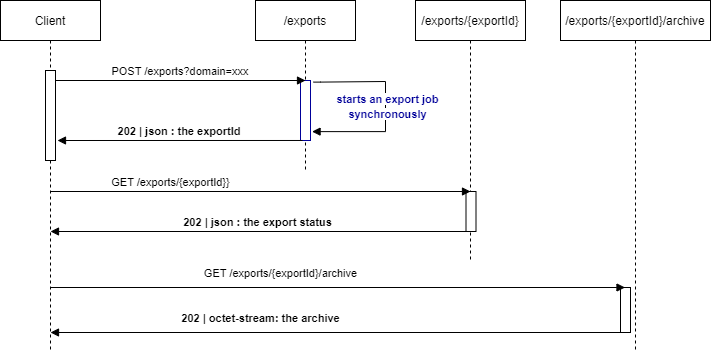
Asynchronous mode
A non-blocking mode that responds with an export ID and launches a task to export the archive. The client must poll the status endpoint to retrieve the status of the export. When the status changes to "Exported", the archive would be downloadable.
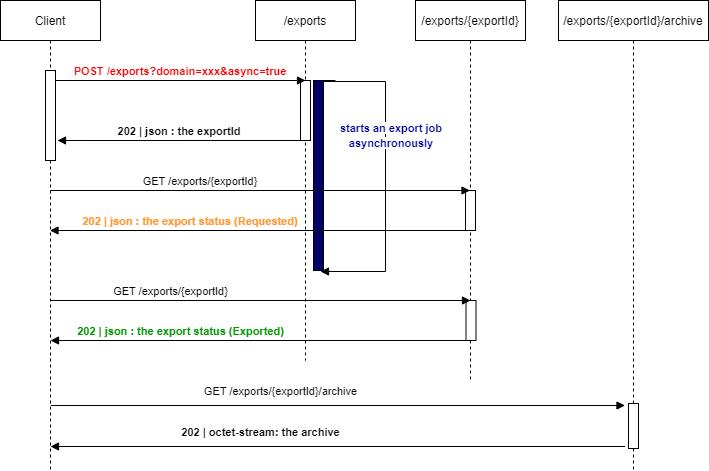
For consistency, any staging asynchronous job is aborted if it does not complete before 60 minutes of work.
Import operations
The imports service is designed to handle advanced import features. The archive is uploaded and stored on the server for a predefined period. The user can initiate an import asynchronously or retrieve information about an in-progress or completed import.
The archive is uploaded using the archives service with the option
asyncImport=true.
The provided features are:
-
Initiate an import by using an already uploaded archive.
-
Get the status/report of an initiated import.The archive name can be retrieved from an old import to initiate a re-import of the same archive with different options. It will be available until it expires.This endpoint works only in asynchronous mode:
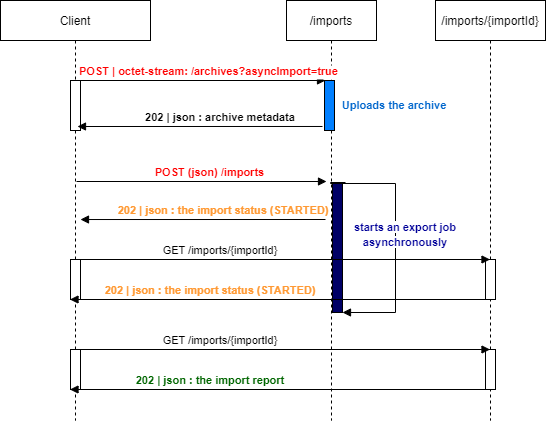
Limitations
General limitations
-
Indexes, in the request URL
{pathInDataset}or{pathInRecord}, are not supported. -
Dataset nodes and field operations applied to nodes that are sub-terminal are not supported.See Access properties for more information about terminal nodes.
Compact format limitations
-
Inheritance, tracking information, session parametersprocedure context and field as selection node, are not handled in the compact format. Use the extended format instead.
-
History categoryis not supported in the compact format.
Business object category limitations
-
In business object category: sort, filter, and
historyselection features can not be applied to a field under a relationship defined in a business object.
Read operations
-
Within the
selector, the pagination context is limited to thenextPageproperty. -
When the
sortByRelevancyparameter is activated, the ones below are ignored: sort, sortOnLabel, sortPriority and sort criteria defined through the viewPublication. -
Within the
viewPublicationparameter, the hierarchical and tile views are not supported. -
The
sortOnLabelparameter ignores programmatic labels. -
The system information response's properties cannot be browsed through the REST URL with the hierarchical representation.See System information operation for more information.
-
The prepare for creation operation does not support a dataset node.
-
The select dataspaces operation does not sort them by label.
-
The select snapshots operation does not sort them by creation date.
-
The select snapshots operation can not include the initial snapshots.
Write operations
-
Association fields cannot be updated, therefore, the list of associated records cannot be modified directly.
-
Control policy
onUserSubmit-checkModifiedValuesof the user interface is not supported. To retrieve validation errors, invoke the select operation on the resource by including theincludeValidationparameter.See Blocking and non-blocking constraints for more information.
Directory operations
-
Changing or resetting a password for a user is not supported.
OpenAPI operations
-
The document generation is not available through the user interface.
-
The document generation REST services does not support the YAML format.
-
Supports only Data operations and Form data operations except:
-
Select Dataset tree, Dataset node and Field operations.
-
Insert or delete multiple records in a single request.
-
Use of the HTTP header
content-type: x-www-form-urlencodedto send query parameters in the body request.
-
-
The 'Basic Authentication Scheme' is the only described method.