
All release notes
Related information
Version 6.2.1
New features
This release contains the following new features:
-
The following updates were made to enhance user experience:
-
The add-on's line, column, and stacked column charts now include a horizontal scroll bar. This allows you to seamlessly view more results for indicators executed over longer periods of time.
-
The multi-row card charts now include a re-sizeable column, which allows you to adjust the width to display full data values.
-
-
It is now possible to export a PDF file of a dashboard. Exported PDFs replicate the structure of the dashboard, with each section containing the corresponding indicators displayed at the time of export.
-
The F22 - String length distribution indicator now provides a parameter that allows you to determine whether to include white spaces in the length calculation.
Changes in Functionality
This release contains no changes in functionality.
Changes to third-party libraries
This release contains no changes to third-party libraries.
Closed Issues
This release includes the following closed issues:
Known Issues
This release contains the following known issues:
-
The following data types are not currently available for indicators to monitor:
-
multi-value foreign keys
-
associations
-
multi-value groups
-
-
Validation of configuration data after importing it from an archive file is not supported.
Version 6.2.0
New features
This release contains the following new features:
-
A new permission option is available that takes into account any custom record level access rules. The record level permissions are set in the DMA. Take the example where a record level permission allows a user profile to only view active customers. If the table has 1000 customers and 300 were inactive, the indicator results for the user profile would only be based on the 700 active customers. When record level permissions are applied, the indicator results cannot be shared with other users when this permission setting is applied.
-
Built-in workflow functions now support the legacy workflow mode.
-
The add-on now has the option to apply a restriction policy when specifying user permissions.
-
The queuing of scheduled indicator executions was improved.
-
The permissions for the data profiling service were updated to follow the Bypass EBX permission, when this option is enabled.
Changes in Functionality
This release contains no changes in functionality.
Changes to third-party libraries
This release contains no changes to third-party libraries.
Closed Issues
Known Issues
This release contains the following known issues:
-
The following data types are not currently available for indicators to monitor:
-
multi-value foreign keys
-
associations
-
multi-value groups
-
-
Validation of configuration data after importing it from an archive file is not supported.
Version 6.1.3
New features
This release contains no new features.
Changes in Functionality
This release contains no changes in functionality.
Changes to third-party libraries
This release contains no changes to third-party libraries.
Closed Issues
Known Issues
This release contains the following known issues:
-
The following data types are not currently available for indicators to monitor:
-
multi-value foreign keys
-
associations
-
multi-value groups
-
-
Validation of configuration data after importing it from an archive file is not supported.
Version 6.1.2
New features
This release contains no new features.
Changes in Functionality
This release contains no changes in functionality.
Changes to third-party libraries
The FasterXML Jackson Databind library was updated to version 2.15.2.
Closed Issues
This release contains no closed issues.
Known Issues
This release contains the following known issues:
-
The following data types are not currently available for indicators to monitor:
-
multi-value foreign keys
-
associations
-
multi-value groups
-
-
Validation of configuration data after importing it from an archive file is not supported.
Version 6.1.1
New features
You can now delete dashboards that you own.
Changes in Functionality
This release contains no changes in functionality.
Changes to third-party libraries
This release contains no changes to third-party libraries.
Closed Issues
This release contains the following closed issues:
Known Issues
This release contains the following known issues:
-
The following data types are not currently available for indicators to monitor:
-
multi-value foreign keys
-
associations
-
multi-value groups
-
-
Validation of configuration data after importing it from an archive file is not supported.
Version 6.1.0
Released: March 2023
New features
This release contains the following new features:
-
The add-on was updated to ensure compatibility with the new TIBCO EBX® URL encoding format. See the EBX® release notes for more information.
-
The add-on was updated to ensure compatibility with the new TIBCO EBX® staging feature. This feature allows you to migrate configuration settings from one environment to another. See the EBX® product documentation for more details.
Changes in Functionality
This release contains no changes in functionality.
Changes to third-party libraries
The SnakeYAML library was updated to version 2.0.
Closed Issues
Known Issues
This release contains the following known issues:
-
The following data types are not currently available for indicators to monitor:
-
multi-value foreign keys
-
associations
-
multi-value groups
-
-
Validation of configuration data after importing it from an archive file is not supported.
Version 4.5.1
Released: November 2022
New features
This release contains no new features.
Changes in Functionality
This release contains no changes in functionality.
Changes to third-party libraries
The FasterXML jackson-databind library was updated to version 2.13.4.2.
Closed Issues
This release includes no closed issues.
Known Issues
This release contains the following known issues:
-
The following data types are not currently available for indicators to monitor:
-
multi-value foreign keys
-
associations
-
multi-value groups
-
-
Validation of configuration data after importing it from an archive file is not supported.
Version 4.5.0
Released: September 2022
New features
This release contains the following new features:
-
Indicator tile positions on dashboards can be changed and saved.
-
Regardless of whether any dashboards were previously created, the Create new dashboard service is available in the advanced perspective.
Changes in Functionality
This release contains no changes in functionality.
Changes to third-party libraries
This release contains no changes to third-party libraries.
Closed Issues
This release contains no closed issues.
Known Issues
This release contains the following known issues:
-
The following data types are not currently available for indicators to monitor:
-
multi-value foreign keys
-
associations
-
multi-value groups
-
-
Validation of configuration data after importing it from an archive file is not supported.
Version 4.4.1
Released: July 2022
New features
This release includes no new features.
Changes in Functionality
This release contains no changes in functionality.
Changes to third-party libraries
This release contains no changes to third-party libraries.
Closed Issues
This release contains the following closed issues:
Known Issues
This release contains the following known issues:
-
The following data types are not currently available for indicators to monitor:
-
multi-value foreign keys
-
associations
-
multi-value groups
-
-
Validation of configuration data after importing it from an archive file is not supported.
Version 4.4.0
Released: June 2022
New features
This release includes the following new features:
-
You can run data profiling from a custom TIBCO EBX® perspective.
-
The data profiling dashboard now includes:
-
The ability to access an indicator's linked records.
-
A drop down menu that allows you to select, or search for a specific field.
-
The following functions for foreign key fields: Completeness and Top/Bottom values.
-
Tooltips that include a description of each indicator (access by hovering your mouse over the function name).
-
Changes in Functionality
The Least frequent value and Most frequent value functions are no longer supported on fields that have the Resource data type.
Changes to third-party libraries
This release contains no changes to third-party libraries.
Closed Issues
This release contains the following closed issues:
Known Issues
This release contains the following known issues:
-
The following data types are not currently available for indicators to monitor:
-
multi-value foreign keys
-
associations
-
multi-value groups
-
-
Validation of configuration data after importing it from an archive file is not supported.
Version 4.3.2
Released: April 2022
New features
This release includes no new features.
Changes in Functionality
Updates were made to ensure compatibility the TIBCO EBX 6.0.6 GA release.
Changes to third-party libraries
This release contains no changes to third-party libraries.
Closed Issues
This release contains no closed issues.
Known Issues
This release contains the following known issues:
-
The following data types are not currently available for indicators to monitor:
-
multi-value foreign keys
-
associations
-
multi-value groups
-
-
Validation of configuration data after importing it from an archive file is not supported.
Version 4.3.1
Released: March 2022
New features
This release includes no new features.
Changes in Functionality
This release includes no changes to functionality.
Changes to third-party libraries
This release contains the following changes to third-party libraries:
-
The FasterXML/jackson-databind library was updated to version 2.13.2.1.
Closed Issues
This release contains the following closed issues:
Known Issues
This release contains the following known issues:
-
The following data types are not currently available for indicators to monitor:
-
multi-value foreign keys
-
associations
-
multi-value groups
-
-
Validation of configuration data after importing it from an archive file is not supported.
Version 4.3.0
Released: February 2022
New features
This release includes the following new features:
-
The new Launch data profiling service allows you to run automatic data profiling on a table. The only configuration required for this service is for an administrator to enable it for user profiles. This service generates a dashboard with pre-configured indicators for the table and its fields. The indicators applied to each field depend on the field's data type. You can drill down on each field to view additional indicators applied to it.
-
This release includes the following new functions:
-
F20 Patterns: Identifies and displays the most common formats. "L" is a letter and "D" is a digit.
-
F21 Number value distribution: Reports all the distinct number values in the selected column and number of rows (number of counts) in the table that each value represents.
-
F22 String length distribution: Reports all the distinct lengths of string values in the selected column and the number of rows in the table that each length represents.
-
F23 Duplicate count: Computes the number of duplicate value for a field. A duplicate value is a value that is repeated in the column.
-
-
New multi row card and bar charts are available. To access these options on indicators created prior to the 4.3.0 GA release, you must edit the indicator and select the new options in the Chart configuration. This procedure is not required for indicators created from the 4.3.0 GA.
-
When history is enabled, you can now set a computational periodicity for the Number of operations and Number of users by operation indicators. You can set the periodicity from the Additional config tab when configuring the indicator.
Changes in Functionality
This release includes no changes to functionality.
Closed Issues
Known Issues
Version 4.2.0
Released: November 2021
New features
This release includes the following new features:
-
A Java API was implemented that allows you to create custom functions to register and execute on indicators. The API also allows you to execute indicators programmatically. See the Javadoc for more details.
-
A REST API was implemented that allows you to execute indicators and obtain their results. See REST overview for more details.
-
You can now edit an indicator's linked records. With sufficient permissions, users can now access and make changes to an indicator's underlying data directly from indicator results.
-
This release includes a new indicator function for tables: T08 Table freshness. This function computes the freshness rate for a table by averaging the freshness of the table's records.
-
This release includes a new indicator function for datasets: D06 Dataset freshness. This function computes a dataset's freshness rate by averaging the freshness of it's tables.
-
A new tile size was added. You can set indicators to display as small or large tiles in dashboards.
-
As no functions are currently available to apply to the Group data type, this asset type no longer displays in the list of available asset types.
Changes in Functionality
This release includes no changes to functionality.
Closed Issues
This release contains the following closed issues:
Known Issues
Version 4.1.0
Released: July 2021
New features
This release includes the following new features:
-
Permission configuration is now required to allow access to add-on services. See About add-on permissions for more information.
-
Themes are available to customize the display of indicator charts. Themes can be applied at the dashboard level and to individual indicators. When applied at the dashboard level, the settings affect the display of each indicator in the dashboard. Settings applied to individual indicators override the dashboard settings. See Customizing display for more information.
-
An option is now available to view only a subset of records linked to an indicator's output.
-
This release includes the following new indicators for fields:
-
F14: Computes the highest, lowest, and average field lengths.
-
F15: Computes the median of a numeric series. It returns the value which divides all the values sorted in 2 sub lists of the same size. If the number of values is odd, the result is the middle value of the list of all the sorted values. If the number of values is even, the result is the mean of the two values in the middle of the list of all the sorted values. If all values are null, result is 'NULL'
-
F16: Computes the difference between the highest value and the lowest value of a numeric series.
-
F18: Computes the completeness rate of an asset (the percentage of fulfillment of a field against all records in the table).
-
-
This release includes the following indicators for tables:
-
T06: Provides the last update date of the asset.
-
T07: Counts of the number of missing value for a table (it computes the number of missing value in each field and for each record in the table).
-
-
This release includes the following indicators for workflows:
-
W03: Computes the average processing time of each task for all the instances of a workflow publication. The processing time is the difference between the started date and the completed date (interval). Uncompleted tasks are ignored and not computed. This function can monitor multiple tasks. Additionally, the computation is done on profiles, so you can configure it to monitor single users or users in a group.
-
W04: Computes the longest task duration for a workflow publication. Only manual tasks are computed. The duration is the difference between the starting date and time and the completed states.
-
W05: Computes the average processing time for a workflow publication. All completed instances of the publication are used. The duration is the difference between the started and the completed date of all tasks.
-
W07: Provides reporting on the number of workflow instances closed during a period of time (time elapsed since 2 executions of the workflow). Coupled with the scheduler it can provide information on the efficiency of a team to process a particular workflow over time.
-
Changes in Functionality
This release includes the following updated functionality:
-
Legends display an enumeration's label and not its Id.
-
The input parameters were removed from the following functions: F03 and F04.
Closed Issues
This release contains the following closed issues:
Known Issues
This release contains the following known issues:
-
The following data types are not currently available for indicators to monitor:
-
multi-value foreign keys
-
associations
-
multi-value groups
-
Version 4.0.1
Released: June 2021
Bug Fixes
Version 4.0.0
New features
Released: March 2021
The TIBCO EBX® Insight Add-on (New) allows you to measure, monitor, and report on overall data quality. This can help you to determine whether data is fit for consumption by other business units or systems in your organization.
Attention:
This version of the add-on includes UI enhancements and usability improvements but does not yet contain a full feature set. Additionally, a best-practice recommendation is to avoid editing configuration settings in the Administration panel and make changes using the add-on's built-in services.
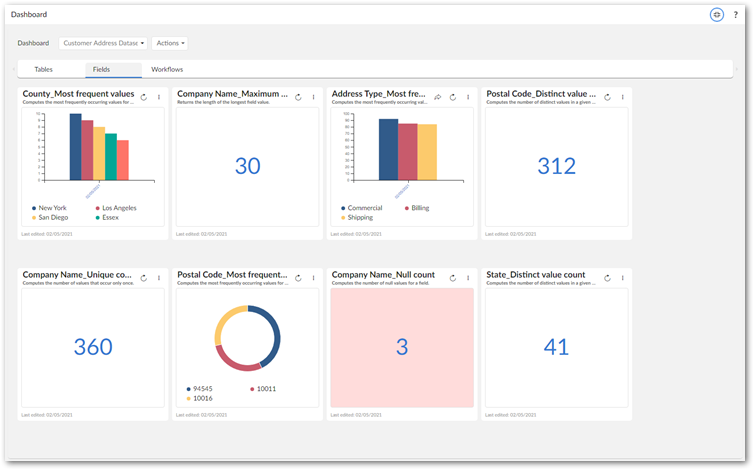
The main components in this release of the add-on are dashboards, sections, and indicators. Dashbords and the sections within them allow you to categorize and organize indicators. Each indicator presents visual feedback on data. The image below shows an example dashboard:
Use the links below to access additional topics:
|
Getting started
|
|
|
UI reference
|
|
|
Built-in function reference
|