Archiving management
Related information
Archiving overview
You can specify that the add-on automatically archive monitoring log data based on the log size, or by configuring the EBX® scheduler.
Archiving based on the size of the log data
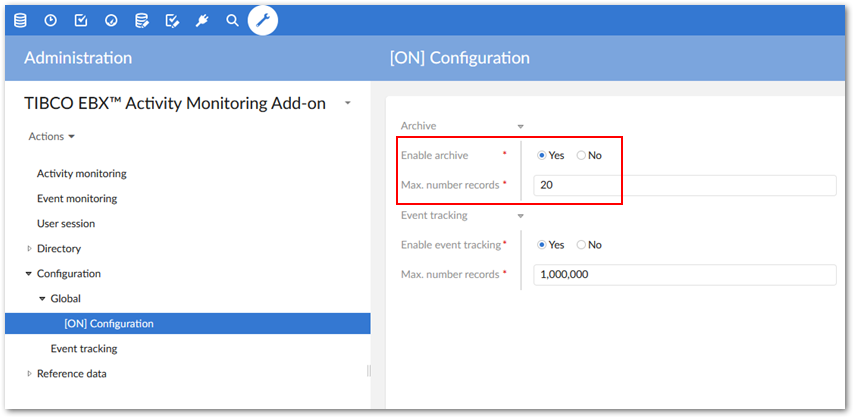
You can locate archive configuration settings under the 'Administration' → 'Repository management' → 'TIBCO EBX® Activity Monitoring Add-on' → 'Configuration' → 'Global' table's ' Configuration' record. The 'Max number records' property declares the maximum number of stopped operations that the add-on can record before archiving older records. To activate the archive feature, set the 'Enable archive' property to 'Yes'.
Archiving based on the EBX® scheduler
Restoring the archive files
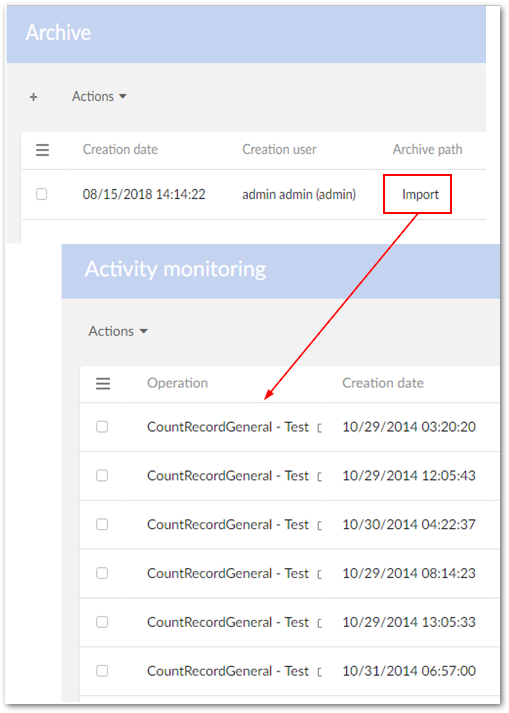
The archive files and the restore process are located in the 'TIBCO EBX® Activity Monitoring Add-on - Archive' data space. The action 'Import' allows you to load the archive file into the table 'Activity Monitoring'.