
Rules configuration
Related information
Administration domain
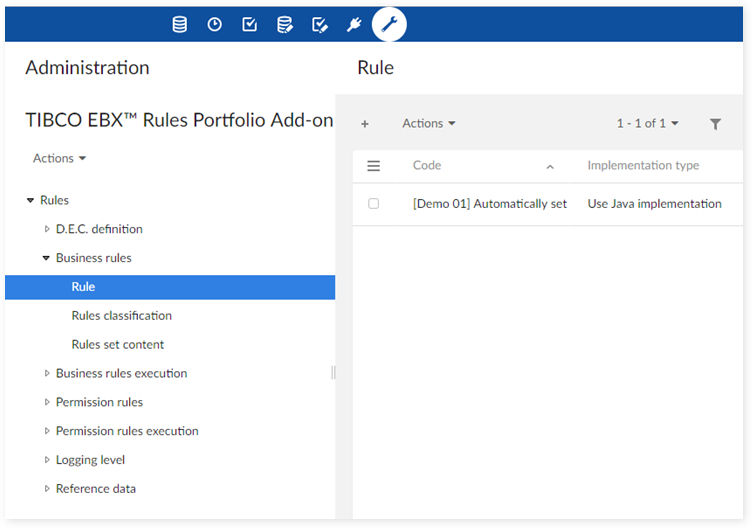
The 'TIBCO EBX® Rules Portfolio Add-on' data space is located in the Administration tab and allows you to configure rules and how they execute.
-
The 'D.E.C. definition' group contains tables to declare the Data Element Concept (D.E.C.). The D.E.C. is an ISO-IEC 11179 concept that is used in other add-ons such as EBX® Information Governance Add-on and EBX® Insight Add-on. Rules can be executed on a D.E.C. which can be either a table, a field, a service, etc.
-
The 'Business rules' group contains the business rules definitions and their packaging in the form of 'Rules set content' and 'Rules classification'.
-
The 'Business rules execution' group contains all tables defining the context for rules set execution.
-
The 'Permission rules' group contains all tables defining permission rules, permission rules set and permission rule classification.
-
The 'Permission rules execution' group contains all tables defining contexts to execute a permission rule or a permission rules set.
-
The 'Logging level' group contains the configuration for the logging mechanism.
-
The 'Reference data' group contains the reference tables' definition.
| Special Notation | |
|---|---|
 |
Rules do not execute through add-on configuration. They execute on a publication of the rule configuration. Before executing rules, you have to run the 'Publish rule portfolio' service to publish the current configuration. |
D.E.C. Definition
The 'D.E.C. definition' group contains tables that declare a Data Element Concept (D.E.C.). The D.E.C. is an ISO-IEC 11179 concept that is used in other EBX® add-ons such as EBX® Information Governance Add-on and EBX® Insight Add-on. Rules can be executed on a D.E.C. which can be either a table, a field, a service, etc.
D.E.C. (Data Element Concept)
A Data Element Concept (D.E.C.) is a generic term defining any type of data asset that can be associated with rules. The primary D.E.C. used is 'Table'.
You can define the D.E.C. properties shown in the following table:
| Property | Definition |
|---|---|
| Data model | The data model to which the Data Element Concept belongs. |
| Property | Definition |
|---|---|
| Table | A list of available tables contained in the selected 'Data model'. |
| Property | Definition |
|---|---|
| Field | A list of available fields contained in the selected 'Table'. |
| Mandatory | If 'Yes': this field is mandatory. If 'No': it is not. |
| Computed value | If 'Yes': this field is a computed value. If 'No': it is not. |
| Multi-valued | If 'Yes': this field is a multi-valued or under a multi-valued group. If 'No': it is not. |
If 'Type' is 'Service', the following property is available:
| Property | Definition |
|---|---|
| Service | A field that allows you to enter a 'Service' name. |
D.E.C. creation service
You can automatically create all D.E.C.(s) for a selected data model. The 'D.E.C. creation' service is available in the D.E.C. table as illustrated below.
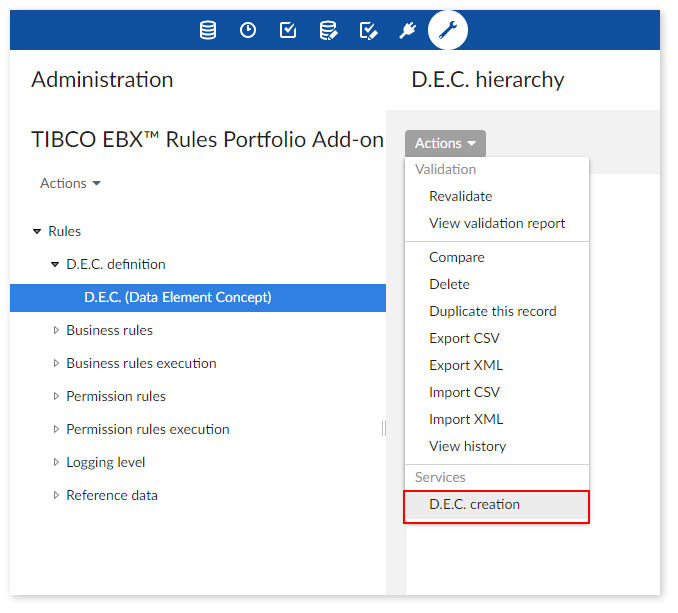
In configuration part of 'D.E.C. creation' service, you have to choose data model and table. The 'D.E.C. creation' service generates D.E.C.s based on your input data.

'Business rules' group
This group allows you to define business rules and their packaging.
Configuring a business rule
You can base rule configuration on business rules and implement their configuration using a script or Java. Predefined Java-implemented rules are ready-to-use and require no specific programming knowledge from end-users. However, using a script requires scripting language knowledge for implementation and requires end-users to possess at least basic programming knowledge. For more information about the scripting language see the Scripting Language.
The 'Rule' table contains settings that allow you to define rules. This table's view defaults to a hierarchy of D.E.C.'s under which associated rules display. You can use the 'View' drop down menu to change views. The following points outline the rule creation process:
-
Choose whether to use a script or Java based rule.
-
Name the rule and select the D.E.C. on which the rule executes.
-
Specify the rule type and the conditions that must be met for successful execution.
-
Document the message displayed when the rule cannot execute successfully.
The following table describes the 'Rule' table's properties that allow you to configure a rule:
|
Property
|
Definition
|
|---|---|
|
Code
|
Any naming convention can be used except the prefix '[ON]' which is reserved by the add-on for predefined rules.
Example: [ON] Rule 01
|
|
Implementation type
|
There are 2 ways to implement a business rule:
-Use script: you use a script to define the rule.
-Use Java implementation: you use Java implementation to define the rule.
|
|
Name
|
The rule name. You can use any naming convention.
|
|
Description
|
The rule description. You can use any naming convention.
|
|
Table
|
The Data Element Concept (D.E.C.) on which the rule executes. By default, this is a data model table. A control is applied by the add-on to check if the selected table is compliant with the rule definition.
|
|
Field attachment
|
The field on which the rule executes. The field specified by this property is only used if a constraint prompts execution of a validation rule. When you specify a field, the rule can only execute from a constraint attached to the specified field in the table selected above. The system returns either a warning, or an error based on the level of severity chosen. If this property is set to undefined, the rule can execute via constraint on any field in the selected table.
The rule can execute via trigger, regardless of the field specified here.
|
|
Type
|
A rule's type. This value can be: Validation rule, Manual validation rule, Automated rule or Table set rule
|
|
Active
|
If set to 'True': the rule can execute.
If set to 'False': the rule is deactivated and cannot execute even if all other execution conditions are valid (execution context, rule set is active).
|
|
Mandatory
|
|
|
Severity
|
The type of error message displayed, either Warning or Error.
|
|
Message
|
The message displayed when an error or warning is raised.
|
|
Script
|
You enter the script for your rule here. The Scripting Language used by the add-on is based on JavaScript and simplifies the rule definition process. However, when running against a high volume of data, performance may be reduced. So, careful consideration must be put into the decision on whether to use Java or a script.
|
| Property | Definition |
|---|---|
| Rule name | The list of available rules. This list populates automatically through a Java introspection of the rules implementation (refer to the Java doc). |
| Object class | Business object on which the rule can be applied. This information is for documentation only. This is not the table name. For example, the "Employee" Object class can be related to several tables, such as: Employee, Third party, Salaried employee, etc. |
| Input data | Read-only parameters controlled and used by the add-on to execute the rule. |
| Output data | The read-only result data. |
| Property data | These are parameters that can be modified at the configuration level, and used as input data for rule execution. |
|
Property
|
Definition
|
|---|---|
|
Mode
|
You can choose from three dependency modes:
|
|
Property
|
Definition
|
|---|---|
|
Dependency
|
This group is used for defining explicit dependencies only. It displays when you select the 'Explicit dependencies' mode.
|
|
Event
|
You can use the following seven events that define an explicit dependency:
The following four possible fields display depending on the event you select: 'Data space', 'Data set', 'Table' and 'Field'.
|
|
Data space
|
If you set the 'Event' field to one of values presented below, this field displays:
|
|
Data set
|
If you set the 'Event' field to one of values presented below, this field displays:
|
|
Table
|
If you set the 'Event' field to one of values presented below, this field displays:
|
|
Field
|
If you set the 'Event' field to one of values presented below, this field displays:
|
Classifying business rules
Rules can be organized into a classification scheme making their management easier. A rule can be associated to one to many domain of rules.
| Property | Definition |
|---|---|
| Domain of rules | A domain of rules configured in the reference 'Domain of rules' table. |
| Rule | A rule configured in the 'Rule' table. This rule is attached to the domain. |
Defining Rules set content
You can group individual rules into a 'Rules set' and execute multiple rules at the same time. The 'Rules set content' lets you define rules contained in a 'Rules set'.
| Property | Definition |
|---|---|
| Rules set | A reference to a 'Rules set'. |
| Rule | A reference to a rule that is integrated into the 'Rules set'. All rules contained in a 'Rules set' must be attached to the same Data Element Concept (D.E.C.). Therefore, the list of rule selections is limited to those related to a single D.E.C. The referenced D.E.C. is determined by the first rule in the list. |
| Order | The order of rules contained in the 'Rules set'. This order manages the rule's execution sequence. You can rearrange rules using the 'move up', 'move down' and 'move to position' services in the 'Rule set hierarchy' data hierarchy. |
| Active rule | This property is inherited from the 'Is active' property configured in the 'Rule' table. It can be overwritten to adapt the property in the context of the rules set content. If set to 'True': the rule can be executed. If set to 'False': the rule is deactivated and cannot be executed even if all other execution conditions are valid (execution context, rule set is active). |
'Business rules execution' group
The tables in the 'Business rules execution' group allow you to define the context for rule execution.
Using the 'Rule execution' table to configure business rule execution
A record in the 'Rule execution' table applies to either a business rule or multiple rules contained in a 'Rules set'. You can configure an event that determines when rule execution occurs (Ex. On demand, After create, etc.). The D.E.C. on which the rules execute is defined in the rule definition. The following table lists 'Rule execution' properties and their definitions:
|
Property
|
Definition
|
|---|---|
|
Code
|
Any naming convention can be used except the prefix '[ON]' which is reserved by the add-on for predefined rule execution.
Example: [ON] Create Account
|
|
Table
|
The Data Element Concept (D.E.C.) on which the rule executes.
The value of 'Rule' and 'Rule set' will be filtered accordingly.
|
|
Rule
|
The rule to execute. If this property is configured, you cannot define the 'Rules set' property.
After you select a rule, the 'Event' field's value filters accordingly.
|
|
Rules set
|
The 'Rules set' to execute. If this property is configured, you cannot define the 'Rule' property.
|
|
Execution context
|
This field allows you to choose: 'No context', 'Use Script' and 'Use Java implementation' for the execution context. The value 'Use simple expression' only pertains to old data and displays after the migration process.
|
|
Active
|
If set to 'True': the Rule execution can execute.
If set to 'False': the Rule execution is deactivated and cannot execute, even if all other execution conditions are valid.
|
|
Validity date
|
The first date that the Rule execution can be executed.
|
|
Expiry date
|
The date that you can no longer execute the Rule execution, even though its 'Is active' property is set to 'True'.
|
|
Event
|
The event that launches the Rule execution (refer to the reference table 'Event'). These events are aligned with triggers:
|
|
Data set execution
|
One to many data sets can be selected as a execution context. This means that rule execution happens only if the execution is requested in the defined data set(s). It is possible to use the special tokens '[All data spaces]' and '[All data sets]'.
|
|
User profile
|
This property allows you to restrict rule execution for the selected user-profiles. This is not applied to 'Manual validation' rule types that are executed through the validation report service.
|
|
Script
|
You enter the script for your rule here. The Scripting Language used by the add-on is based on JavaScript and simplifies the rule definition process. However, when running against a high volume of data, performance may be reduced. So, careful consideration must be put into the decision on whether to use Java or a script. See the Scripting Language for more information.
|
| Property | Definition |
|---|---|
| Rule name | The list of available rules. This list populates automatically through a Java introspection of the rules implementation (refer to the Java doc). |
| Object class | Business object on which the rule can be applied. This information is for documentation only. This is not the table name. For example, the "Employee" Object class can be related to several tables, such as: Employee, Third party, Salaried employee, etc. |
| Input data | Read-only parameters controlled and used by the add-on to execute the rule. |
| Output data | The read-only results data. |
| Property data | You can modify these parameters at the configuration level and use them as input data for rule execution. |
Context
A context is used to associate a Rule execution with one to many Simple expression(s). Only simple expressions related to the same Data Element Concept as the 'Rule execution' can be selected in the configuration.
| Special Notation | |
|---|---|
 |
From version 1.3.0. of the add-on, the 'Context' table is only used for backward compatibility. Its permission level is set to read-only if it previously contained data, if not, it is hidden. |
| Property | Definition |
|---|---|
| Rule execution | A rule execution on which the context is defined. |
| Simple expression | A simple expression that defines a constraint applied to the fields of the Data Element Concept declared for rule execution. |
| Logical operator | A logical operator used to combine two simple expressions. The logical operator of the first simple expression is configured to 'Void' or 'Not'. |
| Order | Displays the simple expression order. When more than one simple expression is configured, their order and associated 'Logical operator' determine flow. You can manage simple expression order in the data hierarchy view 'Context by D.E.C. and Rule execution'. |
Simple expression
A 'Simple expression' is used by the 'Context' table and defines the conditions under which rules can be executed.
| Special Notation | |
|---|---|
|
From version 1.3.0. of the add-on, the 'Simple expression' table is only used for backward compatibility. Its permission level is set to read-only if it previously contained data, if not, it is hidden. |
| Property | Definition |
|---|---|
| Rule name | The name of the selected rule. This list populates automatically through a Java introspection of the rules implementation (refer to the Java doc). |
| Object class | Business object on which the rule can be applied. This information is for documentation only. This is not the table name. For example, the "Employee" Object class can be related to several tables, such as: Employee, Third party, Salaried employee, etc. |
| Input data | Read-only parameters used to execute the rule that are under the full control of the add-on. |
| Output data | Read-only results data. |
| Property data | Modifiable parameters used as input data for rule execution. |
Logging level
This group contains logging mechanism configuration settings and is hidden in the rule portfolio snapshot (publication of rules' configuration).
Business rules logging
This record contains the properties to configure business rules logging.
| Property | Definition |
|---|---|
| Trace activation | If set to 'True': Logging is active. If set to 'False': Logging is not active. This property's default value is 'False'. |
| Automatic archive | If set to 'True': archives are automatically created when the maximum number of logs allowed is reached. If set to 'False': the system will not create automatically archives file after creating the log data. This property's default value is 'False'. |
| Stack trace size (in records) | The maximum number of logs allowed before the automatic archive process begins archiving logs or overwriting older ones. |
Permission rules logging
This record contains the properties to configure permission rules logging.
| Property | Definition |
|---|---|
| Trace activation | If set to 'True': Logging is active. If set to 'False': Logging is not active. This property's default value is 'False'. |
| Automatic archive | If set to 'True': archives are automatically created when the maximum number of logs allowed is reached. If set to 'False': the system will not create automatically archives file after creating the log data. This property's default value is 'False'. |
| Stack trace size (in records) | The maximum number of logs allowed before the automatic archive process begins archiving logs or overwriting older ones. |
'Permission rules' group
The tables in the 'Permission rules' group allow you to define permission rules, permission rules sets and permission rule classification.
Configuring a permission rule
You can base rule configuration on permission rules and use Java or a script to implement the configuration. Predefined Java-implemented rules are ready-to-use and require no specific programming knowledge from end-users. However, using a script requires Scripting Language knowledge for implementation and users should possess at least basic programming knowledge. See the Scripting Language for more information.
A 'Rule' allows you to set Hidden, Read-Only or Read-Write permissions and apply them to a table, record, field, data set or service.
|
Property
|
Definition
|
|---|---|
|
Code
|
Any naming convention can be used except the prefix '[ON]' which is reserved by the add-on to provide predefined rules.
Example: [ON] Rule 01
|
|
Implementation type
|
There are 3 implementation types:
|
|
Name
|
A required, editable field that displays the 'Rule' name. You can use any naming convention.
|
|
Description
|
An optional, editable field where you can enter a description for the 'Rule'.
|
|
D.E.C. attachment
|
The selected Data Element Concept (D.E.C.) on which the rule executes.
|
|
Scope
|
Scope of permission rule.
|
|
Type
|
There are 2 supported types for permission rules:
|
|
Active
|
If set to 'True': the rule can execute.
If set to 'False': the rule cannot execute even if all execution conditions are valid (execution context, rule set is active).
|
|
Script
|
You enter the script for your rule here. The Scripting Language used by the add-on is based on JavaScript and simplifies the rule definition process. However, when running against a high volume of data, performance may be reduced. So, careful consideration must be put into the decision on whether to use Java or a script.
|
| Property | Definition |
|---|---|
| Rule name | A list of the available rules. This list populates automatically through a Java introspection of the rule implementation (refer to the Java doc). |
| Object class | Displays the name of the business object class on which the rule implementation is applied. This information is for documentation only. This should not be a specific name of a table, field, record, data set or service on which the rule is applied, but a generic identification, namely: Table, Field, Service, etc. |
| Input data | These read-only parameters are used for rule execution and are fully under control of the add-on. |
| Output data | Read-only result data. |
| Property data | These parameters can be modified at the configuration level and used as input data for rule execution. |
| Property | Definition |
|---|---|
| Access rule | Class path of your programmatic access rule. |
Rule classification
A rule can be associated with one to many 'Domain of rules'. This enables you to organize rules into any classification scheme and simplifies their management.
| Property | Definition |
|---|---|
| Domain of rules | A domain of rules configured in the 'Domain of rules' reference table . |
| Rule | A rule configured in the 'Rule' table. This rule is attached to the 'Domain of rules'. |
Rules set content
You can group individual rules into a 'Rules set' which allows multiple rules to execute at the same time. The 'Rules set content' lets you define the rules contained in a 'Rules set'.
| Property | Definition |
|---|---|
| Rules set | The name of the referenced 'Rule set'. |
| Rule | The name of the 'Rule' that is added to the rules set. All rules in a 'Rules set' are attached to the same Data Element Concept (D.E.C.). Therefore, you can only select rules that are attached to the first listed rule's D.E.C. |
| Order | The order of rules contained in the 'Rules set'. This order manages the rule's execution sequence. You can rearrange rules using the 'move up', 'move down' and 'move to position' services in the 'Rule set hierarchy' data hierarchy. |
| Active rule | This property is inherited from the 'Is active' property configured in the 'Rule' table. It can be overwritten to adapt to the property in the context of the rules set. If set to 'True': the rule can be executed. If set to 'False': the rule is deactivated and cannot be executed even if all other execution conditions are valid (execution context, rule set is active). |
'Permission rules execution' group
The 'Permission rules execution' group allows you to define contexts to execute a permission rule or a permission rules set.
Using the 'Rule execution' table to configure permission rule execution
A record in the 'Rule execution' table can be an executable permission rule or a 'Rules set'. The rule definition determines the D.E.C. on which the rules are executed.
| Property | Definition |
|---|---|
| Rule name | The list of available rules. This list populates automatically through a Java introspection of the rules implementation (refer to the Java doc). |
| Object class | Business object on which the rule can be applied. This information is for documentation only. This is not the table name. For example, the "Employee" Object class can be related to several tables, such as: Employee, Third party, Salaried employee, etc. |
| Input data | Read-only parameters controlled and used by the add-on to execute the rule. |
| Output data | The read-only results data. |
| Property data | These parameters that can be modified at the configuration level, and used as input data for rule execution. |
Context
A context is used to associate a Rule execution with one to many Simple expression(s). Only simple expressions related to the same Data Element Concept as the 'Rule execution' can be selected for configuration.
| Special Notation | |
|---|---|
|
From version 1.3.0. of the add-on, the 'Context' table is only used for backward compatibility. Its permission level is set to read-only if it previously contained data, if not, it is hidden. |
| Property | Definition |
|---|---|
| Rule execution | The rule execution on which the context is defined. |
| Simple expression | The simple expression defining a constraint applied to the fields of the Data Element Concept that has been declared for rule execution. |
| Logical operator | A logical operator used to combine two simple expressions. The logical operator of the first simple expression is configured to 'Void' or 'Not'. |
| Order | The order of the simple expression. When many simple expressions are configured, their flow is defined by the order and the associated 'Logical operator' (refer to the next property). The order is managed through the data hierarchy view 'Context by D.E.C. and Rule execution'. The 'move up', 'move down' and 'move to position' are available from this view. |
Simple expression
A 'Simple expression' is used by the 'Context' table to define the rule execution conditions.
| Special Notation | |
|---|---|
|
From version 1.3.0. of the add-on, the 'Simple expression' table is only used for backward compatibility. Its permission level is set to read-only if it previously contained data, if not, it is hidden. |
| Property | Definition |
|---|---|
| Rule name | A list of the available rules. This list populates automatically through a Java introspection of the rules implementation (refer to the Java doc). |
| Object class | Business object on which the rule can be applied. This information is for documentation only. This is not the table name. For example, the "Employee" Object class can be related to several tables, such as: Employee, Third party, Salaried employee, etc. |
| Input data | Read-only parameters used for rule execution and are fully controlled by the add-on. |
| Output data | Read-only results data. |
| Property data | These parameters can be modified at the configuration level and used as input data for rule execution. |
Reference data
The 'Reference data' group contains the reference tables' definition.
Domain of rules
You can make rule management easier by using a 'Domain of rules' to classify rules. A 'Domain of rules' is differentiated from a 'Rules set' in that it is used only as a classification scheme and not at run-time to execute multiple rules at the same time.
Domain of rules hierarchy
You can use the 'Domain of rules hierarchy' to arrange 'Domain(s) of rules' and further facilitate classification.
| Property | Definition |
|---|---|
| Parent domain | The 'Domain of rules' selected as the parent domain out of the available 'Domains of rules'. |
| Child domain | The 'Domain of rules' child. When there are many children, a child's position is configured through the data hierarchy view 'Domain hierarchy view' available on the 'Domain of rules' table. Their position can be adjusted using the 'move up', 'move down' and 'move to position' services. |
Business rules set
A 'Business rules set' is a defined group of rules that can be executed together. 'Business rules set' content is defined in the 'Rules set content' table.
Permission rules set
A 'Permission rules set' defines a group of rules that can be executed together. 'Permission rules set' content is defined in 'Rules set content' table.
|
Property
|
Definition
|
|---|---|
|
Code
|
The name of the 'Rules set code'. Any naming convention can be used except the prefix '[ON]' which is reserved by the add-on for predefined rules sets.
Example: [ON] Validate account
|
|
Name
|
The name of 'Permission rules set'. You can use any naming convention
|
|
Description
|
Text defining the 'Permission rules set' description. You can use any naming convention.
|
|
Active
|
If set to 'True': the rule set is active and the rules are executed if the execution context is valid.
If set to 'False': the rule set is inactive and cannot be executed even if the execution context is valid.
|
|
Restriction mode
|
A property that allows you to combine the results of the rule set's permission rules:
|
Data set
You can use a data set to limit rule execution. The following table lists data set properties and their definitions:
| Property | Definition |
|---|---|
| Code | The data set name. You can use any naming convention. |
| Data space | The data space in which the rules are executed. This property is used as a context of the rules execution. Refer to the 'Rule execution' table. |
| Data set | The data set in which the rules are executed. This property is used as a context of the rules execution. Refer to the 'Rule execution' table. |
| Description | A description of the data set. |
Event
An event initiates rule execution. The predefined events provided by the add-on allow you to manage any type of need. Refer to the 'Rule execution' table to see 'Event' definitions.
Rule type
Refer to the online help for more information on the 'Rule type' table.
Severity
The type of error message displayed, either Warning or Error.
|
Property
|
Definition
|
|---|---|
|
Code
|
There are two severity levels:
|
|
Name
|
You can use any naming convention.
|
|
Description
|
You can use any naming convention.
|
D.E.C. type
This table defines the type of data element concept.
Comparison operator
Defines the operator which is used to compare values.
Logical operator
Defines the operator that is used to combine the logic value.
Deleting contexts and simple expressions
The 'Context' and 'Simple expression' tables remain to ensure backwards compatibility with versions of the add-on prior to the GA 1.3.0 release. Due to read-only or hidden access permissions, you cannot create new records in these tables. However, you can still delete these records as existing contexts and expressions become obsolete.
To delete a context or simple expression, navigate to the relevant table, open the 'Actions' drop-down menu, and select either the 'Delete context' or 'Delete simple expression' service.