
Configuring search
When configuring a targeted search, you create records that:
-
register searchable datasets with the add-on.
-
set permissions for profiles that determine the datasets targeted when users run searches. The permissions you set in the add-on do not conflict with existing EBX® permissions. A targeted search only returns results from the tables and fields that users have sufficient permission to view.
After you complete configuration, users can perform a targeted search via the main EBX® menu. The scope of a targeted search is always the same. This differs from the EBX® quick search feature that returns data from the location where a search is run. For example, datasets A, B, and C are registered with the add-on and permissions link the Steward profile with A and C. It makes no difference as to the users current dataset location. When a user in the Steward profile runs a targeted search, they will get results only from datasets A and C.
To configure targeted search:
-
Register searchable datasets with the add-on:

-
Open the Administration panel and navigate to Data quality & analytics > TIBCO EBX® Information Search Add-on > Searchable datasets.
-
Select the '+' icon to create a new record. Empty fields display.
-
Enter a unique identifier in the Code field.
-
Use the Dataspace and Dataset menus to specify the dataset you want to make available for targeted searches.
-
Optionally, enter text in the Custom title field to add a title that displays at the top of the search page.
-
Use the Search template menu to specify the template used when searching this dataset. The list of available templates depends on search templates configured for the data model. At a minimum the Default search template is available which uses default search strategies based on field data types. See the EBX® documentation for more information about search strategies and templates.The following shows a completed record.
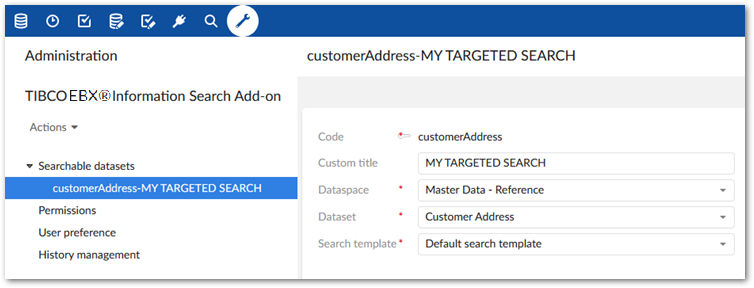
-
-
Set permissions to determine search scope:
-
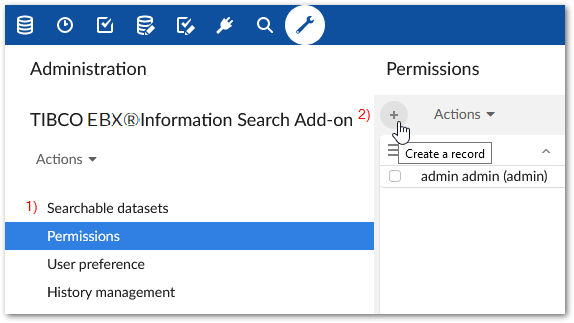
Select the Permissions table.
-
Select the '+' icon to create a new record. Empty fields display. As described in the next steps, this record is used to link a user profile with one or more datasets that set the scope for a targeted search.
-
Use the Profile menu to specify the desired user profile or role. When this profile runs a targeted search, it will include the datasets you specify in the following step.
-
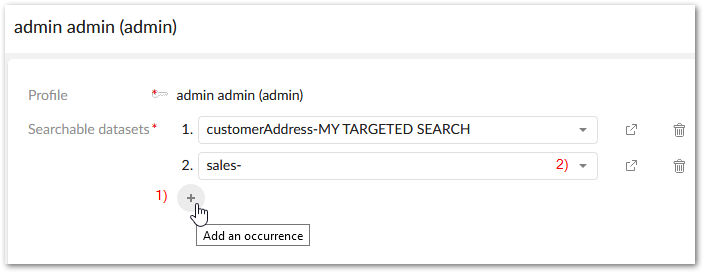
Add datasets using the Searchable datasets group:
-
Click the '+' icon to include an additional dataset.
-
Use the drop-down to select the desired dataset.
-
After saving and closing, the targeted search icon will now be available for the user, or users included in the profile.
-
Related information