
All release notes
Related information
Version 2.7.24
New features
The
Servlet version was updated to 3.1.
Changes in Functionality
This release contains no changes in functionality.
Changes to third-party libraries
This release contains no changes to third-party libraries.
Closed Issues
This release contains no closed issues.
Known Issues
This release contains the following known issues:
-
Workaround: Refresh the browser window where the import was initiated and the process will resume. Additionally, you can increase the allotted JVM memory up to 35GB.
-
Due to a limitation in Excel, long fields with the number data type display all numbers past the 16th place as a 0.
-
When importing using XLSM and the Download file of invalid data option is enabled, the file containing invalid data will be in XLSX format.
-
Association object and selection node are not supported.
-
Data lineage.
-
Graphical view of the data mapping configurations.
-
Split of string transformation function is not supported for a multi-valued string field.
-
Data transfer between complex terminal nodes is possible only if they use the same Java Bean.
-
You can not export data from multiple complex nodes in EBX® that when there is at least one complex node with multiple occurrences.
-
You can not import data from multiple complex nodes in an XML file when there is at least one complex node with multiple occurrences.
-
Split of data works for terminal nodes only.
SQL export
-
You can only export data from EBX® to the selected columns in the same tables of a view which is joined by multiple tables.
-
The add-on doesn't support exporting SQL with the Replace all content mode to a view which is joined by multiple tables.
-
Checking mandatory fields of a view in SQL database is not supported.
-
The export still executes normally and shows an error message from database when no privilege granted.
-
Exporting data from multi-valued fields and multi-valued groups is not supported.
-
You can not export data from EBX® to a view in PostgreSQL database.
-
Exporting data from EBX® to an auto-increment column in SQL Server is not supported because the IDENTITY\_INSERT property is always set to
OFF.
SQL import
-
Checking privileges for a view in PostgreSQL is not supported.
Dynamic Data Modeling
-
Foreign key statements in the DDL file are not managed.
Version 2.7.23
New features
This release contains no new features.
Changes in Functionality
This release contains no changes in functionality.
Changes to third-party libraries
The following third-party libraries were updated:
-
The Apache Commons Compress library was updated to version 1.26.0.
-
The Apache Commons IO library was updated to version 2.12.0.
Closed Issues
This release contains no closed issues.
Known Issues
This release contains the following known issues:
-
Due to a limitation in Excel, long fields with the number data type display all numbers past the 16th place as a 0.
-
When importing using XLSM and the Download file of invalid data option is enabled, the file containing invalid data will be in XLSX format.
-
Association object and selection node are not supported.
-
Data lineage.
-
Graphical view of the data mapping configurations.
-
Split of string transformation function is not supported for a multi-valued string field.
-
Data transfer between complex terminal nodes is possible only if they use the same Java Bean.
-
You can not export data from multiple complex nodes in EBX® that when there is at least one complex node with multiple occurrences.
-
You can not import data from multiple complex nodes in an XML file when there is at least one complex node with multiple occurrences.
-
Split of data works for terminal nodes only.
SQL export
-
You can only export data from EBX® to the selected columns in the same tables of a view which is joined by multiple tables.
-
The add-on doesn't support exporting SQL with the Replace all content mode to a view which is joined by multiple tables.
-
Checking mandatory fields of a view in SQL database is not supported.
-
The export still executes normally and shows an error message from database when no privilege granted.
-
Exporting data from multi-valued fields and multi-valued groups is not supported.
-
You can not export data from EBX® to a view in PostgreSQL database.
-
Exporting data from EBX® to an auto-increment column in SQL Server is not supported because the IDENTITY\_INSERT property is always set to
OFF.
SQL import
-
Checking privileges for a view in PostgreSQL is not supported.
Dynamic Data Modeling
-
Foreign key statements in the DDL file are not managed.
Version 2.7.22
New features
The add-on was updated to ensure compatibility with JDK 17.
Changes in Functionality
This release contains no changes in functionality.
Changes to third-party libraries
This release contains no changes to third-party libraries.
Closed Issues
This release contains no closed issues.
Known Issues
This release contains the following known issues:
-
Due to a limitation in Excel, long fields with the number data type display all numbers past the 16th place as a 0.
-
When importing using XLSM and the Download file of invalid data option is enabled, the file containing invalid data will be in XLSX format.
-
Association object and selection node are not supported.
-
Data lineage.
-
Graphical view of the data mapping configurations.
-
Split of string transformation function is not supported for a multi-valued string field.
-
Data transfer between complex terminal nodes is possible only if they use the same Java Bean.
-
You can not export data from multiple complex nodes in EBX® that when there is at least one complex node with multiple occurrences.
-
You can not import data from multiple complex nodes in an XML file when there is at least one complex node with multiple occurrences.
-
Split of data works for terminal nodes only.
SQL export
-
You can only export data from EBX® to the selected columns in the same tables of a view which is joined by multiple tables.
-
The add-on doesn't support exporting SQL with the Replace all content mode to a view which is joined by multiple tables.
-
Checking mandatory fields of a view in SQL database is not supported.
-
The export still executes normally and shows an error message from database when no privilege granted.
-
Exporting data from multi-valued fields and multi-valued groups is not supported.
-
You can not export data from EBX® to a view in PostgreSQL database.
-
Exporting data from EBX® to an auto-increment column in SQL Server is not supported because the IDENTITY\_INSERT property is always set to
OFF.
SQL import
-
Checking privileges for a view in PostgreSQL is not supported.
Dynamic Data Modeling
-
Foreign key statements in the DDL file are not managed.
Version 2.7.21
New features
This release contains no new features.
Changes in Functionality
This release contains no changes in functionality.
Changes to third-party libraries
This release contains no changes to third-party libraries.
Closed Issues
This release contains the following closed issues:
Known Issues
This release contains the following known issues:
-
Due to a limitation in Excel, long fields with the number data type display all numbers past the 16th place as a 0.
-
When importing using XLSM and the Download file of invalid data option is enabled, the file containing invalid data will be in XLSX format.
-
Association object and selection node are not supported.
-
Data lineage.
-
Graphical view of the data mapping configurations.
-
Split of string transformation function is not supported for a multi-valued string field.
-
Data transfer between complex terminal nodes is possible only if they use the same Java Bean.
-
You can not export data from multiple complex nodes in EBX® that when there is at least one complex node with multiple occurrences.
-
You can not import data from multiple complex nodes in an XML file when there is at least one complex node with multiple occurrences.
-
Split of data works for terminal nodes only.
SQL export
-
You can only export data from EBX® to the selected columns in the same tables of a view which is joined by multiple tables.
-
The add-on doesn't support exporting SQL with the Replace all content mode to a view which is joined by multiple tables.
-
Checking mandatory fields of a view in SQL database is not supported.
-
The export still executes normally and shows an error message from database when no privilege granted.
-
Exporting data from multi-valued fields and multi-valued groups is not supported.
-
You can not export data from EBX® to a view in PostgreSQL database.
-
Exporting data from EBX® to an auto-increment column in SQL Server is not supported because the IDENTITY\_INSERT property is always set to
OFF.
SQL import
-
Checking privileges for a view in PostgreSQL is not supported.
Dynamic Data Modeling
-
Foreign key statements in the DDL file are not managed.
Version 2.7.20
Released: July 2023
New features
This release contains no new features.
Changes in Functionality
This release contains no changes in functionality.
Changes to third-party libraries
The jQuery library was upgraded to version 3.6.4.
Closed Issues
This release contains no closed issues.
Known Issues
This release contains the following known issues:
-
Due to a limitation in Excel, long fields with the number data type display all numbers past the 16th place as a 0.
-
When importing using XLSM and the Download file of invalid data option is enabled, the file containing invalid data will be in XLSX format.
-
Association object and selection node are not supported.
-
Data lineage.
-
Graphical view of the data mapping configurations.
-
Split of string transformation function is not supported for a multi-valued string field.
-
Data transfer between complex terminal nodes is possible only if they use the same Java Bean.
-
You can not export data from multiple complex nodes in EBX® that when there is at least one complex node with multiple occurrences.
-
You can not import data from multiple complex nodes in an XML file when there is at least one complex node with multiple occurrences.
-
Split of data works for terminal nodes only.
SQL export
-
You can only export data from EBX® to the selected columns in the same tables of a view which is joined by multiple tables.
-
The add-on doesn't support exporting SQL with the Replace all content mode to a view which is joined by multiple tables.
-
Checking mandatory fields of a view in SQL database is not supported.
-
The export still executes normally and shows an error message from database when no privilege granted.
-
Exporting data from multi-valued fields and multi-valued groups is not supported.
-
You can not export data from EBX® to a view in PostgreSQL database.
-
Exporting data from EBX® to an auto-increment column in SQL Server is not supported because the IDENTITY\_INSERT property is always set to
OFF.
SQL import
-
Checking privileges for a view in PostgreSQL is not supported.
Dynamic Data Modeling
-
Foreign key statements in the DDL file are not managed.
Version 2.7.19
Released: April 2023
New features
This release was updated to ensure compatibility with the TIBCO EBX® Add-ons Bundle version 4.5.17.
Changes in Functionality
This release contains no changes in functionality.
Changes to third-party libraries
This release contains no changes to third-party libraries.
Closed Issues
This release contains no closed issues.
Known Issues
This release contains the following known issues:
-
Due to a limitation in Excel, long fields with the number data type display all numbers past the 16th place as a 0.
-
When importing using XLSM and the Download file of invalid data option is enabled, the file containing invalid data will be in XLSX format.
-
Association object and selection node are not supported.
-
Data lineage.
-
Graphical view of the data mapping configurations.
-
Split of string transformation function is not supported for a multi-valued string field.
-
Data transfer between complex terminal nodes is possible only if they use the same Java Bean.
-
You can not export data from multiple complex nodes in EBX® that when there is at least one complex node with multiple occurrences.
-
You can not import data from multiple complex nodes in an XML file when there is at least one complex node with multiple occurrences.
-
Split of data works for terminal nodes only.
SQL export
-
You can only export data from EBX® to the selected columns in the same tables of a view which is joined by multiple tables.
-
The add-on doesn't support exporting SQL with the Replace all content mode to a view which is joined by multiple tables.
-
Checking mandatory fields of a view in SQL database is not supported.
-
The export still executes normally and shows an error message from database when no privilege granted.
-
Exporting data from multi-valued fields and multi-valued groups is not supported.
-
You can not export data from EBX® to a view in PostgreSQL database.
-
Exporting data from EBX® to an auto-increment column in SQL Server is not supported because the IDENTITY\_INSERT property is always set to
OFF.
SQL import
-
Checking privileges for a view in PostgreSQL is not supported.
Dynamic Data Modeling
-
Foreign key statements in the DDL file are not managed.
Version 2.7.18
Released: January 2023
New features
Instructions were added to the documentation that describe how to prevent library conflicts when deploying on WebLogic. See the Preventing library conflicts on WebLogic heading in the
index.html file that is located in the following folder in the 4.5.16 Add-on Bundle: documentation > adix\_<xxx>.
Changes in Functionality
This release contains no changes in functionality.
Changes to third-party libraries
This release contains no changes to third-party libraries.
Closed Issues
Known Issues
This release contains the following known issues:
-
Due to a limitation in Excel, long fields with the number data type display all numbers past the 16th place as a 0.
-
When importing using XLSM and the Download file of invalid data option is enabled, the file containing invalid data will be in XLSX format.
-
Association object and selection node are not supported.
-
Data lineage.
-
Graphical view of the data mapping configurations.
-
Split of string transformation function is not supported for a multi-valued string field.
-
Data transfer between complex terminal nodes is possible only if they use the same Java Bean.
-
You can not export data from multiple complex nodes in EBX® that when there is at least one complex node with multiple occurrences.
-
You can not import data from multiple complex nodes in an XML file when there is at least one complex node with multiple occurrences.
-
Split of data works for terminal nodes only.
SQL export
-
You can only export data from EBX® to the selected columns in the same tables of a view which is joined by multiple tables.
-
The add-on doesn't support exporting SQL with the Replace all content mode to a view which is joined by multiple tables.
-
Checking mandatory fields of a view in SQL database is not supported.
-
The export still executes normally and shows an error message from database when no privilege granted.
-
Exporting data from multi-valued fields and multi-valued groups is not supported.
-
You can not export data from EBX® to a view in PostgreSQL database.
-
Exporting data from EBX® to an auto-increment column in SQL Server is not supported because the IDENTITY\_INSERT property is always set to
OFF.
SQL import
-
Checking privileges for a view in PostgreSQL is not supported.
Dynamic Data Modeling
-
Foreign key statements in the DDL file are not managed.
Version 2.7.17
Released: October 2022
New features
This release contains no new features.
Changes in Functionality
This release contains no changes in functionality.
Changes to third-party libraries
This release contains no changes to third-party libraries.
Closed Issues
Known Issues
This release contains the following known issues:
-
Due to a limitation in Excel, long fields with the number data type display all numbers past the 16th place as a 0.
-
When importing using XLSM and the Download file of invalid data option is enabled, the file containing invalid data will be in XLSX format.
-
Association object and selection node are not supported.
-
Data lineage.
-
Graphical view of the data mapping configurations.
-
Split of string transformation function is not supported for a multi-valued string field.
-
Data transfer between complex terminal nodes is possible only if they use the same Java Bean.
-
You can not export data from multiple complex nodes in EBX® that when there is at least one complex node with multiple occurrences.
-
You can not import data from multiple complex nodes in an XML file when there is at least one complex node with multiple occurrences.
-
Split of data works for terminal nodes only.
SQL export
-
You can only export data from EBX® to the selected columns in the same tables of a view which is joined by multiple tables.
-
The add-on doesn't support exporting SQL with the Replace all content mode to a view which is joined by multiple tables.
-
Checking mandatory fields of a view in SQL database is not supported.
-
The export still executes normally and shows an error message from database when no privilege granted.
-
Exporting data from multi-valued fields and multi-valued groups is not supported.
-
You can not export data from EBX® to a view in PostgreSQL database.
-
Exporting data from EBX® to an auto-increment column in SQL Server is not supported because the IDENTITY\_INSERT property is always set to
OFF.
SQL import
-
Checking privileges for a view in PostgreSQL is not supported.
Dynamic Data Modeling
-
Foreign key statements in the DDL file are not managed.
Version 2.7.16
Released: August 2022
New features
This release contains no new features.
Changes in Functionality
This release contains no changes in functionality.
Changes to third-party libraries
The Apache POI library was updated to version 5.2.2.
Closed Issues
This release contains no closed issues.
Known Issues
This release contains the following known issues:
-
Due to a limitation in Excel, long fields with the number data type display all numbers past the 16th place as a 0.
-
When importing using XLSM and the Download file of invalid data option is enabled, the file containing invalid data will be in XLSX format.
-
Association object and selection node are not supported.
-
Data lineage.
-
Graphical view of the data mapping configurations.
-
Split of string transformation function is not supported for a multi-valued string field.
-
Data transfer between complex terminal nodes is possible only if they use the same Java Bean.
-
You can not export data from multiple complex nodes in EBX® that when there is at least one complex node with multiple occurrences.
-
You can not import data from multiple complex nodes in an XML file when there is at least one complex node with multiple occurrences.
-
Split of data works for terminal nodes only.
SQL export
-
You can only export data from EBX® to the selected columns in the same tables of a view which is joined by multiple tables.
-
The add-on doesn't support exporting SQL with the Replace all content mode to a view which is joined by multiple tables.
-
Checking mandatory fields of a view in SQL database is not supported.
-
The export still executes normally and shows an error message from database when no privilege granted.
-
Exporting data from multi-valued fields and multi-valued groups is not supported.
-
You can not export data from EBX® to a view in PostgreSQL database.
-
Exporting data from EBX® to an auto-increment column in SQL Server is not supported because the IDENTITY\_INSERT property is always set to
OFF.
SQL import
-
Checking privileges for a view in PostgreSQL is not supported.
Dynamic Data Modeling
-
Foreign key statements in the DDL file are not managed.
Version 2.7.15
Released: August 2022
New features
This release allows you to import XLSM files.
Changes in Functionality
This release contains no changes in functionality.
Changes to third-party libraries
This release contains no changes to third-party libraries.
Closed Issues
This release contains the following closed issues:
Known Issues
This release contains the following known issues:
-
Due to a limitation in Excel, long fields with the number data type display all numbers past the 16th place as a 0.
-
When importing using XLSM and the Download file of invalid data option is enabled, the file containing invalid data will be in XLSX format.
-
Association object and selection node are not supported.
-
Data lineage.
-
Graphical view of the data mapping configurations.
-
Split of string transformation function is not supported for a multi-valued string field.
-
Data transfer between complex terminal nodes is possible only if they use the same Java Bean.
-
You can not export data from multiple complex nodes in EBX® that when there is at least one complex node with multiple occurrences.
-
You can not import data from multiple complex nodes in an XML file when there is at least one complex node with multiple occurrences.
-
Split of data works for terminal nodes only.
SQL export
-
You can only export data from EBX® to the selected columns in the same tables of a view which is joined by multiple tables.
-
The add-on doesn't support exporting SQL with the Replace all content mode to a view which is joined by multiple tables.
-
Checking mandatory fields of a view in SQL database is not supported.
-
The export still executes normally and shows an error message from database when no privilege granted.
-
Exporting data from multi-valued fields and multi-valued groups is not supported.
-
You can not export data from EBX® to a view in PostgreSQL database.
-
Exporting data from EBX® to an auto-increment column in SQL Server is not supported because the IDENTITY\_INSERT property is always set to
OFF.
SQL import
-
Checking privileges for a view in PostgreSQL is not supported.
Dynamic Data Modeling
-
Foreign key statements in the DDL file are not managed.
Version 2.7.14
Released: March 2022
New features
This release contains no new features.
Changes in Functionality
This release contains no changes in functionality.
Changes to third-party libraries
The JQuery library was updated to version 3.6.0.
Closed Issues
This release contains no closed issues.
Known Issues
This release contains the following known issues:
-
Association object and selection node are not supported.
-
Data lineage.
-
Graphical view of the data mapping configurations.
-
Split of string transformation function is not supported for a multi-valued string field.
-
Data transfer between complex terminal nodes is possible only if they use the same Java Bean.
-
You can not export data from multiple complex nodes in EBX® that when there is at least one complex node with multiple occurrences.
-
You can not import data from multiple complex nodes in an XML file when there is at least one complex node with multiple occurrences.
-
Split of data works for terminal nodes only.
SQL export
-
You can only export data from EBX® to the selected columns in the same tables of a view which is joined by multiple tables.
-
The add-on doesn't support exporting SQL with the Replace all content mode to a view which is joined by multiple tables.
-
Checking mandatory fields of a view in SQL database is not supported.
-
The export still executes normally and shows an error message from database when no privilege granted.
-
Exporting data from multi-valued fields and multi-valued groups is not supported.
-
You can not export data from EBX® to a view in PostgreSQL database.
-
Exporting data from EBX® to an auto-increment column in SQL Server is not supported because the IDENTITY\_INSERT property is always set to
OFF.
SQL import
-
Checking privileges for a view in PostgreSQL is not supported.
Dynamic Data Modeling
-
Foreign key statements in the DDL file are not managed.
Version 2.7.13
Released: January 2021
New features
This release contains no new features.
Changes in Functionality
This release contains the following functionality changes:
-
During an Excel or CSV import simulation, any Match and Merge Add-on triggers are deactivated. During the simulation other triggers are still active and all triggers are active when performing the actual import.
-
The following information is now included in the log when importing, exporting, and transferring:
-
Dataspace, dataset, and table names.
-
User information.
-
Service name.
-
Start, end, and ongoing percentage of upload, transfer, import and export progress.
-
IP address and HTTP Session ID.
-
Changes to third-party libraries
This release contains no updates to third-party libraries.
Closed Issues
This release contains the following closed issues:
Known Issues
This release contains the following known issues:
-
Association object and selection node are not supported.
-
Data lineage.
-
Graphical view of the data mapping configurations.
-
Split of string transformation function is not supported for a multi-valued string field.
-
Data transfer between complex terminal nodes is possible only if they use the same Java Bean.
-
You can not export data from multiple complex nodes in EBX® that when there is at least one complex node with multiple occurrences.
-
You can not import data from multiple complex nodes in an XML file when there is at least one complex node with multiple occurrences.
-
Split of data works for terminal nodes only.
SQL export
-
You can only export data from EBX® to the selected columns in the same tables of a view which is joined by multiple tables.
-
The add-on doesn't support exporting SQL with the Replace all content mode to a view which is joined by multiple tables.
-
Checking mandatory fields of a view in SQL database is not supported.
-
The export still executes normally and shows an error message from database when no privilege granted.
-
Exporting data from multi-valued fields and multi-valued groups is not supported.
-
You can not export data from EBX® to a view in PostgreSQL database.
-
Exporting data from EBX® to an auto-increment column in SQL Server is not supported because the IDENTITY\_INSERT property is always set to
OFF.
SQL import
-
Checking privileges for a view in PostgreSQL is not supported.
Dynamic Data Modeling
Foreign key statements in the DDL file are not managed.
Version 2.7.12
Released: December 2021
New features
This release contains no new features.
Changes in Functionality
This release contains no functionality changes.
Changes to third-party libraries
This release contains no updates to third-party libraries.
Closed Issues
Known Issues
This release contains the following known issues:
-
Association object and selection node are not supported.
-
Data lineage.
-
Graphical view of the data mapping configurations.
-
Split of string transformation function is not supported for a multi-valued string field.
-
Data transfer between complex terminal nodes is possible only if they use the same Java Bean.
-
You can not export data from multiple complex nodes in EBX® that when there is at least one complex node with multiple occurrences.
-
You can not import data from multiple complex nodes in an XML file when there is at least one complex node with multiple occurrences.
-
Split of data works for terminal nodes only.
SQL export
-
You can only export data from EBX® to the selected columns in the same tables of a view which is joined by multiple tables.
-
The add-on doesn't support exporting SQL with the Replace all content mode to a view which is joined by multiple tables.
-
Checking mandatory fields of a view in SQL database is not supported.
-
The export still executes normally and shows an error message from database when no privilege granted.
-
Exporting data from multi-valued fields and multi-valued groups is not supported.
-
You can not export data from EBX® to a view in PostgreSQL database.
-
Exporting data from EBX® to an auto-increment column in SQL Server is not supported because the IDENTITY\_INSERT property is always set to
OFF.
SQL import
Checking privileges for a view in PostgreSQL is not supported.
Dynamic Data Modeling
Foreign key statements in the DDL file are not managed.
Version 2.7.11
Released: November 2021
New features
This release contains no new features.
Changes in Functionality
This release contains no functionality changes.
Changes to third-party libraries
This release contains no updates to third-party libraries.
Closed Issues
This release contains the following closed issues:
Known Issues
This release contains the following known issues:
-
Association object and selection node are not supported.
-
Data lineage.
-
Graphical view of the data mapping configurations.
-
Split of string transformation function is not supported for a multi-valued string field.
-
Data transfer between complex terminal nodes is possible only if they use the same Java Bean.
-
You can not export data from multiple complex nodes in EBX® that when there is at least one complex node with multiple occurrences.
-
You can not import data from multiple complex nodes in an XML file when there is at least one complex node with multiple occurrences.
-
Split of data works for terminal nodes only.
SQL export
-
You can only export data from EBX® to the selected columns in the same tables of a view which is joined by multiple tables.
-
The add-on doesn't support exporting SQL with the Replace all content mode to a view which is joined by multiple tables.
-
Checking mandatory fields of a view in SQL database is not supported.
-
The export still executes normally and shows an error message from database when no privilege granted.
-
Exporting data from multi-valued fields and multi-valued groups is not supported.
-
You can not export data from EBX® to a view in PostgreSQL database.
-
Exporting data from EBX® to an auto-increment column in SQL Server is not supported because the IDENTITY\_INSERT property is always set to
OFF.
SQL import
-
Checking privileges for a view in PostgreSQL is not supported.
Dynamic Data Modeling
-
Foreign key statements in the DDL file are not managed.
Version 2.7.10
Released: August 2021
New features
Fields are now exported even when their visibility in the Data Model Assistant (DMA) is set to hidden.
Changes in Functionality
This release contains no functionality changes.
Changes to third-party libraries
This release contains the following third-party updates:
-
Apache Commons Compress to version 1.21.
Closed Issues
This release contains no closed issues.
Known Issues
This release contains the following known issues:
-
Association object and selection node are not supported.
-
Data lineage.
-
Graphical view of the data mapping configurations.
-
Split of string transformation function is not supported for a multi-valued string field.
-
Data transfer between complex terminal nodes is possible only if they use the same Java Bean.
-
You can not export data from multiple complex nodes in EBX® that when there is at least one complex node with multiple occurrences.
-
You can not import data from multiple complex nodes in an XML file when there is at least one complex node with multiple occurrences.
-
Split of data works for terminal nodes only.
SQL export
-
You can only export data from EBX® to the selected columns in the same tables of a view which is joined by multiple tables.
-
The add-on doesn't support exporting SQL with the Replace all content mode to a view which is joined by multiple tables.
-
Checking mandatory fields of a view in SQL database is not supported.
-
The export still executes normally and shows an error message from database when no privilege granted.
-
Exporting data from multi-valued fields and multi-valued groups is not supported.
-
You can not export data from EBX® to a view in PostgreSQL database.
-
Exporting data from EBX® to an auto-increment column in SQL Server is not supported because the IDENTITY\_INSERT property is always set to
OFF.
SQL import
-
Checking privileges for a view in PostgreSQL is not supported.
Dynamic Data Modeling
-
Foreign key statements in the DDL file are not managed.
Version 2.7.9
Released: May 2021
Updates
A warning is now provided when discrepancies exist between preference settings and an import's source file.
Bug fixes
This release includes the following bug fixes:
Version 2.7.8
Released: March 2021
Updates
The jQuery 1.10.2 and jQuery UI 1.11.4 libraries were removed in this release.
Version 2.7.7
Released: February 2021
Bug fixes
Version 2.7.6
Released: January 2021
Product updates
The add-on no longer supports the Document Type Definition declaration in XML files. If this causes an exception, the add-on will inform you that this declaration is not allowed.
Bug fixes
Version 2.7.5
Release Date: October 20, 2020
Bug fixes
This release includes the following bug fixes:
Version 2.7.4
Release Date: September 18, 2020
Updates
This release contains the following updates:
-
Support has been updated for the JDK11 library.
-
The JQuery library was updated to version 3.5.0.
-
The Apache POI library was updated to version 4.1.2.
Bug fixes
Version 2.7.3
Release Date: June 23, 2020
New and updated behavior
This release includes the following updates:
-
Data in hidden fields in the DaqaMetaData group can now be transferred.
-
The steps in the API documentation that describe how to create an SQL field mapper for import and export were updated.
-
Support has been updated for the JDK8 and JDK11 libraries. Additionally, the log4j library version 1.2.17 was removed.
Bug fixes
Version 2.7.2
Release Date: April 20, 2020
New and updated behavior
This release includes the following updates:
-
The add-on now includes the progress of import operations in its log.
-
Performance has been improved when importing from a CSV file.
Bug fixes
This release includes the following bug fixes:
Version 2.7.1
Release Date: December 10, 2019
Updated behavior
When using the Validate imported records only option, the add-on only validates records included in the import. This update can improve performance as previously the entire table was validated and results were filtered to only show those related to imported records.
Bug fixes
Version 2.7.0
Release Date: November 8, 2019
New features and updates
The new features and updates for this release are described below:
Updates and enhancements
This release contains the following updates and enhancements:
-
For Excel and CSV, the Update and insert import mode has been renamed to Update or insert.
-
Administrators can now use permission settings to determine access rights to import, export, and transfer screens. Additionally, they can specify the type of import modes accessible to users. For example, they could set permissions so that a profile can only access the Update or insert option and not the Replace all option.
-
The add-on now offers fine-grained control over how configuration and preference data can be imported and exported. When importing, administrators can now choose the scope of configuration data to import, as well as specify that only preference data from a specific profile gets imported.
-
The new Export preference service allows export of configuration data related to selected preferences. The service is accessible from the Application interface preference table.
-
If a user has made adjustments to import settings and not saved a preference, a prompt now displays to inform them that they can save settings as a preference.
-
Dataset permissions data can now be exported to an Excel file.
API Updates
API updates included in this release provide the:
-
methods to get a
PrimaryKeyset that identifies records in the Application interface preference table. SeeApplicationInterfaceConfigurationFactoryin the Java API documentation for more information. -
methods to export the records in the Application interface preference table and the related data from other tables to an XML file. See
ExportDataExchangeConfigurationSpecin the Java API documentation for more information. -
methods to import add-on configuration data from an XML file based on the specified preference owner and import scope. See
ImportDataExchangeConfigurationSpecandImportScopein the Java API documentation for more information. -
context to get the
com.orchestranetworks.addon.dex.DataExchangeSpecfrom the configuration declared in the add-on's dataset. SeeDataExchangeHelper,DataExchangeHelperContext,CSVExportDataExchangeHelperContext,CSVImportDataExchangeHelperContext,SpreadsheetExportDataExchangeHelperContextandSpreadsheetImportDataExchangeHelperContextin the Java API documentation for more information.
Bug fixes
This release includes the following bug fixes:
Version 2.6.4
Release Date: September 3, 2019
Updates and enhancements
This release contains the following updates and enhancements:
-
During the simulation phase of Excel and CSV import you can now:
-
Use the Validate imported records only option to specify whether the validation report runs only on imported records, or also includes all records in the target table.
-
Skip the detailed validation report.
-
-
For Excel import and export, multi-valued complex fields are now supported.
-
During CSV export, when an exported field includes the same character used as a separator, the add-on now automatically uses double quotes as escape characters to ensure data integrity.
-
The option to specify whether the
handleNewContext()method executes on import or transfer is now available. The new Allow transient record context management property can be accessed from the Administration > Integration > TIBCO EBX® Data Exchange Add-on > Additional configuration > Import preference table.
Bug fixes
This release includes the following bug fixes:
Version 2.6.3
Release Date: June 20, 2019
Updates and enhancements
This release contains the following updates and enhancements:
-
When exporting Excel using preferences, you now have the option of adding or removing tables in the main configuration screen.
-
For Excel export, the Preference field is now located at the top of the main configuration screen.
-
Export of fields that are enumerations has been enhanced. See the section below for more details.
-
An API to return a
CommonApplicationusing the application's Universal Name is now available. -
After selecting a preference, the Export and Mapping buttons are now displayed. This allows an export to be performed without having to navigate through each screen.
Enumeration export enhancements
The add-on allows you to include enumerations in CSV and Excel exports of tables, or individual records. The following describes behavior for each supported export type:
-
Excel export: On the main configuration page, the add-on presents you with the following options under Export enumerations:
-
Export label: The export includes an additional column for the enumeration field's label.
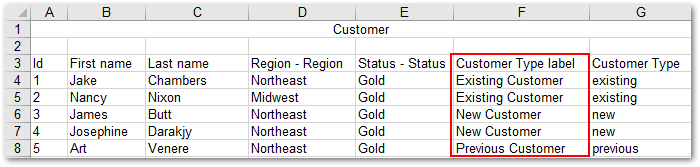
-
Export static enumerations: The enumeration column will contain a drop-down list of enumeration values defined in the data model.
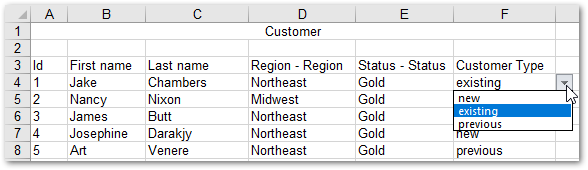
-
When you select both options, the exported columns both have drop-down lists of their available values.
-
If you leave both options unchecked, the exported column includes only the enumeration value defined in the data model.
-
-
CSV export: The exported file will include a dedicated column with the enumeration value's labels.

Bug fixes
Release Notes 2.6.2
Release Date: January 18, 2019
Updates and enhancements
This release contains the following updates and enhancements:
-
As part of an effort to improve overall user experience, the file and preference selection pages have been combined for Excel and CSV import.
-
Dynamic Data Modeling services can now be invoked via the API.
Bug fixes
Release Notes 2.6.1
Release Date: December 14, 2018
Updates and enhancements
This release contains the following updates and enhancements:
-
The add-on can now automatically handle line break characters when importing and exporting.
-
The add-on no longer displays warning messages pertaining to write permission for hidden or read-only fields, associations, and selection nodes.
-
The option to export ignored fields as blank columns now defaults to No.
Bug fixes
This release includes the following bug fixes:
Release Notes 2.6.0
Release Date: October 26, 2018
Featured updates
The EBX® Data Exchange Add-on has undergone significant updates to ensure compatibility with the EBX® 5.9.0 GA release.
Bug fixes
This release includes the following bug fixes:
Release Notes 2.5.1
Release Date: July 17, 2018
Bug fixes
This release includes the following bug fixes:
Release Notes 2.5.0
Release Date: July 4, 2018
New features and enhancements
The new features and enhancements in this release are highlighted in the following sections:
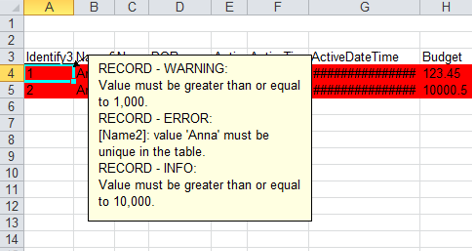
Inclusion of validation messages in Excel export
You can now include validation messages when exporting to Excel. In the exported file, the add-on highlights fields and rows containing messages. If a message applies to a table, the add-on creates a new sheet in the exported file and appends "-MSG" to the name. See Including messages in exported files for more details. The image below shows an example of how messages display in an exported file:
Simplified SQL data source connections
Administrators can now create a connection to an SQL data source without having to manually define the connection information in the application server. Connection settings can be configured using the new JNDI data source table located under Administration > Integration > EBX® Data Exchange Add-on > Reference data. For further instructions, see Connecting to an SQL data source.
Enhanced data transfer options
You can now select multiple target tables when transferring data. Additionally, the new Stop and rollback on error option allows you to specify behavior when errors occur during transfer. When you enable this option and errors are encountered during transfer, the add-on cancels all transfers in progress and rolls back any transferred data. When the option is disabled and errors are encountered, the add-on only cancels transfers for the tables where errors occurred and completes any remaining transfers.
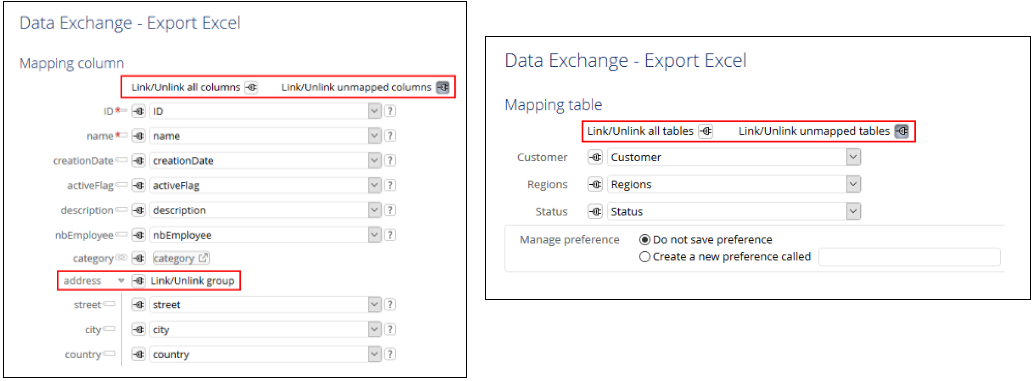
Updated table and column mapping screen features
As highlighted in the following image:
-
All tables, columns, unmapped tables, and unmapped columns can be linked and unlinked with a single click.
-
Fields that are part of a complex type are now grouped. Each group can also be linked and unlinked without having to select individual fields.
Improved transformation function features
The following enhancements have been made to transformation functions:
-
Transformation function parameter values now display in the Field mapping transformation table.
-
You can now use fields of all data types with a cross reference transformation function. If the source and target data types are different:
-
The source field and the field used to lookup the desired value (located in the cross-referenced table) must be the same data type.
-
The field containing the replacement value (located in the cross-referenced table) and the target field must be the same data type.
-
New functionality to export related data
To help you locate data linked to specific records, the add-on now allows you to include related data when exporting to:
-
CSV: The add-on exports a ZIP file containing individual CSV files. One file contains the export's source data. The remaining files—one for each table—contain the related data.
-
Excel: The add-on exports a single Excel file. The first sheet in the file contains the export's source data. Each additional sheet—one for each table—contains the related data.The option to export related data is only available when exporting from the table level, or individual records. For more information, see Exporting related data.
Addition of default options and preference permissions settings
Administrators can now set the default selections and preference permissions for each import and export operations. When users perform an import/export, they can still change selections if needed, or load available preferences.
Additional improvements
This release contains the following additional improvements:
-
Business rules can now be checked when simulating CSV or Excel import.
-
When opening an existing, or creating a new Table mapping record, the Field mapping tab displays to provide quick access to field mappings.
-
The UI has been updated when importing and exporting Excel at the dataset level.
Java API
Additions to the API included in this release allow you to:
-
Generate table and application mappings for import and export of Excel and CSV formats. See
CSVTableGeneration,SpreadsheetTableGeneration,CSVExportApplicationMappingHelper,CSVImportApplicationMappingHelper,SpreadsheetExportApplicationMappingHelperandSpreadsheetImportApplicationMappingHelperin the Java API documentation for more information. -
Get the table declared in the EBX® Data Exchange Add-on configuration. See
TableHelper,TableHelperSpecandTableHelperFactoryin the Java API documentation for more information. -
Export related data when exporting to Excel or CSV formats. See
FileExportConfigurationSpecin the Java API documentation for more information. -
Define the JNDI configuration used for SQL import and export without requiring application server configuration. See
JNDIDataSource,SQLExportConfigurationSpecandSQLImportConfigurationSpecin the Java API documentation for more information. -
Export validation messages when exporting to Excel. See
SpreadsheetExportConfigurationSpecin the Java API documentation for more information. -
Stop a data transfer in progress when errors occur and rollback all data. See
TransferConfigurationSpecin the Java API documentation for more information. -
Export tables with a prepared list of each table's records, or table filter. See
DataExchangeExportTableSpec,DataExchangeExportTableSpecBuilderandDataExchangeServicein the Java API documentation for more information.
Bug fixes
This release includes the following bug fixes:
Release Note 2.4.9
Release Date: June 8, 2018
Bug fixes
Release Note 2.4.8
Release Date: May 23, 2018
Bug fixes
This release includes the following bug fixes:
Release Note 2.4.7
Release Date: May 2, 2018
Latest updates
The EBX® Data Exchange Add-on import now relies on the commit threshold value set in ebx.properties. If left undefined, the threshold value defaults to 100.
Release Note 2.4.6
Release Date: April 20, 2018
Latest updates
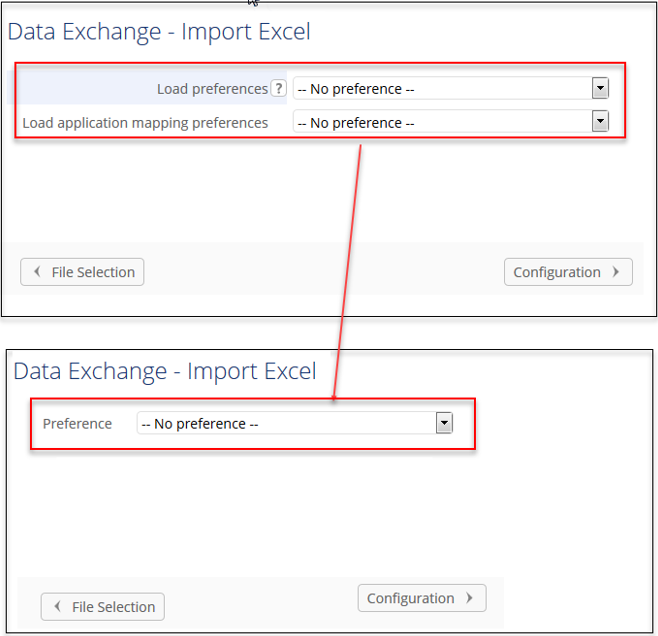
This release of the EBX® Data Exchange Add-on simplifies preference loading by consolidating functionality. You now use only the Preference drop-down menu to specify preferences for Excel and CSV import and export. The new behavior also applies to workflows.
Java API
It is now possible to get the procedure context of an ongoing transaction when importing. See
com.orchestranetworks.addon.dex.transformation.TransformationExecutionContext in the Java API documentation for more information.
Backwards compatibility
The
getImportPreference and setImportPreference methods are no longer used. Export mapping based on an import mapping preference is no longer supported. The mapping defined in the export preference is used instead. See AdixExportSpec in the Java API documentation for more information.
Bug fixes
Release Note 2.4.5
Release Date: April 6, 2018
Bug fixes
Release Note 2.4.4
Release Date: March 28, 2018
Bug fixes
Release Note 2.4.3
Release Date: March 16, 2018
Bug fixes
Release Note 2.4.2
Release Date: January 31, 2018
New features
This release contains the following new features and bug fixes:
EBX® Data Exchange Add-on configuration Import/Export
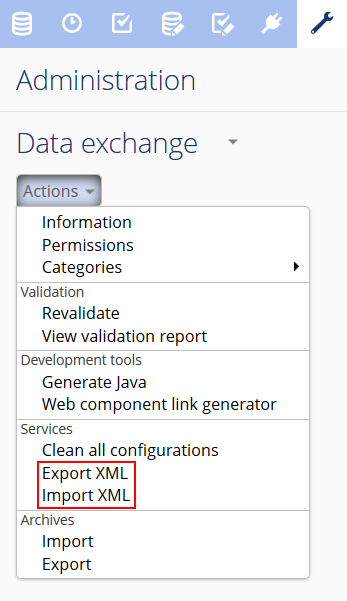
You can now import and export entire EBX® Data Exchange Add-on configurations using the following services:
-
Export XML: Exports all table records from the EBX® Data Exchange Add-on dataset to an XML file.
-
Import XML: Imports data from an XML file to the EBX® Data Exchange Add-on dataset.As shown below, the services are available to administrators from the EBX® Data Exchange Add-on dataset Actions menu:
 For more information, see Importing and Exporting EBX® Data Exchange Add-on configuration.
Importing when a table's PK is read-only
The following list outlines improved behavior when importing to a table that has a read-only primary key:
-
When importing CSV/Excel: If you map the primary key field, you can use the Update only and Update and insert modes. When using these modes records are updated normally, but an error is displayed if the import attempts to add a new record to the target table.
-
When importing from SQL/XML and transferring data: You can use the Update or insert mode to update records on import/transfer. Note that you will not be able to import/transfer new records to the target table.
Java API
It is now possible to import and export EBX® Data Exchange Add-on configurations from/to an XML file. See
DataExchangeConfigurationService in the Java API documentation for more information.
Bug fixes
Release Note 2.4.0
Release Date: December 15, 2017
Overview of features and enhancements
The following list contains features and enhancements for EBX® Data Exchange Add-on version 2.4.0. You can use the links provided for more detailed descriptions of the larger features.
-
When exporting SQL, or transferring data, you can now use the Include computed values option to specify whether to include the source's computed values.
-
Preferences and permissions have been consolidated into the EBX® Data Exchange Add-on administration area.
-
A Snapshot input parameter is now included for export and transfer data services in workflows and perspectives.
-
You can now define table mappings for Excel export and field mappings for Excel and CSV export.
-
During Excel export you can now choose whether ignored fields are included in the export. If included, the add-on exports them as blank columns in the spreadsheet.
Generating constant values
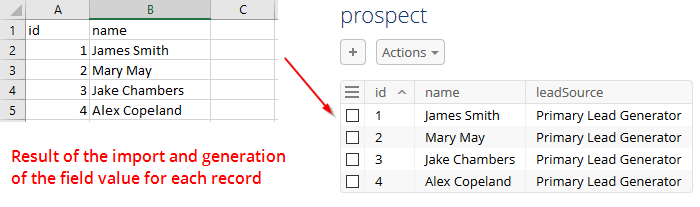
A new transformation function allows you to populate a column's fields with a pre-defined value on import, export, or transfer. This allows you to set a specific value to a target field even when there is no mapped source field.
In the image below, the add-on automatically inserted a pre-defined value in the table's leadSource column during import. This column did not exist in the source spreadsheet. See the User Guide > Generating constant values for more information and step by step instructions that demonstrate a use case.
Generating models
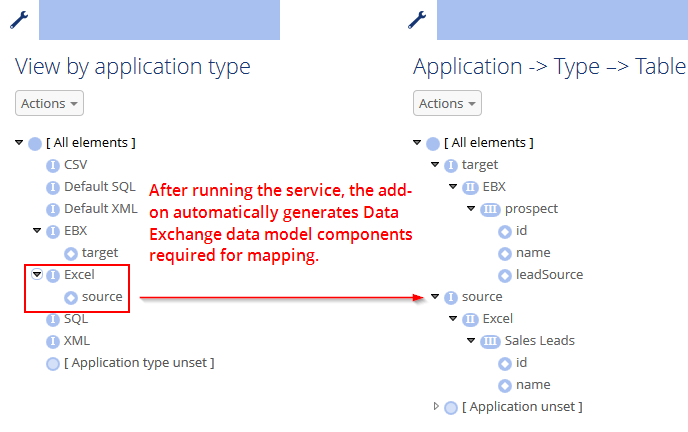
In EBX® Data Exchange Add-on, models are required for user-defined and auto-generated mappings. Previously, administrators were required to manually create models for Excel and CSV type applications. This process has been greatly simplified and the add-on can now automatically generate models from a supplied file.
Suppose an administrator needed to create a configuration that uses a transformation function during Excel import. The following provides a high-level outline of the simplified process:
-
Create applications and their types corresponding to the EBX® table and Excel file.
-
For each application type, run the Generate models service. When run for Excel, just provide the file location and basic configuration information.
-
Map the tables, fields, and supply the transformation information.
Data transfer enhancements
This release includes the following new features and enhancements to data transfer functionality:
Transfer data to/from any table
A previous limitation prevented you from transferring data between tables within the same dataset. This limitation has been removed and you can transfer data between all tables in the repository (of course, mapping configuration requirements and permission constraints still apply). The following describes behavior when transferring data within the same table:
-
The default behavior is that data will be replaced. For example, a business need may require an update of values in a table field to all uppercase letters. In this instance, data transfer could be used in conjunction with a transformation function to update the values.
-
When the table has an auto-incremented primary key, you can choose to duplicate the data rather than replace it.
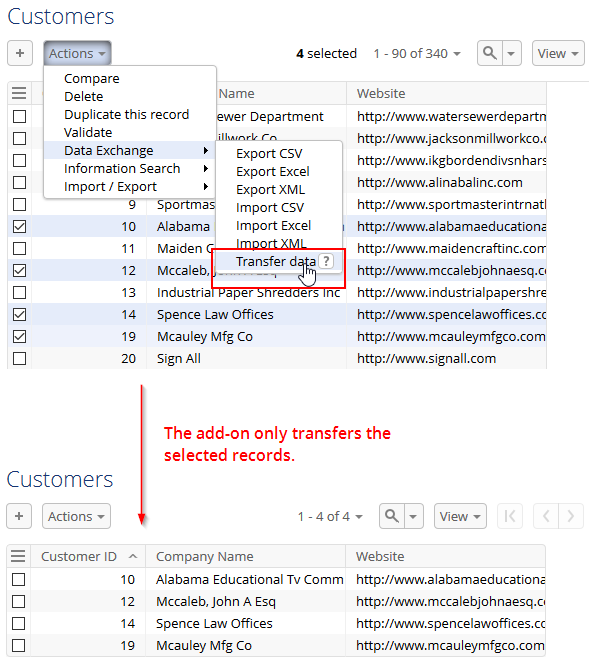
Filtering records
When transferring data between tables, you may only want to transfer a subset of records. Data transfer now supplies this functionality. As shown below, you can select the records you want to transfer in the tabular and hierarchical views:
API Updates
When transferring data using the API, you can now retrieve information such as source and target record primary keys. Additionally, the API now allows you to filter records during transfer. See the API documentation for examples.
Java API
-
It is now possible to specify the characters used to signify the end of a CSV line. See
CSVImportConfigurationSpecandLineReturnCharactersin the Java API documentation for more information. -
It is now possible to export ignored fields as blank columns. See
SpreadsheetExportConfigurationSpecin the Java API documentation for more information. -
It is now possible to transfer computed values from source to target tables. See
TransferConfigurationSpecin the Java API documentation for more information. -
It is now possible to specify the configuration used for an EBX® reference field. See
EBXLinkFieldin the Java API documentation for more information. -
It is now possible to define possible field attributes. See
FieldAttributein the Java API documentation for more information. -
It is now possible to create a field with the NO\_SOURCE\_FIELD field attribute. See
CSVField,EBXField,SpreadsheetField,SQLFieldandXMLFieldin the Java API documentation for more information. -
It is now possible to return a list of the targeted deleted records' primary keys before data transfer, and a map between source and target record primary keys for created or updated records in the transfer result. See
TransferResultin the Java API documentation for more information. -
Provides the necessary context for integrating EBX® Data Exchange Add-on services. See
DataExchangeServiceContextandDataExchangeServiceContextFactoryin the Java API documentation for more information.
Bug fixes
Release Note 2.3.2
Release Date: November 10, 2017
Bug fixes
Release Note 2.3.1
Release Date: September 20, 2017
Bug fixes
Release Note 2.3.0
Release Date: August 3, 2017
New features
-
The add-on's architecture has been updated and includes a common, unified API. Additionally, this version has been optimized for improved performance.
Java API
-
It is now possible to use the common API for all import, export and transfer services. See
com.orchestranetworks.addon.dexin the Java API for more information.
Bug fixes
Release Note 2.2.7
Release Date: July 6, 2017
Bug fixes
Release Note 2.2.6
Release Date: May 19, 2017
New features
-
It is now possible to export and transfer data on a snapshot.
Release Note 2.2.5
Release Date: April 18, 2017
New features
-
It is now possible to import the number values as displayed in the cell while importing Excel.
Bug fixes
Release Note 2.2.4
Release Date: March 31, 2017
Bug fixes
Release Note 2.2.3
Release Date: February 23, 2017
Bug fixes
Release Note 2.2.2
Release Date: January 23, 2017
Bug fixes
Release Note 2.2.1
Release Date: December 16, 2016
New features
-
It is now possible to lock or unlock the dataspace while exporting.
-
You can now transfer data from many source tables to many target tables.
Java API
-
It is now possible to disable the write access lock on the dataspace while executing SQL/XML export. See
DataExchangeExportSpecin the Java API for more information. -
It is now possible to transfer from many source tables to many target tables via API. See
DataExchangeTransferSpecandTableMappingin the Java API for more information.
Bug fixes
Release Note 2.2.0
Release Date: November 18, 2016
New features
-
Data can be imported from or exported to an external SQL database via a JNDI data source using default mapping.
-
Creation and modification privileges can be defined on a profile's preferences.
Bug fixes
Release Note 2.1.9
Release Date: October 12, 2016
New features
-
The new 'Include the reference sheet' option is available during the Excel export at the dataset level to determine whether the reference sheet 'Reference table mapping' will be added to the end of an Excel file. This sheet contains information such as the sheet name, table label and table path that was used to detect the mapping between sheets and tables at import time.
-
The new 'Include computed values' option is available to determine whether the computed values must be included during an Excel or CSV export.
Bug fixes
Release Note 2.1.8
Release Date: August 4, 2016
New features
-
The new 'Use language' option is available to determine whether the language and corresponding number format policy are applied during CSV export.
Java API
-
It is possible to set the specific locale when executing Excel or CSV export via the API using the filter data function. See
ExportDataAccessSpecin the Java API for more information.
Bug fixes
Release Note 2.1.7
Release Date: July 8, 2016
Bug fixes
Release Note 2.1.6
Release Date: June 10, 2016
New features
-
Import Excel, CSV, XML file and transfer dataThe primary key mapping and its data validation are handled by the new 'Check empty or null primary keys' property.
Java API
-
The new methods
getRepository,getSession,getSourceTableandgetReferencedTablefor transforming data before exporting Excel or CSV are added to theTransformContextForExportinterface. -
The new methods
getRepository,getSession,getReferencedTableandgetValueInSpreadsheetfor transforming data before importing Excel or CSV are added to theTransformContextForImportinterface. -
The method
getTargetTablehas been removed from theTransformContextForExportinterface. -
The Javadoc of the method
getTargetTableis updated on theTransformContextForImportinterface.
Bug fixes
Release Note 2.1.5
Release Date: May 19, 2016
New features
-
Import Excel, CSV, XML file and transfer dataNull and empty values in the imported file are handled by the new 'Ignore the empty or null values' property.
-
Documentation improvementAdd JavaDoc for TransformerDefinition constructor.Add sample for Transformer.
Bug fixes
Release Note 2.1.4
Release Date: March 18, 2016
New features
-
Ability to filter data when executing the Excel or CSV export via the API.
Bug fixes
Release Note 2.1.3
Release Date: February 26, 2016
New features
-
Preferences can be defined as parameters in the user task declaration when importing or exporting Excel/CSV.
Bug fixes
Release Note 2.1.2 fix 002
Release Date: January 18, 2016
Bug fixes
Release Note 2.1.2 fix 001
Release Date: January 11, 2016
Bug fixes
Release Note 2.1.2
Release Date: December 11, 2015
New features
-
Excel/CSV import and exportThe CSV import and export feature has been improved and been brought into alignment with EBX® behavior. It can now use a list separator to separate values in a list.The CSV import feature now works with simple field lists, simple foreign key lists and complex foreign key lists.The Excel import feature can now work with complex foreign key lists.
-
ValidatorA Java class can be used to specify criteria and validate data being imported, or transferred.
Bug fixes
Release Note 2.1.1
Release Date: October 14, 2015
New features
User interface improvements
-
Export Excel formatA new option allows you to select and export all tables in the current dataset.Table template options now display in tabs on the 'Export Excel' configuration screen, unless you are exporting a dataset.
-
Import Excel and CSV formatsThe 'Import Excel' configuration screen contains a new option that allows you to remove redundant characters in the imported file's header.The 'Import Excel' and 'Import CSV' configuration screens contain a new option to use case-sensitive comparison in matching the imported file's header with the field label.The 'Ignore' button is now in front of the column mapping drop-down lists.The 'Starting position of table content' group's borders on the mapping page were removed to match the existing format. Additionally, its location was changed to the top of the screen.The 'Simulation' result screen is fixed to a specific height.
Bug fixes
Release Note 2.1.0
Release Date: August 24, 2015
New features
-
Transformation functionsTransformation functions are used to adapt data values during exchange. They are now defined in a portfolio. This portfolio is fed from a publication of functions done by an API. At configuration time, you can customize the functions without any bespoke development. The Add-on provides you with pre-defined transformation functions (aggregate, split, concatenate, etc.) which you can enrich using the API.New transformation functions such as 'split', 'aggregation' and 'conversion' are now available to drive the export, import and transfer processes.A new transformation function called 'Cross-reference' is available to replace a source code field value with another value during export, import or transfer.
-
Data transferWhen a data mapping can be reused in both directions for data transfer ('source to target' and 'target to source') you no longer need to duplicate the configuration.A new option allows you to deactivate all triggers and constraints on tables during a data transfer.
-
XML formatThe 'EBX® Data Exchange Add-on' header included by the add-on in exported XML files is now optional. You can export and import XML data without using this header.A new option allows you to deactivate all triggers and constraints on tables during XML import.
-
Excel – CSV formatsA new UI option is available that determines whether the 'Validate data before transforming data' option is active for Excel and CSV data formats.
-
Data mapping configurationExport, import and transfer of multi-occurs complex data type is now possible.A new service called 'Clean all configurations' allows you to remove all the data mapping configurations to get an empty repository.A new service called 'Clean unused paths' allows you to clean up all deprecated paths in the 'Path' table.A new service called 'Report data mapping' is now available to get a report on the data mapping between source and target applications. This service is located on the 'Table mapping' and 'Field mapping' tables.New 'Data Hierarchy' views are now available on the 'Table' and 'Field' tables to get a clearer view of the data model structure by 'Application → Table → Field'. A new service called 'Refresh hierarchical views' allows you to initialize these views in case you already have an existing data mapping configuration (located on the 'Table' table).
-
Dynamic Data ModelingYou can now generate an EBX® Data Model from XML and DDL files.There is a new option to automatically generate values for table and field labels when importing from an Excel file.
Java API
-
API for data transfer and export XML is enriched to enable the use of a data filter. In this version, the filters are available at the API level only. In the next version, it will be possible to configure filters at the administration level.See
DataExchangeExportSpecandDataExchangeTransferSpecin the Java API for more information. -
The method
addErrorMessageandsetErrorMessageshave been removed from the classDataExchangeExportResult.
Bug fixes
Release Note 2.0.11
Release Date: July 9, 2015
Bug fixes
Release Note 2.0.10
Release Date: June 29, 2015
Bug fixes
Release Note 2.0.9
Release Date: May 6, 2015
Memory usage improvements
-
The Excel import and export for Excel 2007 have been improved in order to be able to manage hundreds of thousands of records.
Release Note 2.0.8
Release Date: April 27, 2015
New updates
-
It is now possible to import file with the extension is in upper-case such as XLSX.
Release Note 2.0.7
Release Date: March 17, 2015
New updates
-
New UI option to force the import of data by making disable all triggers and constraints.
-
Improve error messages in importing data.
-
It is now possible to import records by ignoring mandatory foreign keys.
-
It is now possible to ignore mandatory columns in the data mapping configuration.
-
When a field is not mapped, the import data process is not stopped and raised a warning.
Bug Fixes
Release Note 2.0.6
Release Date: February 12, 2015
New updates
-
Add the ability to choose the first line/column of the file to import when importing an Excel file in multiple tables.
Release Note 2.0.5
Release Date: January 26, 2015
Bug Fixes
Release Note 2.0.4
Release Date: December 8, 2014
Bug Fixes
Release Note 2.0.3
Release Date: December 4, 2014
Bug Fixes
Release Note 2.0.2
Release Date: November 19, 2014
Bug Fixes
Release Note 2.0.1
Release Date: October 10, 2014
New updates
-
Support for exporting enumeration in the data model as an enumeration also in Excel file.
Bug Fixes
-
"An unexpected exception occurred" is shown on result screen when executing import data from an Excel file.User has an Excel file that contains data of a dataset then executes Import Excel service to import data from this file to another dataset, there is a "An unexpected exception occurred" message shown on result screen.
-
Scientific formatted cells are not well integrated at import if the target column has a String type.If the value of a cell is a big number (for example 9121323656454) with a scientific format, when it is mapped into a String column, the import result will be the scientific formatted value (9,E+12) instead of the "real" value.
Release Note 2.0.0
Release Date: September 12, 2014
New updates
-
User's operations for XML import-export and data transferExport and Import in XML based on a 'by default' data mapping.Export and Import in XML based on a user-defined data mapping.Data transfer between EBX® tables relying on the same data model.Data transfer between EBX® tables relying on different data models and based on a user-defined data mapping.
-
Extended operations to manage user-defined data mapping configurationThese operations are located in the EBX® Data Exchange Add-on's configuration dataset. They are used by IT specialists to create and maintain user-defined data mapping configurations between source and target applications. These configurations allow end-users to import, export and transfer data.Creation of the application portfolio for XML and EBX types.From an EBX type application, automatic generation of the Tables, Fields, Object Classes and Properties declaration.From an XML type application, automatic generation of the Tables and Fields declaration with XML paths (based on an XML sample that is provided as input parameter of the operation).Automatic detection of any misaligned items between a data mapping configuration and its underling EBX® application.Automatic data mapping configuration between two EBX type applications sharing the same Object Class and Property items.
Release Note 1.3.0
Release Date: December 16, 2013
New updates
-
Support for transforming data before the processing an export to file or a data import.
-
Display a progress bar when importing data from a file into the repository or exporting data to file.
-
Support for importing a non-mandatory complex foreign key with empty data.
Release Note 1.2.1
Release Date: October 3, 2013
New updates
-
Support for defining and exporting a template to an Excel file.
Release Note 1.2.0
Release Date: August 5, 2013
New updates
-
Beta version of API .
-
The option 'Only string' has been added for specifying a delimiter that is only applied for string data types when importing or exporting CSV files.
-
Support for exporting a hyperlink of data type
anyURIto an Excel file.
Known limitations
This version contains the following known limitations:
-
Not support for exporting a record to a CSV/Excel file in a hierarchy view.
Release Note 1.1.2
Release Date: June 11, 2013
New updates
-
Support for exporting to Excel 2007 files (.xlsx).
-
Support for exporting the labels of the imported file columns when using "import preferences".
Bug Fixes
-
Even though the header option is selected, the add-on exports an empty spreadsheet tab for empty tables. The headers should still be exported for empty tables so that import options that take the header into account are not affected just because the table has no rows of data.
-
When exporting tables to CSV, the delimiter field is required. The default character is a quotation mark. This should not be required, as it is not necessarily desirable to have a delimiter surrounding each field. By default, there should be no delimiter, as that is how built-in CSV exports work.
-
Dates can be formatted for CSV export, but fields of type
dateTimecannot. Both types should have customizable formats. -
When performing a CSV export of a table, each row ends with a separator character. This is not consistent with what the built-in CSV export does, where there are only separators between fields. For example,
field1;field2;is currently exported instead offield1;field2.
Release Note 1.1.1
Release Date: April 11, 2013
New updates
-
Support for inputting non-predefined date formats when importing from and exporting to CSV files.
-
Support for exporting to an Excel file using the mapping information from import preferences.
-
Support for saving export configurations for reuse in subsequent exports.
Release Note 1.1.0
Release Date: February 25, 2013
In this version, the import and export features have been updated to be more user-friendly. When exporting the labels of primary or foreign keys to Excel, it is now possible to also define a hyperlink to the underlying record. The export of multiple tables to an Excel file and the import of multiple sheets from an Excel file are now supported.
New updates
-
Export of the labels of primary or foreign keys to Excel and CSV files.
-
Export of permalinks for primary or foreign keys to Excel files.
-
Support for export of multiple tables to an Excel file.
-
Support for the import of multiple sheets from an Excel file.
-
Support for generating a CSV/ Excel file that contains records with errors during import of CSV/ Excel files. The user can download this file at the end of the import.
-
When exporting, the labelling of foreign keys has been enhanced.
-
Fix for the former limitation:When exporting an empty table or importing a file with a simulation error and not selecting the option 'Import only valid records', the waiting animation is not displayed properly.
Release Note 1.0.0
Release Date: October 31, 2012
Known limitations
This version contains the following known limitations:
-
When two columns have the same name and have same type of validation error, only the first invalid column is included in the validation report message.
-
When exporting an empty table or importing a file with a simulation error and not selecting the option 'Import only valid records', the waiting animation is not displayed properly.
-
The user interface has the same known browser limitations as EBX®.See the section Administration Guide >Installation & configuration > Supported environments > Browsing environments in the main EBX® documentation for more information.