
All release notes
Related information
Version 6.2.3
New features
This release contains the following new features:
|
Microsoft Entra ID support
|
Support has been added to enable Drive connections to Azure Blob Storage using Microsoft Entra ID (formerly Azure AD) with client secret credentials. When the
ebx.addon.dama.azure.tenant.id, ebx.addon.dama.azure.client.id, and ebx.addon.dama.azure.client.secret properties are set, the connector authenticates via Entra ID. Otherwise, credentials default back to a storage account key. This added support enhances security (least privilege, rotation, auditability) by avoiding broad shared key usage. See the Azure connection documentation for details.
|
|
Improved metadata display
|
The Digital asset information tab now shows additional metadata: file size, image width, and image height.
|
|
Usability improvements
|
Improvements in this release include:
|
|
Asset metadata synchronization
|
Asset metadata background synchronization has been included for assets added via a third-party server. This ensures the Digital asset information tab displays accurate dimensions for externally synchronized assets and improves consistency across Drives.
|
|
Font mapping support
|
Support has been introduced for custom Chinese, Japanese, Korean (CJK) font mapping in document previews. Administrators can provide a font mapping JSON file via the
ebx.addon.dama.cjk.font.mapping.file.path property to map CJK font names to installed system fonts. This improves text rendering quality and coverage for CJK in DOCX-to-PDF conversion and other document preview workflows.
See also:
|
Attention:
As the add-on is undergoing revision, the documentation's images and descriptions of some components might not exactly match the current UI.
Changes in Functionality
Generating an asset permalink now opens a pop-up dialog showing the URL in a read-only field with a copy action and feedback. Previously, permalinks were generated silently without a dialog.
Changes to third-party libraries
This release contains the following changes to third-party libraries:
-
Added
com.drewnoakes:metadata-extractordependency at version 2.19.0 to improve image and media metadata extraction (dimensions, EXIF). -
The Apache Commons Lang library was updated to version 3.20.0.
-
io.netty:netty-all was updated to version 4.2.9.Final.
-
com.azure:azure-identity was updated to version 1.18.1.
-
Jackson Core was updated to version 2.21.1.
-
Jakarta Servlet was updated to version 6.0.
Closed Issues
This release contains the following closed issues:
Known Issues
This release contains the following known issues:
-
Searching for assets in the media-type field using quick search is not supported. However, when previewing some file types, such as PDFs, you can search for text within the file.
-
The configuration is not updated for the supported file extensions after users access the Digital Asset Manager widget.
-
Document previews cannot display Vietnamese text.
-
When accessing assets in an external Drive, error messages may display when selecting all assets. This can be the result of access limitations put in place by the third-party tool.
-
Thumbnails of some uploaded SVG files do not display correctly.
-
Previews of PPT, PPTX, DOC and DOCX files cannot display charts due to a limitation of the library used to generate the preview.
Version 6.2.2
New features
This release contains the following new features:
-
As a convenient way for an administrator to get an asset's UUID, it now displays in the UI as one of the attributes when viewing an asset in the Digital asset table.
-
New REST API endpoints enable programmatic management and interaction with folders. This enhancement aligns folder-related REST operations with existing UI capabilities, improving automation and integration potential. Most endpoints for POST, PUT, and Delete were previously available, but were refactored to accommodate folder-related actions. This release includes the addition of new endpoints were added for GET search and download:
-
/v1/folder/{dataspace}/{dataset}:search -
/v1/folder/download
-
-
Previously, the Drive screen only supported a grid view, limiting the amount of visible information per asset and number of assets displayed. Users needed to open asset previews or access the Version management tab to see more details. Now you can switch between Grid view and List view in the Drive screen. The new List view displays assets and folders in a table layout with extended details, offering improved information visibility without requiring additional clicks.
-
The file size limit for document previews was increased from 5MB to 20MB. Additionally, parts of the document can be previewed without waiting for the entire file to load.
-
The documentation now includes instructions for encoding special characters in REST calls. See the Developer Guide > REST overview section for details.
-
Performance was improved:
-
When deleting digital assets.
-
For operations on dataspaces, such as creation, deletion, and dataspace merge.
-
-
Usability improvements:
-
The top level of the Folder navigation pane now displays Drives. Users can browse and access folders within different Drives directly from the navigation pane. This change improves navigation by allowing direct access to all available Drives without requiring additional steps or context switching.
-
To make it easier to find a tag when filtering assets in the Drive view, tags now display in alphabetical order.
-
A progress bar was added to communicate the real-time status when deleting and uploading assets. Additionally, individual assets now also display progress indicators during the upload process.
-
After asset deletion or upload completes, the following statistics are now displayed for the total number of: processed assets, successfully deleted/uploaded assets, unsuccessfully processed assets.
-
Attention:
As the add-on is undergoing revision, the documentation's images and descriptions of some components might not exactly match the current UI.
Changes in Functionality
This release contains the following changes in functionality:
-
The TIBCO EBX® Digital Asset Manager Add-on no longer supports previews for Word 2003 DOC files. The add-on continues to support preview functionality for Word 2007 and newer DOCX files.
-
Previously, retrieving an asset's current version via the Java API always returned the version marked as current in the Drive. This behavior has changed. The API now returns the version that is current in the context of the specified dataset, which may differ from the Drive's current version.
Changes to third-party libraries
This release contains the following changes to third-party libraries:
-
Updated Apache POI and related libraries (poi, poi-ooxml, poi-ooxml-full, poi-scratchpad) to version 5.4.1.
-
Updated docx4j-JAXB-ReferenceImpl and docx4j-export-fo to version 11.5.2.
-
Updated Azure libraries:
-
azure-core-http-netty to version 1.15.12.
-
azure-core to version 1.55.4.
-
azure-identity to version 1.16.2.
-
-
Updated pdfbox, pdfbox-tools, fontbox, preflight, and xmpbox to version 3.0.5.
-
Updated batik-all to version 1.18.
-
Updated xmlgraphics-commons to version 2.10.
Closed Issues
This release contains the following closed issues:
Known Issues
This release contains the following known issues:
-
Searching for assets in the media-type field using quick search is not supported. However, when previewing some file types, such as PDFs, you can search for text within the file.
-
The configuration is not updated for the supported file extensions after users access the Digital Asset Manager widget.
-
Document previews cannot display Vietnamese text.
-
When accessing assets in an external Drive, error messages may display when selecting all assets. This can be the result of access limitations put in place by the third-party tool.
-
Thumbnails of some uploaded SVG files do not display correctly.
-
Previews of PPT, PPTX, DOC and DOCX files cannot display charts due to a limitation of the library used to generate the preview.
Version 6.2.1
New features
This release contains the following new features:
-
The REST API was updated to allow retrieval of an asset using its UUID. The endpoint for this API is: http:///ebx-addon-dama/rest/v1/asset/:getInfo
-
You can now share an asset via its URL. This allows you to share assets with colleagues that might not have access to EBX®. The URL link expiration time defaults to 30 minutes. However, an administrator can adjust this limit in the
ebx.propertiesfile using theebx.addon.dama.rest.token.timeoutproperty. -
When an administrator imports a ZIP file to an internal Drive, the folder hierarchy is now preserved. If an imported folder already exists in the Drive, you can choose to replace the existing folder, or keep both. Please note that this feature is not available for externally managed Drives (AWS, Microsoft Azure, Sharepoint, etc.).
-
A new transformation function was added to the TIBCO EBX® Data Integration Add-on that exports asset file names, instead of their UUIDs. This provides a more streamlined approach to automatically attaching assets with CSV or Excel import operations.
-
When searching for assets in a Drive, you can now switch between the Exact and Contains modes. The selected mode determines whether the search operation only returns results that exactly match the keyword, or that the results only include the search term.
Attention:
As the add-on is undergoing revision, the documentation's images and descriptions of some components might not exactly match the current UI.
Changes in Functionality
This release includes no changes to functionality.
Changes to third-party libraries
This release contains the following changes to third-party libraries:
-
The Microsoft Azure Client Library for Identity was updated to version 1.14.1.
-
The Kotlin Stdlib was updated to version 2.1.0.
-
The Apache Commons IO library was updated to version 2.18.0.
Closed Issues
This release contains the following closed issues:
Known Issues
This release contains the following known issues:
-
Searching for assets in the media-type field using quick search is not supported. However, when previewing some file types, such as PDFs, you can search for text within the file.
-
The configuration is not updated for the supported file extensions after users access the Digital Asset Manager widget.
-
Document previews cannot display Vietnamese text.
-
When accessing assets in an external Drive, error messages may display when selecting all assets. This can be the result of access limitations put in place by the third-party tool.
-
Thumbnails of some uploaded SVG files do not display correctly.
-
Previews of PPT, PPTX, DOC and DOCX files cannot display charts due to a limitation of the library used to generate the preview.
Version 6.2.0
New features
This release contains the following new features:
-
The add-on's Migrate digital asset manager data service can now successfully migrate configuration settings from versions of the add-on compatible with TIBCO EBX® version 5.9.X to version 6.X.
-
The Max usable space option was added to configuration settings for external connectors. Administrators can use this option to specify how much space is used for Drives in externally managed storage locations.
-
The REST API was updated to allow digital asset retrieval using an asset or version UUID. This update means that assets can be retrieved without having to be attached to a record.
Attention:
As the add-on is undergoing revision, the documentation's images and descriptions of some components might not exactly match the current UI.
Changes in Functionality
This release includes no changes to functionality.
Changes to third-party libraries
The following libraries were updated:
-
Jackson Databind was updated to version 2.16.0.
-
Microsoft Graph was updated to version 5.8.0.
-
Apache Commons Compress was updated to version 1.26.1.
-
AWS Java SDK for Amazon S3 was updated to version 1.12.676.
-
Nimbus JOSE JWT was updated to version 9.37.2.
-
Reactor Netty was updated to version 1.0.45.
-
Okio was updated to version 3.6.0.
Closed Issues
This release contains the following closed issues:
Known Issues
This release contains the following known issues:
-
Searching for assets in the media-type field using quick search is not supported. However, when previewing some file types, such as PDFs, you can search for text within the file.
-
The configuration is not updated for the supported file extensions after users access the Digital Asset Manager widget.
-
Document previews cannot display Vietnamese text.
-
When accessing assets in an external Drive, error messages may display when selecting all assets. This can be the result of access limitations put in place by the third-party tool.
-
Thumbnails of some uploaded SVG files do not display correctly.
-
Previews of PPT, PPTX, DOC and DOCX files cannot display charts due to a limitation of the library used to generate the preview.
Version 6.1.3
New features
This release contains the following new features:
-
It is now possible to create a tile view in EBX® that displays an image that is a digital asset.
-
The UI when viewing a Drive was enhanced to include a pagination feature that displays the number of pages containing assets and allows you to navigate. Note, that when displaying the pagination information on a Drive connected to an externally managed location, the add-on cannot display the final page of assets if the API isn't implemented correctly. Please ensure the
ExternalSearchRequestadds the total number of fields.
Attention:
As the add-on is undergoing revision, the documentation's images and descriptions of some components might not exactly match the current UI.
Changes in Functionality
This release includes no changes to functionality.
Changes to third-party libraries
The Netty library was updated to version 4.1.100.Final.
Closed Issues
This release contains the following closed issues:
Known Issues
This release contains the following known issues:
-
Searching for assets in the media-type field using quick search is not supported. However, when previewing some file types, such as PDFs, you can search for text within the file.
-
The configuration is not updated for the supported file extensions after users access the Digital Asset Manager widget.
-
Document previews cannot display Vietnamese text.
-
When accessing assets in an external Drive, error messages may display when selecting all assets. This can be the result of access limitations put in place by the third-party tool.
-
Thumbnails of some uploaded SVG files do not display correctly.
-
Previews of PPT, PPTX, DOC and DOCX files cannot display charts due to a limitation of the library used to generate the preview.
Version 6.1.2
New features
This release contains the following new features:
-
You can now specify the expiration time limit for asset URLs in the
ebx.propertiesfile by changing the value ofebx.addon.dama.rest.token.timeout. This property defaults to a value of 1800 seconds (30 minutes). Also note that theuseAddonTokenparameter was removed from all REST endpoints. -
It is now possible to use drag and drop functionality to move assets between folders, and to move folders.
-
The ability to change the downloaded size of assets that are images is now available when using the API.
Attention:
As the add-on is undergoing revision, the documentation's images and descriptions of some components might not exactly match the current UI.
Changes in Functionality
This release includes no changes to functionality.
Changes to third-party libraries
The following third-party libraries were updated:
-
The FasterXML jackson core library was updated to version 2.15.2.
-
Guava: Google Core Libraries For Java was updated to version 32.0.1-jre
-
Netty/All In One: NIO client server framework was updated to version 4.1.94.Final
-
Batik aggregate artifact was updated to version 1.17
-
Microsoft Azure Client Library For Blob Storage was updated to version 12.23.1
Closed Issues
This release contains the following closed issues:
Known Issues
This release contains the following known issues:
-
Searching for assets in the media-type field using quick search is not supported. However, when previewing some file types, such as PDFs, you can search for text within the file.
-
The configuration is not updated for the supported file extensions after users access the Digital Asset Manager widget.
-
Document previews cannot display Vietnamese text.
-
When accessing assets in an external Drive, error messages may display when selecting all assets. This can be the result of access limitations put in place by the third-party tool.
-
Thumbnails of some uploaded SVG files do not display correctly.
-
Previews of PPT, PPTX, DOC and DOCX files cannot display charts due to a limitation of the library used to generate the preview.
Version 6.1.1
New features
This release contains the following new features:
-
An option was added to Drive configurations that disables automatic synchronization between the add-on and an external Drive. When this option is disabled, it can help improve performance. You can synchronize manually as needed when viewing the Drive.
-
Digital assets can now be migrated using the EBX® staging feature.
-
Users with administrative access can now download a ZIP file of selected assets when viewing the Digital asset table. This provides a convenient way to download assets contained in different Drives.
-
Digital assets that are images can now be resized when downloading.
-
The Image configuration property is now available on Drives and Digital Asset Components for external storage locations. This property allows a maximum image size to be defined.
-
The options to restrict file upload are now available for Drives and Digital Asset Components that connect to external storage locations.
-
The filter that sorts digital assets can now also sort folders.
-
This release contains the following API updates:
-
The Java API's
DigitalAssetandDigitalAssetVersionclasses now includegetSize()to retrieve an image's size. -
The responses from the following REST API endpoints now include the
sizeproperty withwidthandheightproperties when the asset type is an image:-
:search -
:getInfo -
:getAttachment -
:upload
-
-
Attention:
As the add-on is undergoing revision, the documentation's images and descriptions of some components might not exactly match the current UI.
Changes in Functionality
This release includes no changes to functionality.
Changes to third-party libraries
The following third-party libraries were updated:
-
Guava: Google Core Libraries For Java was updated to version 32.0.1-jre
-
Netty/All In One: NIO client server framework was updated to version 4.1.94.Final
Closed Issues
This release contains the following closed issues:
Known Issues
This release contains the following known issues:
-
The add-on is not stable when deployed on a WebLogic application server. Fatal errors can occur when trying to use the add-on's services. The root cause is under investigation.
-
Searching for assets in the media-type field using quick search is not supported. However, when previewing some file types, such as PDFs, you can search for text within the file.
-
The configuration is not updated for the supported file extensions after users access the Digital Asset Manager widget.
-
Document previews cannot display Vietnamese text.
-
When accessing assets in an external Drive, error messages may display when selecting all assets. This can be the result of access limitations put in place by the third-party tool.
-
Thumbnails of some uploaded SVG files do not display correctly.
-
Previews of PPT, PPTX, DOC and DOCX files cannot display charts due to a limitation of the library used to generate the preview.
Version 6.1.0
Released: March 2023
New features
This release contains the following new features:
-
A new built-in connector for Microsoft SharePoint is available.
-
A new built-in connector for Google Drive is available.
-
The add-on was updated to ensure compatibility with the new TIBCO EBX® staging feature. Use this feature to migrate configuration settings from one environment to another. See the EBX® documentation for more details. The available staging elements for the EBX Digital Asset Manager Add-on are the Digital Asset Components (DACs). Staging a DAC configuration will also stage any related Drive configurations, Image configurations, etc.
-
The add-on was updated to ensure compatibility with the way TIBCO EBX® now handles URL encoding. Please see the EBX® release notes for more details.
-
The ability to create folders in Drives and move assets between folders was added. This enables asset organization and classification. Folders can also be shared and downloaded.
-
User Experience enhancements:
-
An advanced search mode is now available to search on inclusive or exclusive criteria types.
-
Multiple file extensions and digital asset types can now be applied when filtering assets in a Drive.
-
It is no longer possible to input a last updated date or creation date that is greater than the current date.
-
Asset URLs are now optimized when sharing the asset via email.
-
When choosing a Drive, you can now search for the desired Drive in the menu.
-
-
REST API updates:
-
A new V2 REST API was added that includes:
-
An endpoint for the TIBCO EBX GO Add-on to retrieve asset information.
-
Endpoints to select and search for assets of multiple types, extensions, and criteria matches.
-
-
The V1 REST API can now physically delete assets. This includes assets uploaded by the current user and other users.
-
Attention:
As the add-on is undergoing revision, the documentation's images and descriptions of some components might not exactly match the current UI.
Changes in Functionality
This release includes the following changes to functionality:
-
The permissions for deleting and deactivating assets were decoupled. When a user's permission to delete assets is restricted, they can still deactivate assets.
-
The permission setting Edit other user's assets is now coupled with the ability to deactivate assets. When this setting is enabled, users can deactivate assets uploaded by other users and vice versa.
Changes to third-party libraries
This release contains the following changes to third-party libraries:
-
Google library updates:
-
Guava: Google Core Libraries For Javato version 31.1-jre -
google-api-clientto version 2.0.0 -
google-api-services-driveto version v3-rev20220815-2.0.0
-
-
YAML 1.1 parser and emitter for Java library was updated to version 2.0.
-
JSON Small and Fast Parser library was updated to version 2.4.10.
-
The FasterXML jackson core library was updated to version 2.14.2.
-
The Apache Commons FileUpload library was updated to version 1.5.
-
The iText library was removed. Note if you experience issues displaying DOCX files, you might need to manually deploy iText in your environment.
Closed Issues
This release contains the following closed issues:
Known Issues
This release contains the following known issues:
-
Searching for assets in the media-type field using quick search is not supported. However, when previewing some file types, such as PDFs, you can search for text within the file.
-
The configuration is not updated for the supported file extensions after users access the Digital Asset Manager widget.
-
Document previews cannot display Vietnamese text.
-
When accessing assets in an external Drive, error messages may display when selecting all assets. This can be the result of access limitations put in place by the third-party tool.
-
Thumbnails of some uploaded SVG files do not display correctly.
-
Previews of PPT, PPTX, DOC and DOCX files cannot display charts due to a limitation of the library used to generate the preview.
Version 2.5.2
Released: February 2023
New features
This release contains no new features.
Attention:
As the add-on is undergoing revision, the documentation's images and descriptions of some components might not exactly match the current UI.
Changes in Functionality
This release includes no changes to functionality.
Changes to third-party libraries
The Zip4j library for zip files and streams was updated to version 2.11.3.
The Microsoft Azure Client Library For Blob Storage library was updated to version 12.20.2.
Closed Issues
This release contains no closed issues.
Known Issues
This release contains the following known issues:
-
Searching for assets in the media-type field using quick search is not supported. However, when previewing some file types, such as PDFs, you can search for text within the file.
-
The configuration is not updated for the supported file extensions after users access the Digital Asset Manager widget.
-
Document previews cannot display Vietnamese text.
-
When accessing assets in an external Drive, error messages may display when selecting all assets. This can be the result of access limitations put in place by the third-party tool.
-
Thumbnails of some uploaded SVG files do not display correctly.
-
Previews of PPT, PPTX, DOC and DOCX files cannot display charts due to a limitation of the library used to generate the preview.
Version 2.5.1
Released: November 2022
New features
This release contains no new features.
Attention:
As the add-on is undergoing revision, the documentation's images and descriptions of some components might not exactly match the current UI.
Changes in Functionality
This release includes no changes to functionality.
Changes to third-party libraries
The FasterXML jackson-databind library was updated to version 2.13.4.2.
Closed Issues
This release contains no closed issues.
Known Issues
This release contains the following known issues:
-
Searching for assets in the media-type field using quick search is not supported. However, when previewing some file types, such as PDFs, you can search for text within the file.
-
The configuration is not updated for the supported file extensions after users access the Digital Asset Manager widget.
-
Document previews cannot display Vietnamese text.
-
When accessing assets in an external Drive, error messages may display when selecting all assets. This can be the result of access limitations put in place by the third-party tool.
-
Thumbnails of some uploaded SVG files do not display correctly.
-
Previews of PPT, PPTX, DOC and DOCX files cannot display charts due to a limitation of the library used to generate the preview.
Version 2.5.0
Released: September 2022
New features
This release contains the following new features:
-
A built-in connector is available for Microsoft Azure.
-
An option is available to move assets from one Drive to another.
-
User Experience enhancements:
-
Permission options renamed for clarity.
-
When removing assets from an upload, the confirmation dialog no longer displays each time an asset is removed.
-
Tabular view: pagination via next and previous actions is available when multiple assets are attached to a record.
-
When viewing an asset preview, the ESC key is a shortcut to closing the preview.
-
When viewing assets shared via a permalink or email, the attach icon, detach icon, and attachments pane are hidden.
-
-
Asset previews are available by clicking the asset's thumbnail in the tabular view. Additionally, assets can be downloaded from the tabular view.
-
Permission updates:
-
Two new permission options are available on Drive and D.A.C configurations: Delete other user's assets and Edit other user's assets.
-
The behavior of the View other user's assets permission was updated so that users with this permission have read-only access to other user's assets. They cannot edit or delete them.
-
When the Quick upload and attach permission is enabled, it applies when uploading from the tabular view.
-
-
The Reject duplicates setting is applied when:
-
Users upload assets from the record's details view (with quick upload and attach permission), or the tabular view.
-
Administrators upload an asset from the Administration panel, move an asset to another Drive, or upload a ZIP file.
-
-
The ability to upload assets from the tabular view is manageable using the Display the upload button in the D.A.C configuration.
-
When configuring an S3 connection, the folder is selectable from a list of existing folders. Alternatively, the option is available to create a new folder.
-
When configuring an S3 connection, the bucket name is check for valid input.
-
There is an option to delete asset versions from the Version management tab when accessing from the Administration panel.
-
REST API Updates:
-
The REST API was refactored.
-
The
getInfoendpoint was updated to include a list of all versions of an asset.
-
Attention:
As the add-on is undergoing revision, the documentation's images and descriptions of some components might not exactly match the current UI.
Changes in Functionality
This release includes no changes to functionality.
Changes to third-party libraries
This release contains no changes to third-party libraries.
Closed Issues
Known Issues
This release contains the following known issues:
-
Searching for assets in the media-type field using quick search is not supported. However, when previewing some file types, such as PDFs, you can search for text within the file.
-
The configuration is not updated for the supported file extensions after users access the Digital Asset Manager widget.
-
Document previews cannot display Vietnamese text.
-
When accessing assets in an external Drive, error messages may display when selecting all assets. This can be the result of access limitations put in place by the third-party tool.
-
Thumbnails of some uploaded SVG files do not display correctly.
-
Previews of PPT, PPTX, DOC and DOCX files cannot display charts due to a limitation of the library used to generate the preview.
Version 2.4.1
Released: July 2022
New features
This release contains no new features.
Attention:
As the add-on is undergoing revision, the documentation's images and descriptions of some components might not exactly match the current UI.
Changes in Functionality
This release includes no changes to functionality.
Changes to third-party libraries
The AWS Java SDK for Amazon S3 was updated to version 1.12.262.
Closed Issues
Known Issues
This release contains the following known issues:
-
Searching for assets in the media-type field using quick search is not supported. However, when previewing some file types, such as PDFs, you can search for text within the file.
-
The configuration is not updated for the supported file extensions after users access the Digital Asset Manager widget.
-
Document previews cannot display Vietnamese text.
-
When accessing assets in an external Drive, error messages may display when selecting all assets. This can be the result of access limitations put in place by the third-party tool.
-
Thumbnails of some uploaded SVG files do not display correctly.
-
Previews of PPT, PPTX, DOC and DOCX files cannot display charts due to a limitation of the library used to generate the preview.
Version 2.4.0
Released: June 2022
New features
A new REST API was published that conforms to the Open API Specification.
Attention:
As the add-on is undergoing revision, the documentation's images and descriptions of some components might not exactly match the current UI.
Changes in Functionality
This release includes the following changes to functionality:
-
Deactivated assets no longer display in the Attachments pane.
-
New records can no longer be created in the Connector table.
Changes to third-party libraries
This release contains no changes to third-party libraries.
Closed Issues
This release contains the following closed issues:
Known Issues
This release contains the following known issues:
-
Searching for assets in the media-type field using quick search is not supported. However, when previewing some file types, such as PDFs, you can search for text within the file.
-
The configuration is not updated for the supported file extensions after users access the Digital Asset Manager widget.
-
Document previews cannot display Vietnamese text.
-
When accessing assets in an external Drive, error messages may display when selecting all assets. This can be the result of access limitations put in place by the third-party tool.
-
Thumbnails of some uploaded SVG files do not display correctly.
-
Previews of PPT, PPTX, DOC and DOCX files cannot display charts due to a limitation of the library used to generate the preview.
Version 2.3.2
Released: April 2022
New features
This release contains no new features.
Attention:
As the add-on is undergoing revision, the documentation's images and descriptions of some components might not exactly match the current UI.
Changes in Functionality
This release includes no changes to functionality.
Changes to third-party libraries
The Zip4j library was updated to version 2.10.0.
Closed Issues
This release contains no closed issues.
Known Issues
This release contains the following known issues:
-
Searching for assets in the media-type field using quick search is not supported. However, when previewing some file types, such as PDFs, you can search for text within the file.
-
The configuration is not updated for the supported file extensions after users access the Digital Asset Manager widget.
-
Document previews cannot display Vietnamese text.
-
When accessing assets in an external Drive, error messages may display when selecting all assets. This can be the result of access limitations put in place by the third-party tool.
-
Thumbnails of some uploaded SVG files do not display correctly.
-
Previews of PPT, PPTX, DOC and DOCX files cannot display charts due to a limitation of the library used to generate the preview.
Version 2.3.1
Released: March 2022
New features
This release contains no new features.
Attention:
As the add-on is undergoing revision, the documentation's images and descriptions of some components might not exactly match the current UI.
Changes in Functionality
This release includes no changes to functionality.
Changes to third-party libraries
This release contains the following updates to third-party libraries:
-
The Apache PDFBox and Apache FontBox were updated to version 2.0.25.
-
The jQuery UI and UI widget libraries were updated to version 1.13.1.
-
The jQuery library was updated to version 3.6.0.
-
The Apache XML Graphics Commons library was updated to version 2.7.
-
The debugger.js component was removed from the PDF.js library.
-
The FasterXML/jackson-databind library was updated to version 2.13.2.1.
-
The Zip4j library was updated to version 2.9.1.
Closed Issues
Known Issues
This release contains the following known issues:
-
Searching for assets in the media-type field using quick search is not supported. However, when previewing some file types, such as PDFs, you can search for text within the file.
-
The configuration is not updated for the supported file extensions after users access the Digital Asset Manager widget.
-
Document previews cannot display Vietnamese text.
-
When accessing assets in an external Drive, error messages may display when selecting all assets. This can be the result of access limitations put in place by the third-party tool.
-
Thumbnails of some uploaded SVG files do not display correctly.
-
Previews of PPT, PPTX, DOC and DOCX files cannot display charts due to a limitation of the library used to generate the preview.
Version 2.3.0
Released: February 2022
New features
This release contains the following new features:
-
A new Drive configuration property allows administrators to choose whether to allow upload of duplicate assets to the given Drive.
-
A new connector type allows a Drive location to be set to an Amazon S3 bucket. This allows you to attach assets to fields in EBX® while managing their storage outside of EBX®.
-
Actions such as deletion, deactivation, downloading, and sharing can now be performed on multiple assets at once.
-
When configured by an administrator, users now have the option of uploading and attaching assets directly from the tabular view. This prevents having to open each record to attach assets.
-
The Digital asset table now displays a thumbnail of each digital asset.
-
When uploading files, any files that have errors can now be removed before uploading.
-
A new API is available that allows you to create a custom connector to link a field containing assets with a third-party tool.
Attention:
As the add-on is undergoing revision, the documentation's images and descriptions of some components might not exactly match the current UI.
Changes in Functionality
This release includes the following changes to functionality:
-
The Class field is now hidden in the Pattern table.
-
Two files with the same name can now be uploaded to a Drive. The add-on automatically appends a number increment to the file name.
-
The
File not founderror no longer displays when all assets are removed from a Drive. -
When you delete a D.A.C, any asset modifications made in the local dataspace (that are related to the deleted D.A.C) are lost. Assets are reset to their initial state.
Changes to third-party libraries
This release contains no updates to third-party libraries.
Closed Issues
This release contains the following closed issues:
-
EBXDAMA-1397 The
getAssetInformationendpoint returns the incorrct calculated URL forpreview_url,defaultIcon,versions.URLandversions.preview_url.
Known Issues
This release contains the following known issues:
-
Searching for assets in the media-type field using quick search is not supported. However, when previewing some file types, such as PDFs, you can search for text within the file.
-
The configuration is not updated for the supported file extensions after users access the Digital Asset Manager widget.
-
Document previews cannot display Vietnamese text.
-
When accessing assets in an external Drive, error messages may display when selecting all assets. This can be the result of access limitations put in place by the third-party tool.
-
Thumbnails of some uploaded SVG files do not display correctly.
-
Previews of PPT, PPTX, DOC and DOCX files cannot display charts due to a limitation of the library used to generate the preview.
Version 2.2.1
Released: December 2021
New features
This release contains no new features.
Changes in Functionality
This release includes no changes to functionality.
Changes to third-party libraries
This release contains the following updates to third-party libraries:
-
The jQuery UI library was updated to version 1.13.0.
-
The jQuery File Upload library was updated to the latest version.
Closed Issues
This release contains no closed issues.
Known Issues
This release contains the following known issues:
-
Searching for assets in the media-type field using quick search is not supported. However, when previewing some file types, such as PDFs, you can search for text within the file.
-
The configuration is not updated for the supported file extensions after users access the Digital Asset Manager widget.
-
Document previews cannot display Vietnamese text.
-
When accessing assets in an external Drive, error messages may display when selecting all assets. This can be the result of access limitations put in place by the third-party tool.
-
Thumbnails of some uploaded SVG files do not display correctly.
-
Previews of PPT, PPTX, DOC and DOCX files cannot display charts due to a limitation of the library used to generate the preview.
Version 2.2.0
Released: November 2021
New features
This release contains no new features.
Changes in Functionality
This release includes the following changes to functionality:
-
When configuring a Drive, you now select from a list of available connectors instead of Drive types. The following connectors are available in this release:
-
Default connector: Allows you to create a default Drive where asset storage and management tasks are handled by the add-on.
-
External manager: Allows you to use the API to connect to an externally managed storage location.
-
-
The Editor is now the Drive view and you can no longer edit asset metadata from this view. All functionality, apart from editing, in this view remains the same. You can now access editing features by:
-
Selecting an asset's information icon when viewing a record.
-
Using the Manage digital assets service (available to administrators).
-
-
Modifications to assets are no longer autocratically global in scope. Changes are now either isolated, or applied globally depending on your access rights, and where you initiate changes. When changes are isolated, they only impact the current dataspace. For example, when you make changes in a child dataspace, they do not propagate to the parent. Global changes are propagated to any location where an asset is used. If you:
-
Are a business user and access edit functionality from a record's details view, any changes you make are isolated to the current dataspace.
-
Have administrative privileges and access edit functionality using the Manage digital assets service, changes apply globally. Note that as an administrator you can still edit from a record's details view if you want to keep your changes local.
Note:The above behavior applies to all asset-specific information, except tags. Changes to tags are always applied globally. -
Changes to third-party libraries
This release contains no updates to third-party libraries.
Closed Issues
This release contains no closed issues.
Known Issues
This release contains the following known issues:
-
Searching for assets in the media-type field using quick search is not supported. However, when previewing some file types, such as PDFs, you can search for text within the file.
-
The configuration is not updated for the supported file extensions after users access the Digital Asset Manager widget.
-
Document previews cannot display Vietnamese text.
-
When accessing assets in an external Drive, error messages may display when selecting all assets. This can be the result of access limitations put in place by the third-party tool.
-
Thumbnails of some uploaded SVG files do not display correctly.
-
Previews of PPT, PPTX, DOC and DOCX files cannot display charts due to a limitation of the library used to generate the preview.
Version 2.1.1
Released: September 2021
New features
This release includes no new features.
Changes in Functionality
This release includes no changes in functionality.
Changes to third-party libraries
The Apache Commons Compress library was upgraded to version 1.21.
Closed Issues
This release contains no closed issues.
Known Issues
This release contains the following known issues:
-
Searching for assets in the media-type field using quick search is not supported. However, when previewing some file types, such as PDFs, you can search for text within the file.
-
When updating asset information in a child dataset, the parent dataset automatically updates also.
-
The configuration is not updated for the supported file extensions after users access the Digital Asset Manager widget.
-
Document previews cannot display Vietnamese text.
-
When accessing assets in an external Drive, error messages may display when selecting all assets. This can be the result of access limitations put in place by the third-party tool.
-
Thumbnails of some uploaded SVG files do not display correctly.
-
Previews of PPT, PPTX, DOC and DOCX files cannot display charts due to a limitation of the library used to generate the preview.
Version 2.1.0
Released: July 2021
New features
This release includes the following new features:
-
Use batch processing to automatically attach assets. Note that this feature requires the EBX® Data Exchange (New) Add-on. See Performing bulk actions for more information.
-
You can now specify that assets must meet minimum height and width requirements for upload.
-
A regular expression can now be defined in a D.A.C or Drive configuration to enforce compliance of asset physical file names. If the name doesn't meet the specified pattern, users cannot upload the asset.
-
Performance improvements were made when:
-
Importing assets with tags.
-
Importing assets from a zip file.
-
-
The Upload screen now displays additional information about the Drive and D.A.C.
Changes in Functionality
Instead of uploading assets and then validating them, the add-on saves time by preventing upload of invalid assets. The following asset attributes are validated before upload to ensure compliance with configuration settings:
-
File size
-
File extension
-
Image resolution
-
Max Drive size on bulk upload
-
File name compliance with specified regex patterns
Changes to third-party libraries
The Apache PDFBox, Preflight, pdfbox-tools, and XmpBox libraries were updated to version 2.0.24.
Closed Issues
Known Issues
This release contains the following known issues:
-
Searching for assets in the media-type field using quick search is not supported. However, when previewing some file types, such as PDFs, you can search for text within the file.
-
When updating asset information in a child dataset, the parent dataset automatically updates also.
-
The configuration is not updated for the supported file extensions after users access the Digital Asset Manager widget.
-
Document previews cannot display Vietnamese text.
-
When accessing assets in an external Drive, error messages may display when selecting all assets. This can be the result of access limitations put in place by the third-party tool.
-
Thumbnails of some uploaded SVG files do not display correctly.
-
Previews of PPT, PPTX, DOC and DOCX files cannot display charts due to a limitation of the library used to generate the preview.
Version 2.0.1
Released: June 2021
Updates
The following library updates were made in this release:
-
The Apache PDFBox, FontBox, pdfbox-tools, Preflight, and XmpBox libraries were updated to version 2.0.23.
-
The Apache HTTPClient library was updated to version 4.5.13.
-
The Apache Commons IO library was updated to version 2.8.0.
-
The JAI ImageIO library was updated to version 1.4.0.
-
The Zip4j library was updated to version 1.3.3.
-
The Google Guava library was updated to version 30.
-
The scripts.bundle.js and Google Guava version 29 were removed.
Bug fixes
Version 2.0.0
Released: March 2021
New features and updates
This release contains the following new features and updates:
-
The TIBCO EBX® Digital Asset Manager Add-on has been updated to ensure compatibility with the TIBCO EBX® 6.0.0 GA release.
-
Support was added to enable the preview of XLS and XLSX files.
-
The API was updated to allow you to enable and disable certain features when managing an external Drive.
-
The following updates were made to known limitations:
-
The following limitation was removed: The Deactivated state is still available for user although user does not have the right to deactivate any asset.
-
The following limitation was added: Previews of PPT, PPTX, DOC and DOCX files cannot display charts due to a limitation of the library used to generate the preview.
-
-
The following libraries were updated or removed:
-
dom4j to v2.0.3
-
Jackson-databind to v2.10.0
-
Apache PDFBox (Fontbox, etc …) v2.0.20
-
jaxb-api-2.1.jar to v2.1 and jaxb-impl-2.1.3.jar to v2.1.3
-
common-fileupload to v1.4
-
poi to v4.1.2
-
batik-all to v1.13
-
jQuery\_fileupload to v10.31
-
log4j and slf4j were removed
-
-
APIs that were deprecated in previous versions of the add-on are no longer available. If you use any deprecated APIs, please refer to the list below for their replacements:Attention:All APIs in the following table are located in the
com.orchestranetworks.addon.damapackage.Deprecated Replacement AccessPermissionext.enumeration.AccessPermissionDAMExceptionext.exception.DAMExceptionDateRangeext.bean.DateRangeDigitalAsset getAssetUUID()ext.bean.DigitalAsset getAssetId()DigitalAssetKeyext.bean.DigitalAssetKeyAbstractDigitalAssetSpecDigitalAssetSpecDigitalAssetStateext.enumeration.DigitalAssetStateDigitalAssetVersionKeyext.bean.DigitalAssetVersionKeyDigitalAssetVersionSpecext.bean.DigitalAssetVersionSpecDriveFactoryext.factoryDriveManagerext.DriveManagerDriveTypeext.bean.DriveTypeMetaDataOperationExecutionStatusext.bean.MetaDataext.exception.OperationExecutionStatusResourceIdentifierext.ressource.ResourceIdentifierResourceIdentifierFactoryext.resource.ResourceIdentifierFactorySearchContextext.bean.SearchFilterexternalmanagement.search.SearchConfigexternalmanagement.search.SearchFeatureSizeext.bean.SizeSortByext.enumeration.SortByStorageManagerext.StorageManagerVersionext.bean.DigitalAssetVersion
Note:
A validation error might prevent the Backup service from executing properly. If this occurs, open the validation report and select Reinitialize validation report. Then, re-execute the Backup service.
Version 1.8.8
Released: February 2021
Product updates
Google Guava was updated to version 30.1.
Bug fixes
Version 1.8.7
Released: January 2021
Product updates
This release contains the following library updates:
-
Apache Standard Taglibs to version 1.2.3.
-
Jackson Databind to version 2.11.2.
-
Batik XML utility library to version 1.13.
-
Apache Common Codec to version 1.13.
Bug fixes
Release Notes 1.8.6
Release Date: October 20, 2020
Bug fixes
Release Notes 1.8.5
Release Date: September 18, 2020
Updated features
This release contains the following feature updates:
-
The following library updates were made: jQuery to v3.5.0, jQuery UI to v1.12.1, jQuery fileupload to v10.31, and Apache POI to v4.1.2. Additionally, DOCConverter, OfficeConverter, PPTConverter, and PPTXConverter were updated.
-
Support for the OpenJDK8 and Open JDK11 libraries has been included.
Bug fixes
Release Notes 1.8.4
Release Date: June 23, 2020
New features and updates
This release contains the following feature updates:
-
The add-on now provides administrators the option to activate assets when viewing them from the Digital asset screen. To perform this action, select the Activated option from the Actions drop-down menu.
-
In the Manage digital assets screen, the Drive drop-down list is now sorted alphabetically.
-
File formats listed in the Blacklisted extensions property cannot be attached from the Editor screen.
-
Behavior has been updated to improve consistency in the way error messages display.
-
When an administrator moves assets from an encrypted Drive to an unencrypted Drive, the add-on automatically decrypts assets. This functionality applies when moving assets in the opposite manner—decrypted to encrypted.
-
The error message shown when uses are not able to attach an asset has been updated.
-
Support for JDK8 and JDK11 has been updated. Additionally, the docx4j, pdfbox, and jQuery libraries have been updated.
Bug fixes
This release contains the following bug fixes:
Release Notes 1.8.3
Release Date: April 20, 2020
Updated features
When you use the REST API to retrieve an asset's URL, the returned JSON object includes the following new response parameters:
-
preview_url: The URL of the asset preview. -
defaulticon: The URL of the default file extension icon.
Bug fixes
This release contains the following bug fixes:
Release Notes 1.8.2
Release Date: February 20, 2020
New features and updates
This release contains the following feature updates:
-
Tooltips have been added for the Drive and Tags properties when uploading assets.
-
PDF files that are less than 5MB can now be previewed.
-
When using the API to get an asset's URL, the parameter in the returned JSON object now matches the protocol used in the request.
-
The Editor can now be used to edit assets when using a TIBCO EBX® Cloud Instance.
-
When viewing assets from a storage location managed outside of EBX®, PDF files can now be previewed in the Editor.
-
If using an externally managed Drive location, the State field is now hidden when viewing information about an asset.
-
The number of assets that can be included in a single upload has been increased to 300.
-
When there are multiple versions of an asset, the displayed file size now updates to the current version of the asset.
-
The thumbnail and preview display for SVG files has been updated. If the file includes animation, users can interact with it when previewing.
Bug fixes
This release contains the following bug fixes:
Release Notes 1.8.1
Release Date: December 10, 2019
Updated behavior
The add-on no longer refreshes data model schemas by retrieving a list of all registered models in the repository.
Release Notes 1.8.0
Release Date: November 8, 2019
New features and updates
The following sections highlight the new features and updates for this release:
Features and enhancements
-
You now have the option of enabling encryption upon Drive creation. This option encrypts all assets in a Drive so they can only be accessed by a user logged in to EBX®.
-
When uploading multiple files, asset thumbnails now display immediately after upload of that asset is complete.
-
A Drive can now be configured to access an externally managed storage location. For example, assets might be stored in the cloud on Google Drive or AWS. Alternatively, you might already use a third-party tool to manage digital assets but, you want to enable data model access to these assets. Note that API implementation is required for these types of use cases.
-
To improve user experience in certain deployment environments, Spring configuration has been moved from hybrid to pure Java.
-
It is no longer mandatory for Digital Asset Components to have associated tag clouds.
-
A result page now displays after running the Delete all assets in Drive service.
-
By default all file types are now supported and enabled for upload by the add-on. However, you can use two new properties Restrict file upload and Blacklisted extensions to whitelist and blacklist file extensions, respectively. See, Whitelisting and blacklisting file formats for more details.
-
SVG files are now supported.
API updates
Using the add-on's API you can now access externally managed storage locations. These locations can include assets managed by third-party tools. In addition to linking to and displaying these assets in EBX® data model fields, you can:
-
Search for and filter assets.
-
Enable upload and deletion of assets.
-
Attach and detach externally managed assets to EBX® data model fields.
-
Display externally managed tags.
Known limitations
This release contains the following limitations:
-
When accessing assets in an external Drive, error messages may display when selecting all assets. This can be the result of access limitations put in place by the third-party tool.
-
Without width and height measurements, the thumbnail and content of an SVG asset are not properly displayed.
Bug fixes
This release contains the following bug fixes:
Release Notes 1.7.0
Release Date: June 20, 2019
New features and updates
The following sections highlight the new features and updates for this release:
-
Features and enhancements
-
API updates
Features and enhancements
-
The Manage digital assets service can now be launched from EBX® perspectives. The service can allow users control over assets linked to one or more Drives.
-
When choosing a new asset as the current version, the new asset's file name can be automatically populated to the Editor using the new Update label option.
-
Add-on performance has been improved when a schema refresh is required.
-
The Jackson library has been upgraded due to a security issue.
-
The PhotoSwipe library has been removed from the add-on.
-
When playing asset videos from within the add-on, the video is now streamed instead of downloaded.
-
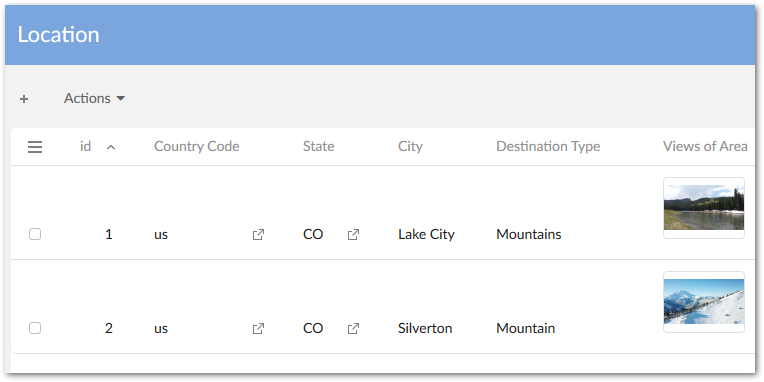
An asset thumbnail can now be displayed in EBX® tables. See Enabling thumbnail display and upload in the tabular view for more information. The following image shows an example of this feature:
API updates
The API now includes the following; please refer to the Java API documentation for additional information and samples:
-
The API now permits assets managed by third-party tools to be linked to data model fields.
-
A custom filter can now be implemented that determines the assets displayed when users enter the Editor.
-
Sample code has been added to demonstrate implementing cloud storage for assets.
-
The Digital Asset
UIBeanhas been replaced byCustomWidget.
Bug fixes
This release contains the following bug fixes:
Release Notes 1.6.0
Release Date: March 25, 2019
New features and updates
The following sections highlight the new features and updates for this release:
General updates
This release contains the following new features and updates:
-
The add-on now supports TIBCO EBX® restriction policy functionality for user permissions.
-
A programmatic filter can now be used to filter assets displayed in the editor.
-
The
baseURLparameter has been removed from theDigitalAsset.getURL()method. -
A public REST service has been provided to upload an asset.
-
Documented code samples have been updated.
-
Support has been added to take into account the new version of the TIBCO EBX™ Information Search Add-on (2.4.0).
Updates to the UI
-
The Manage digital assets UI has been updated.
-
The following updates were made to the Editor UI:
-
The UI is now responsive and automatically resizes based on the window or screen size.
-
Infinite scroll has been added to the Editor for assets and tags.
-
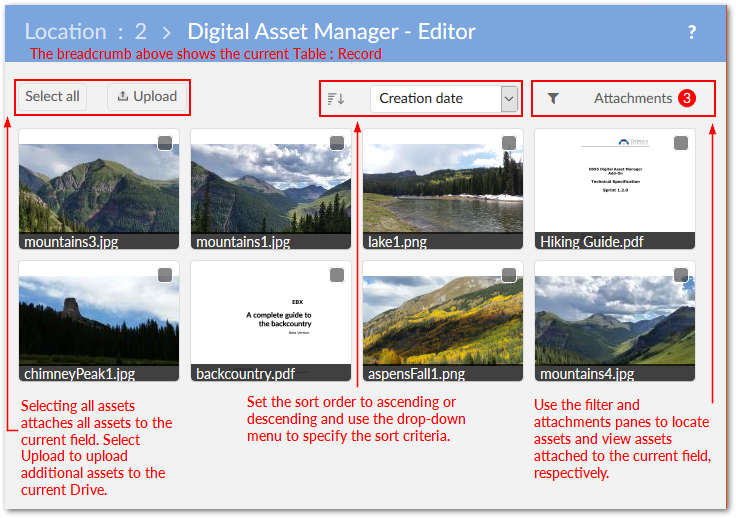
As highlighted in the image below, the UI layout has also been updated:
-
Bug fixes
This release contains the following bug fixes:
Release Notes 1.5.1
Release Date: December 14, 2018
Featured updates
The Creative Commons license has been moved from ECI to BAS.
Bug fixes
Release Notes 1.5.0
Release Date: October 26, 2018
New features and updates
This release contains the following new features and updates:
-
The new Change physical root path service allows you to update a Drive's storage location. Once updated all add-on related assets are migrated to the new location.
-
REST services for TIBCO EBX™ GO Add-on have been implemented.
-
Significant updates have been included to ensure compatibility with the EBX® 5.9.0 GA release.
Bug fixes
This release contains the following bug fixes:
Release Notes 1.4.3
Release Date: November 29, 2018
Featured updates
The Creative Commons license has been moved from ECI to BAS.
Bug fixes
Release Notes 1.4.2
Release Date: September 13, 2018
Featured updates
The Digital Asset Manager Add-on has undergone updates to ensure compatibility with the EBX® 5.8.1 fix M release.
Release Notes 1.4.1
Release Date: June 22, 2018
Bug fixes
Release Notes 1.4.0
Release Date: May 2, 2018
New features
The following sections describe new features for the GA 1.4.0 release:
Previewing assets
The add-on now includes the ability to preview additional types of assets. See Previewing assets for more detailed information. The newly supported types are:
-
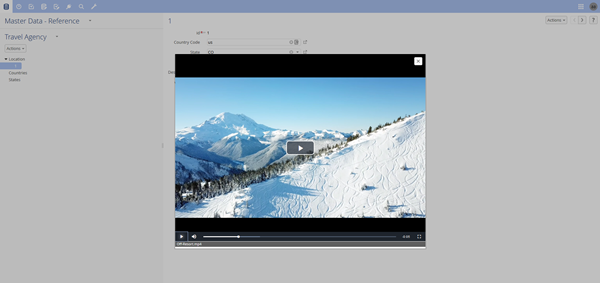
MP4 files: When previewing, the add-on automatically starts the video and enables basic playback control.
-
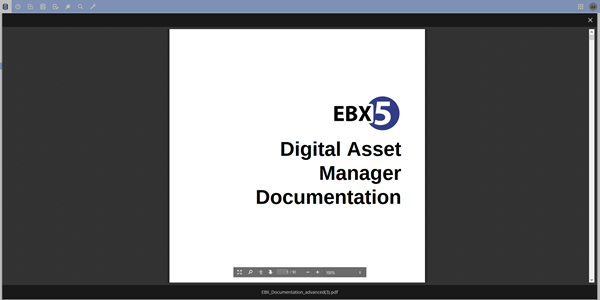
Document files: When previewing PDF, DOC, DOCX, PPT, or PPTX assets you can use standard document viewer features, such as zoom, navigation, and search.
Importing assets in bulk
Administrators now have the option to perform a bulk upload of assets by importing a ZIP file. After import, the Result page's Actions menu enables:
-
Download of a log file if the import failed.
-
Comparison of two or more imported assets.
-
Export of the report in CSV or XML format if the import was successful.
Record filtering
The add-on now provides the ability to filter the following types of records:
-
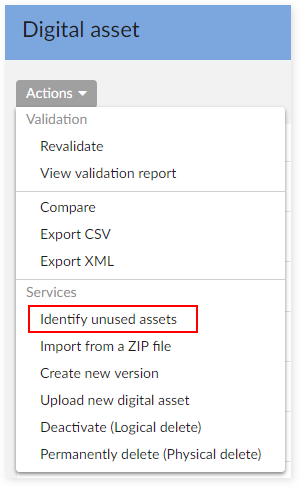
Asset records that are not attached to a field. The new Identify unused assets service locates and displays all assets not attached to a field. From this view you can compare assets and export reports in CSV and XML formats. For more information, see Finding and removing unused assets .
-
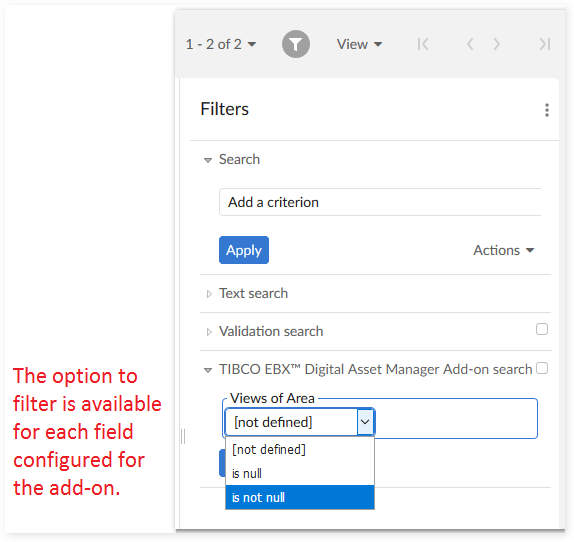
Table records with no attached assets. The EBX® filter now contains the Digital Asset Manager Add-on search filter. The filter can be used to show/hide records that have attached assets. For more information, see Configuring asset filters .
REST services
REST services are now available to:
-
Get all digital assets from a Drive.
-
Attach and detach assets from a field.See REST service operations (deprecated) for examples.
Known limitations
This release contains the following limitations:
-
A JavaScript error is raised in Internet Explorer when canceling an upload.
-
The progress bar does not work properly when importing from a ZIP file.
-
Document previews cannot display Vietnamese text.
-
The video seek bar does not work properly when a user previews MP4 files in Google Chrome.
Bug fixes
This release contains the following bug fixes:
Release Note 1.3.0
Release Date: December 15, 2017
Overview of features and enhancements
-
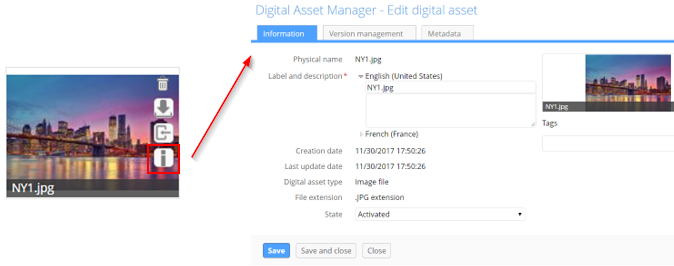
A new Information icon is available on asset thumbnails. Clicking this icon opens the Edit digital asset screen where you can view detailed information about the asset, its versions, and its metadata.
-
You now have the option of determining whether quick action icons always display on assets, or only when users mouse over the asset.
-
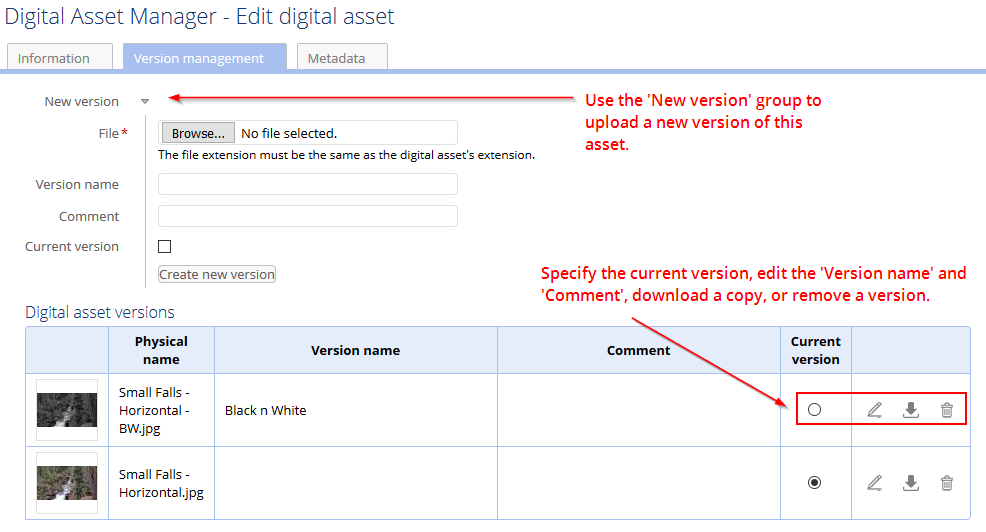
When viewing asset versions, you can now download individual versions for comparison.
-
New REST services are available that allow you to:
-
Retrieve an asset's URL.
-
Get all mediaType fields registered in Digital Asset Manager Add-on.
-
Get information about assets attached to a mediaType field.
-
Usability improvements
A large portion of the asset management process involves getting your assets into the manager. With this in mind, the latest version of the Digital Asset Manager Add-on provides the following usability improvements focused on helping you during the upload process (see Uploading and attaching assets for more information):
-
Instead of bringing in assets individually, you can now upload and attach more than one asset at a time.
-
A new quick-upload mode allows users to bypass pop-up dialogs and directly upload and attach assets. This mode integrates well with workflows.
-
In addition to browsing to select files, drag-n-drop functionality is now included in the upload screen.
-
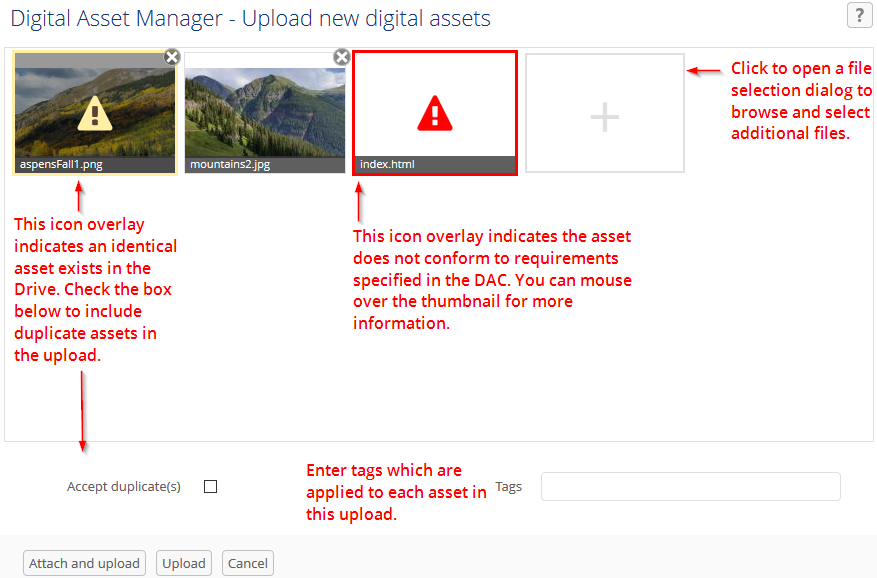
Duplicate asset management during upload has been improved. The upload screen now indicates which assets are duplicate and you can choose whether to keep, or remove these assets during upload.
-
When browsing for files to select during upload, the add-on applies a filter and only displays those extensions supported by the current D.A.C. configuration.The following image highlights some of the aforementioned features:
Bug fixes
Release Note 1.2.2
Release Date: November 7, 2017
New features
-
You can now download assets contained in read-only records.
-
It is now possible to upload a new asset version from the list view.
-
A new REST service is available to retrieve a digital asset's URL.
Release Note 1.2.1
Release Date: October 16, 2017
New features
-
Take into account the new version of TIBCO EBX™ Information Search Add-on (2.0.0).
Release Note 1.2.0
Release Date: September 6, 2017
New features
UI updates and improvements
-
The Editor layout has been improved.
-
Assets can be displayed in fields using a combination of settings that include using thumbnails, or icons and using a list, or tiled mosaic view.
-
Display of asset thumbnails has been improved and also retains an image's original aspect ratio.
Functionality improvements
-
User permissions have been expanded and can now be set at the Drive and D.A.C. levels.
-
In the Editor, assets can be selected to shown an expanded view. Several options for downloading, editing, and sharing are available from the expanded view.
-
Search, sort, and filter options available in the Editor have been updated.
-
An asset's label description, version name and comments, and tags can be modified during upload.
-
The following actions can be performed when mousing over an asset thumbnail: detach, download, or import of a new version.
-
Tag domains have been replaced with tag clouds. Tag clouds can be used to organize tags and display them in the Editor.
-
Duplicate assets can now be uploaded.
-
Uploaded assets are saved in sub-folders so that the limitations of certain file systems don't prevent the upload of additional assets.
Bug fixes
Release Note 1.1.1
Release Date: August 16, 2017
Bug fixes
Release Note 1.1.0
Release Date: April 18, 2017
New features
-
A new public API is available to create, update, and delete digital assets and versions. It also allows connection to additional types of drives.
Bug fixes
Warnings
-
Customers are strongly advised to upgrade to the latest version which patches the security issue.
Release Note 1.0.2 fix 001
Release Date: April 18, 2017
Bug fixes
Warnings
-
Customers are strongly advised to upgrade to the latest version which patches the security issue.
Release Note 1.0.3
Release Date: April 3, 2017
Bug fixes
Release Note 1.0.2
Release Date: January 23, 2017
New features
-
When specifying a Drive's storage location using the 'Physical root path' property it is now possible to use a relative path.
Bug fixes
Release Note 1.0.1
Release Date: October 28, 2016
New features
-
Images that use the CMYK color space can be managed with the Digital Asset Manager Add-on.
Release Note 1.0.0
Release Date: October 12, 2016
New features
-
A 'Media-type' field can be added to a data model to enable digital asset management.
-
Assets can be uploaded using the add-on's services supplied at the administrative, dataset and field levels.
-
An editor is available that allows you to perform the following actions on digital assets: upload, select, deselect, search, filter, edit, preview, download, share, deactivate and delete.
-
Several custom services are available that allow you to perform asset management-specific actions in. The services are covered in more detail in the main documentation.
-
It is possible to create a backup of, and restore the Digital Asset Manager Add-on's configuration settings and assets.