
All release notes
Related information
Version 1.8.29
New features
This release contains the following new features and updates:
-
The
Servletversion was updated to 3.1. -
Digital asset delivery via the API now uses a secured REST endpoint:
/asset-content/provider. This replaces the legacy servlet-based pattern (e.g./ebx-addon-dama/AssetProvider). Unauthenticated asset links distributed in the past no longer work. Update any existing integrations that use the legacy servlet URLs to use the new REST endpoint.
Changes in Functionality
This release contains no changes in functionality.
Changes to third-party libraries
The Spring Web MVC framework was updated to version 5.3.39.
The Apache Commons Lang library was updated to 3.18.0
The Apache Commons FileUpload library was updated to version 1.6.0
The Apache Commons IO library was updated to version 2.20.0.
The Google Gson library was updated to version 2.13.2.
Closed Issues
Known Issues
This release contains the following known issues:
-
DOCX files do not display correctly in previews.
-
Searching for assets in the media-type field using quick search is not supported. However, when previewing some file types, such as PDFs, you can search for text within the file.
-
When updating asset information in a child dataset, the parent dataset automatically updates also.
-
The Deactivated state is available for users without sufficient rights to deactivate an asset.
-
User can import a new version in 'Version management' tab from 'Information' button when 'Import new version' service is disabled.
-
A user can import a new version of an asset without sufficient permissions.
-
Confirm message is displayed after clicking on 'Download' button on the child dataset.
-
The configuration is not updated for the supported file extensions after users access the Digital Asset Manager widget.
-
The progress bar does not work properly when importing from a ZIP file.
-
When running on Linux, the font used in DOCX, PPT, and PPTS files must be installed previous to uploading these assets. Otherwise, Vietnamese text does not display correctly in asset previews.
-
Vietnamese text does not display correctly when viewing previews of DOC assets.
-
PDF previews might not display correctly when using Internet Explorer.
-
When accessing assets in an external Drive, error messages may display when selecting all assets. This can be the result of access limitations put in place by the third-party tool.
-
Thumbnails of some uploaded SVG files do not display correctly.
Version 1.8.28
New features
This release includes the new
ebx.addon.dama.convert.officeFiles.to.pdf property. By default, this property is set to true and it determines whether assets that are Microsoft Office files get automatically converted to PDFs on start up. See Disabling automatic asset to PDF conversion for more information.
Changes in Functionality
This release contains no changes in functionality.
Changes to third-party libraries
The following third-party libraries were updated:
-
The Apache Commons Compress library was updated to version 1.26.0.
-
The Apache Commons IO library was updated to version 2.12.0.
Closed Issues
Known Issues
This release contains the following known issues:
-
DOCX files do not display correctly in previews.
-
Searching for assets in the media-type field using quick search is not supported. However, when previewing some file types, such as PDFs, you can search for text within the file.
-
When updating asset information in a child dataset, the parent dataset automatically updates also.
-
The Deactivated state is available for users without sufficient rights to deactivate an asset.
-
User can import a new version in 'Version management' tab from 'Information' button when 'Import new version' service is disabled.
-
A user can import a new version of an asset without sufficient permissions.
-
Confirm message is displayed after clicking on 'Download' button on the child dataset.
-
The configuration is not updated for the supported file extensions after users access the Digital Asset Manager widget.
-
The progress bar does not work properly when importing from a ZIP file.
-
When running on Linux, the font used in DOCX, PPT, and PPTS files must be installed previous to uploading these assets. Otherwise, Vietnamese text does not display correctly in asset previews.
-
Vietnamese text does not display correctly when viewing previews of DOC assets.
-
PDF previews might not display correctly when using Internet Explorer.
-
When accessing assets in an external Drive, error messages may display when selecting all assets. This can be the result of access limitations put in place by the third-party tool.
-
Thumbnails of some uploaded SVG files do not display correctly.
Version 1.8.27
New features
This release contains no new features.
Changes in Functionality
The REST requests to attach and detach assets from records were updated to use Content-type: multipart/form-data.
Changes to third-party libraries
The FasterXML jackson-databind library was updated to version 2.16.0.
Closed Issues
This release contains the following closed issues:
-
Tomcat Errors occur when uploading and previewing DOCX files.
Known Issues
This release contains the following known issues:
-
DOCX files do not display correctly in previews.
-
Searching for assets in the media-type field using quick search is not supported. However, when previewing some file types, such as PDFs, you can search for text within the file.
-
When updating asset information in a child dataset, the parent dataset automatically updates also.
-
The Deactivated state is available for users without sufficient rights to deactivate an asset.
-
User can import a new version in 'Version management' tab from 'Information' button when 'Import new version' service is disabled.
-
A user can import a new version of an asset without sufficient permissions.
-
Confirm message is displayed after clicking on 'Download' button on the child dataset.
-
The configuration is not updated for the supported file extensions after users access the Digital Asset Manager widget.
-
The progress bar does not work properly when importing from a ZIP file.
-
When running on Linux, the font used in DOCX, PPT, and PPTS files must be installed previous to uploading these assets. Otherwise, Vietnamese text does not display correctly in asset previews.
-
Vietnamese text does not display correctly when viewing previews of DOC assets.
-
PDF previews might not display correctly when using Internet Explorer.
-
When accessing assets in an external Drive, error messages may display when selecting all assets. This can be the result of access limitations put in place by the third-party tool.
-
Thumbnails of some uploaded SVG files do not display correctly.
Version 1.8.26
New features
This release contains no new features.
Changes in Functionality
This release contains no changes in functionality.
Changes to third-party libraries
The following third-party libraries were updated:
-
The FasterXML jackson-databind library was updated to version 2.15.2.
-
The Batik All library was updated to version 1.17.
Closed Issues
Known Issues
This release contains the following known issues:
-
DOCX files do not display correctly in previews.
-
Searching for assets in the media-type field using quick search is not supported. However, when previewing some file types, such as PDFs, you can search for text within the file.
-
When updating asset information in a child dataset, the parent dataset automatically updates also.
-
The Deactivated state is available for users without sufficient rights to deactivate an asset.
-
User can import a new version in 'Version management' tab from 'Information' button when 'Import new version' service is disabled.
-
A user can import a new version of an asset without sufficient permissions.
-
Confirm message is displayed after clicking on 'Download' button on the child dataset.
-
The configuration is not updated for the supported file extensions after users access the Digital Asset Manager widget.
-
The progress bar does not work properly when importing from a ZIP file.
-
When running on Linux, the font used in DOCX, PPT, and PPTS files must be installed previous to uploading these assets. Otherwise, Vietnamese text does not display correctly in asset previews.
-
Vietnamese text does not display correctly when viewing previews of DOC assets.
-
PDF previews might not display correctly when using Internet Explorer.
-
When accessing assets in an external Drive, error messages may display when selecting all assets. This can be the result of access limitations put in place by the third-party tool.
-
Thumbnails of some uploaded SVG files do not display correctly.
Version 1.8.25
Released: July 2023
New features
This release contains no new features.
Changes in Functionality
This release contains no changes in functionality.
Changes to third-party libraries
The following third-party libraries were updated:
-
The jQuery library was updated to version 3.6.4.
-
The Spring framework was updated to version 5.2.24.
Closed Issues
Known Issues
This release contains the following known issues:
-
DOCX files do not display correctly in previews.
-
Searching for assets in the media-type field using quick search is not supported. However, when previewing some file types, such as PDFs, you can search for text within the file.
-
When updating asset information in a child dataset, the parent dataset automatically updates also.
-
The Deactivated state is available for users without sufficient rights to deactivate an asset.
-
User can import a new version in 'Version management' tab from 'Information' button when 'Import new version' service is disabled.
-
A user can import a new version of an asset without sufficient permissions.
-
Confirm message is displayed after clicking on 'Download' button on the child dataset.
-
The configuration is not updated for the supported file extensions after users access the Digital Asset Manager widget.
-
The progress bar does not work properly when importing from a ZIP file.
-
When running on Linux, the font used in DOCX, PPT, and PPTS files must be installed previous to uploading these assets. Otherwise, Vietnamese text does not display correctly in asset previews.
-
Vietnamese text does not display correctly when viewing previews of DOC assets.
-
PDF previews might not display correctly when using Internet Explorer.
-
When accessing assets in an external Drive, error messages may display when selecting all assets. This can be the result of access limitations put in place by the third-party tool.
-
Thumbnails of some uploaded SVG files do not display correctly.
Version 1.8.24
Released: April 2023
New features
This release contains no new features.
Changes in Functionality
This release contains no changes in functionality.
Changes to third-party libraries
The following third-party libraries were updated:
-
The Zip4j library was updated to version 2.11.3.
-
The Apache Commons FileUpload library was updated to version 1.5.
Closed Issues
Known Issues
This release contains the following known issues:
-
DOCX files do not display correctly in previews.
-
Searching for assets in the media-type field using quick search is not supported. However, when previewing some file types, such as PDFs, you can search for text within the file.
-
When updating asset information in a child dataset, the parent dataset automatically updates also.
-
The Deactivated state is available for users without sufficient rights to deactivate an asset.
-
User can import a new version in 'Version management' tab from 'Information' button when 'Import new version' service is disabled.
-
A user can import a new version of an asset without sufficient permissions.
-
Confirm message is displayed after clicking on 'Download' button on the child dataset.
-
The configuration is not updated for the supported file extensions after users access the Digital Asset Manager widget.
-
The progress bar does not work properly when importing from a ZIP file.
-
When running on Linux, the font used in DOCX, PPT, and PPTS files must be installed previous to uploading these assets. Otherwise, Vietnamese text does not display correctly in asset previews.
-
Vietnamese text does not display correctly when viewing previews of DOC assets.
-
PDF previews might not display correctly when using Internet Explorer.
-
When accessing assets in an external Drive, error messages may display when selecting all assets. This can be the result of access limitations put in place by the third-party tool.
-
Thumbnails of some uploaded SVG files do not display correctly.
Version 1.8.23
Released: January 2023
New features
Instructions were added to the documentation that describe how to prevent library conflicts when deploying on WebLogic. See the Preventing library conflicts on WebLogic heading in the
index.html file that is located in the following folder in the 4.5.16 Add-on Bundle: documentation > dama\_<xxx>.
Changes in Functionality
This release contains no changes in functionality.
Changes to third-party libraries
This release contains no changes to third-party libraries.
Closed Issues
This release contains no closed issues.
Known Issues
This release contains the following known issues:
-
DOCX files do not display correctly in previews.
-
Searching for assets in the media-type field using quick search is not supported. However, when previewing some file types, such as PDFs, you can search for text within the file.
-
When updating asset information in a child dataset, the parent dataset automatically updates also.
-
The Deactivated state is available for users without sufficient rights to deactivate an asset.
-
User can import a new version in 'Version management' tab from 'Information' button when 'Import new version' service is disabled.
-
A user can import a new version of an asset without sufficient permissions.
-
Confirm message is displayed after clicking on 'Download' button on the child dataset.
-
The configuration is not updated for the supported file extensions after users access the Digital Asset Manager widget.
-
The progress bar does not work properly when importing from a ZIP file.
-
When running on Linux, the font used in DOCX, PPT, and PPTS files must be installed previous to uploading these assets. Otherwise, Vietnamese text does not display correctly in asset previews.
-
Vietnamese text does not display correctly when viewing previews of DOC assets.
-
PDF previews might not display correctly when using Internet Explorer.
-
When accessing assets in an external Drive, error messages may display when selecting all assets. This can be the result of access limitations put in place by the third-party tool.
-
Thumbnails of some uploaded SVG files do not display correctly.
Version 1.8.22
Released: December 2022
New features
This release contains no new features.
Changes in Functionality
This release contains no changes in functionality.
Changes to third-party libraries
The following third-party libraries were updated:
-
The Apache Batik library was updated to version 1.16.
-
The Apache FOP All In One library was updated to version 2.8.
Closed Issues
Known Issues
This release contains the following known issues:
-
DOCX files do not display correctly in previews.
-
Searching for assets in the media-type field using quick search is not supported. However, when previewing some file types, such as PDFs, you can search for text within the file.
-
When updating asset information in a child dataset, the parent dataset automatically updates also.
-
The Deactivated state is available for users without sufficient rights to deactivate an asset.
-
User can import a new version in 'Version management' tab from 'Information' button when 'Import new version' service is disabled.
-
A user can import a new version of an asset without sufficient permissions.
-
Confirm message is displayed after clicking on 'Download' button on the child dataset.
-
The configuration is not updated for the supported file extensions after users access the Digital Asset Manager widget.
-
The progress bar does not work properly when importing from a ZIP file.
-
When running on Linux, the font used in DOCX, PPT, and PPTS files must be installed previous to uploading these assets. Otherwise, Vietnamese text does not display correctly in asset previews.
-
Vietnamese text does not display correctly when viewing previews of DOC assets.
-
PDF previews might not display correctly when using Internet Explorer.
-
When accessing assets in an external Drive, error messages may display when selecting all assets. This can be the result of access limitations put in place by the third-party tool.
-
Thumbnails of some uploaded SVG files do not display correctly.
Version 1.8.21
Released: October 2022
New features
This release contains no new features.
Changes in Functionality
This release contains no changes in functionality.
Changes to third-party libraries
The following third-party libraries were updated:
-
The Apache Taglibs library was removed.
-
The Apache Xalan library was removed.
-
The Apache Batik library was updated to version 1.15.
-
The FasterXML jackson-databind library was updated 2.14.0-rc2.
Closed Issues
Known Issues
This release contains the following known issues:
-
DOCX files do not display correctly in previews.
-
Searching for assets in the media-type field using quick search is not supported. However, when previewing some file types, such as PDFs, you can search for text within the file.
-
When updating asset information in a child dataset, the parent dataset automatically updates also.
-
The Deactivated state is available for users without sufficient rights to deactivate an asset.
-
User can import a new version in 'Version management' tab from 'Information' button when 'Import new version' service is disabled.
-
A user can import a new version of an asset without sufficient permissions.
-
Confirm message is displayed after clicking on 'Download' button on the child dataset.
-
The configuration is not updated for the supported file extensions after users access the Digital Asset Manager widget.
-
The progress bar does not work properly when importing from a ZIP file.
-
When running on Linux, the font used in DOCX, PPT, and PPTS files must be installed previous to uploading these assets. Otherwise, Vietnamese text does not display correctly in asset previews.
-
Vietnamese text does not display correctly when viewing previews of DOC assets.
-
PDF previews might not display correctly when using Internet Explorer.
-
When accessing assets in an external Drive, error messages may display when selecting all assets. This can be the result of access limitations put in place by the third-party tool.
-
Thumbnails of some uploaded SVG files do not display correctly.
Version 1.8.20
Released: August 2022
New features
This release contains no new features.
Changes in Functionality
This release contains no changes in functionality.
Changes to third-party libraries
The following third-party libraries were updated:
-
The Apache PDFBox libraries were updated to version 2.0.26.
-
The jQuery UI library was updated to version 1.13.2.
Closed Issues
This release contains no closed issues.
Known Issues
This release contains the following known issues:
-
Searching for assets in the media-type field using quick search is not supported. However, when previewing some file types, such as PDFs, you can search for text within the file.
-
When updating asset information in a child dataset, the parent dataset automatically updates also.
-
The Deactivated state is available for users without sufficient rights to deactivate an asset.
-
User can import a new version in 'Version management' tab from 'Information' button when 'Import new version' service is disabled.
-
A user can import a new version of an asset without sufficient permissions.
-
Confirm message is displayed after clicking on 'Download' button on the child dataset.
-
The configuration is not updated for the supported file extensions after users access the Digital Asset Manager widget.
-
The progress bar does not work properly when importing from a ZIP file.
-
When running on Linux, the font used in DOCX, PPT, and PPTS files must be installed previous to uploading these assets. Otherwise, Vietnamese text does not display correctly in asset previews.
-
Vietnamese text does not display correctly when viewing previews of DOC assets.
-
PDF previews might not display correctly when using Internet Explorer.
-
When accessing assets in an external Drive, error messages may display when selecting all assets. This can be the result of access limitations put in place by the third-party tool.
-
Thumbnails of some uploaded SVG files do not display correctly.
Version 1.8.19
Released: August 2022
New features
This release contains no new features.
Changes in Functionality
This release contains no changes in functionality.
Changes to third-party libraries
The Apache POI library was updated to version 5.2.2.
Closed Issues
Known Issues
This release contains the following known issues:
-
Searching for assets in the media-type field using quick search is not supported. However, when previewing some file types, such as PDFs, you can search for text within the file.
-
When updating asset information in a child dataset, the parent dataset automatically updates also.
-
The Deactivated state is available for users without sufficient rights to deactivate an asset.
-
User can import a new version in 'Version management' tab from 'Information' button when 'Import new version' service is disabled.
-
A user can import a new version of an asset without sufficient permissions.
-
Confirm message is displayed after clicking on 'Download' button on the child dataset.
-
The configuration is not updated for the supported file extensions after users access the Digital Asset Manager widget.
-
The progress bar does not work properly when importing from a ZIP file.
-
When running on Linux, the font used in DOCX, PPT, and PPTS files must be installed previous to uploading these assets. Otherwise, Vietnamese text does not display correctly in asset previews.
-
Vietnamese text does not display correctly when viewing previews of DOC assets.
-
PDF previews might not display correctly when using Internet Explorer.
-
When accessing assets in an external Drive, error messages may display when selecting all assets. This can be the result of access limitations put in place by the third-party tool.
-
Thumbnails of some uploaded SVG files do not display correctly.
Version 1.8.18
Released: May 2022
New features
This release contains no new features.
Changes in Functionality
This release contains no changes in functionality.
Changes to third-party libraries
This release contains the following updates to third-party libraries:
-
The zip4j library was updated to version 2.10.0.
-
The Spring framework was updated to version 5.2.22.
Closed Issues
Known Issues
This release contains the following known issues:
-
Searching for assets in the media-type field using quick search is not supported. However, when previewing some file types, such as PDFs, you can search for text within the file.
-
When updating asset information in a child dataset, the parent dataset automatically updates also.
-
The Deactivated state is available for users without sufficient rights to deactivate an asset.
-
User can import a new version in 'Version management' tab from 'Information' button when 'Import new version' service is disabled.
-
A user can import a new version of an asset without sufficient permissions.
-
Confirm message is displayed after clicking on 'Download' button on the child dataset.
-
The configuration is not updated for the supported file extensions after users access the Digital Asset Manager widget.
-
The progress bar does not work properly when importing from a ZIP file.
-
When running on Linux, the font used in DOCX, PPT, and PPTS files must be installed previous to uploading these assets. Otherwise, Vietnamese text does not display correctly in asset previews.
-
Vietnamese text does not display correctly when viewing previews of DOC assets.
-
PDF previews might not display correctly when using Internet Explorer.
-
When accessing assets in an external Drive, error messages may display when selecting all assets. This can be the result of access limitations put in place by the third-party tool.
-
Thumbnails of some uploaded SVG files do not display correctly.
Version 1.8.17
Released: April 2022
New features
This release contains no new features.
Changes in Functionality
This release contains no functionality changes.
Changes to third-party libraries
This release contains the following updates to third-party libraries:
-
The FasterXML/jackson-databind library was updated to version 2.13.2.1.
-
The Spring framework was updated to version 5.2.20.
Closed Issues
This release contains no closed issue.
Known Issues
This release contains the following known issues:
-
Searching for assets in the media-type field using quick search is not supported. However, when previewing some file types, such as PDFs, you can search for text within the file.
-
When updating asset information in a child dataset, the parent dataset automatically updates also.
-
The Deactivated state is available for users without sufficient rights to deactivate an asset.
-
User can import a new version in 'Version management' tab from 'Information' button when 'Import new version' service is disabled.
-
A user can import a new version of an asset without sufficient permissions.
-
Confirm message is displayed after clicking on 'Download' button on the child dataset.
-
The configuration is not updated for the supported file extensions after users access the Digital Asset Manager widget.
-
The progress bar does not work properly when importing from a ZIP file.
-
When running on Linux, the font used in DOCX, PPT, and PPTS files must be installed previous to uploading these assets. Otherwise, Vietnamese text does not display correctly in asset previews.
-
Vietnamese text does not display correctly when viewing previews of DOC assets.
-
PDF previews might not display correctly when using Internet Explorer.
-
When accessing assets in an external Drive, error messages may display when selecting all assets. This can be the result of access limitations put in place by the third-party tool.
-
Thumbnails of some uploaded SVG files do not display correctly.
Version 1.8.16
Released: March 2022
New features
This release contains no new features.
Changes in Functionality
This release contains no functionality changes.
Changes to third-party libraries
This release contains the following updates to third-party libraries:
-
The Apache PDFBox and Apache FontBox were updated to version 2.0.25.
-
The Spring framework was updated to version 5.2.19.
-
The jQuery UI and UI widget libraries were updated to version 1.13.1.
-
The jQuery library was updated to version 3.6.0.
-
The Apache XML Graphics Commons library was updated to version 2.7.
-
The Zip4j library was updated to version 2.9.1.
Closed Issues
This release contains the following closed issues:
Known Issues
This release contains the following known issues:
-
Searching for assets in the media-type field using quick search is not supported. However, when previewing some file types, such as PDFs, you can search for text within the file.
-
When updating asset information in a child dataset, the parent dataset automatically updates also.
-
The Deactivated state is available for users without sufficient rights to deactivate an asset.
-
User can import a new version in 'Version management' tab from 'Information' button when 'Import new version' service is disabled.
-
A user can import a new version of an asset without sufficient permissions.
-
Confirm message is displayed after clicking on 'Download' button on the child dataset.
-
The configuration is not updated for the supported file extensions after users access the Digital Asset Manager widget.
-
The progress bar does not work properly when importing from a ZIP file.
-
When running on Linux, the font used in DOCX, PPT, and PPTS files must be installed previous to uploading these assets. Otherwise, Vietnamese text does not display correctly in asset previews.
-
Vietnamese text does not display correctly when viewing previews of DOC assets.
-
PDF previews might not display correctly when using Internet Explorer.
-
When accessing assets in an external Drive, error messages may display when selecting all assets. This can be the result of access limitations put in place by the third-party tool.
-
Thumbnails of some uploaded SVG files do not display correctly.
Version 1.8.15
Released: January 2022
New features
This release contains no new features.
Changes in Functionality
This release contains no functionality changes.
Changes to third-party libraries
This release contains no updates to third-party libraries.
Closed Issues
This release contains the following closed issues:
Known Issues
This release contains the following known issues:
-
Searching for assets in the media-type field using quick search is not supported. However, when previewing some file types, such as PDFs, you can search for text within the file.
-
When updating asset information in a child dataset, the parent dataset automatically updates also.
-
The Deactivated state is available for users without sufficient rights to deactivate an asset.
-
User can import a new version in 'Version management' tab from 'Information' button when 'Import new version' service is disabled.
-
A user can import a new version of an asset without sufficient permissions.
-
Confirm message is displayed after clicking on 'Download' button on the child dataset.
-
The configuration is not updated for the supported file extensions after users access the Digital Asset Manager widget.
-
The progress bar does not work properly when importing from a ZIP file.
-
When running on Linux, the font used in DOCX, PPT, and PPTS files must be installed previous to uploading these assets. Otherwise, Vietnamese text does not display correctly in asset previews.
-
Vietnamese text does not display correctly when viewing previews of DOC assets.
-
PDF previews might not display correctly when using Internet Explorer.
-
When accessing assets in an external Drive, error messages may display when selecting all assets. This can be the result of access limitations put in place by the third-party tool.
-
Thumbnails of some uploaded SVG files do not display correctly.
Version 1.8.14
Released: December 2021
New features
This release contains no new features.
Changes in Functionality
This release contains no functionality changes.
Changes to third-party libraries
The following changes were made to third-party libraries:
-
The Spring Framework was updated to version 5.2.15.
-
The jQuery UI library was updated to version 1.13.0.
Closed Issues
Known Issues
This release contains the following known issues:
-
Searching for assets in the media-type field using quick search is not supported. However, when previewing some file types, such as PDFs, you can search for text within the file.
-
When updating asset information in a child dataset, the parent dataset automatically updates also.
-
The Deactivated state is available for users without sufficient rights to deactivate an asset.
-
User can import a new version in 'Version management' tab from 'Information' button when 'Import new version' service is disabled.
-
A user can import a new version of an asset without sufficient permissions.
-
Confirm message is displayed after clicking on 'Download' button on the child dataset.
-
The configuration is not updated for the supported file extensions after users access the Digital Asset Manager widget.
-
The progress bar does not work properly when importing from a ZIP file.
-
When running on Linux, the font used in DOCX, PPT, and PPTS files must be installed previous to uploading these assets. Otherwise, Vietnamese text does not display correctly in asset previews.
-
Vietnamese text does not display correctly when viewing previews of DOC assets.
-
PDF previews might not display correctly when using Internet Explorer.
-
When accessing assets in an external Drive, error messages may display when selecting all assets. This can be the result of access limitations put in place by the third-party tool.
-
Thumbnails of some uploaded SVG files do not display correctly.
Version 1.8.13
Released: October 2021
New features
This release contains no new features.
Changes in Functionality
This release contains no functionality changes.
Changes to third-party libraries
This release contains no updates to third-party libraries.
Closed Issues
Known Issues
This release contains the following known issues:
-
Searching for assets in the media-type field using quick search is not supported. However, when previewing some file types, such as PDFs, you can search for text within the file.
-
When updating asset information in a child dataset, the parent dataset automatically updates also.
-
The Deactivated state is available for users without sufficient rights to deactivate an asset.
-
User can import a new version in 'Version management' tab from 'Information' button when 'Import new version' service is disabled.
-
A user can import a new version of an asset without sufficient permissions.
-
Confirm message is displayed after clicking on 'Download' button on the child dataset.
-
The configuration is not updated for the supported file extensions after users access the Digital Asset Manager widget.
-
The progress bar does not work properly when importing from a ZIP file.
-
When running on Linux, the font used in DOCX, PPT, and PPTS files must be installed previous to uploading these assets. Otherwise, Vietnamese text does not display correctly in asset previews.
-
Vietnamese text does not display correctly when viewing previews of DOC assets.
-
PDF previews might not display correctly when using Internet Explorer.
-
When accessing assets in an external Drive, error messages may display when selecting all assets. This can be the result of access limitations put in place by the third-party tool.
-
Thumbnails of some uploaded SVG files do not display correctly.
Version 1.8.12
Released: August 2021
New features
When using the filter's search feature in the Editor, the TIBCO EBX® Information Search Add-on must be activated and have a valid license. If this is not the case, an error message now displays to guide users.
Changes in Functionality
This release contains no functionality changes.
Changes to third-party libraries
This release contains the following third-party updates:
-
The Apache PDFBox, Preflight, pdfbox-tools, and XmpBox libraries were updated to version 2.0.24.
-
Apache Commons Compress to version 1.21.
Closed Issues
This release contains no closed issues.
Known Issues
This release contains the following known issues:
-
Searching for assets in the media-type field using quick search is not supported. However, when previewing some file types, such as PDFs, you can search for text within the file.
-
When updating asset information in a child dataset, the parent dataset automatically updates also.
-
The Deactivated state is available for users without sufficient rights to deactivate an asset.
-
User can import a new version in 'Version management' tab from 'Information' button when 'Import new version' service is disabled.
-
A user can import a new version of an asset without sufficient permissions.
-
Confirm message is displayed after clicking on 'Download' button on the child dataset.
-
The configuration is not updated for the supported file extensions after users access the Digital Asset Manager widget.
-
The progress bar does not work properly when importing from a ZIP file.
-
Document previews cannot display Vietnamese text.
-
When accessing assets in an external Drive, error messages may display when selecting all assets. This can be the result of access limitations put in place by the third-party tool.
-
Thumbnails of some uploaded SVG files do not display correctly.
Version 1.8.11
Released: June 2021
Library Updates
Spring Data was removed from
ui-framework-dependencies.jar.
Version 1.8.10
Released: May 2021
Updates
This release contains the following updates:
-
The Apache PDFBox, PDFBox-tools, FontBox, preflight and XmpBox libraries were updated to version 2.0.23.
-
The jai-imageio library was updated to version 1.4.0.
-
The Zip4j library was updated to version 1.3.3.
-
The Scripts.bundle.js library was removed.
-
The Apache Commons IO library was updated to version 2.8.0.
Bug fixes
This release contains the following bug fixes:
Version 1.8.9
Released: March 2021
Product updates
-
The
DriveManager.getDigitalAsset()API was deprecated and replaced withgetDigitalAssetOrNull(), which returns null if the requested asset does not exist. -
The Apache HttpClient library was upgraded to version 4.5.13 and Batik to version 1.14.
-
An update was applied to correct an issue with the Apache Standard Taglibs library.
Bug fixes
Version 1.8.8
Released: February 2021
Product updates
Google Guava was updated to version 30.1.
Bug fixes
Version 1.8.7
Released: January 2021
Product updates
This release contains the following library updates:
-
Apache Standard Taglibs to version 1.2.3.
-
Spring framework to version 5.2.9.
-
Jackson Databind to version 2.11.2.
-
Batik XML utility library to version 1.13.
-
Apache Common Codec to version 1.13.
Bug fixes
Release Notes 1.8.6
Release Date: October 20, 2020
Bug fixes
Release Notes 1.8.5
Release Date: September 18, 2020
Updated features
This release contains the following feature updates:
-
The following library updates were made: jQuery to v3.5.0, jQuery UI to v1.12.1, jQuery fileupload to v10.31, and Apache POI to v4.1.2. Additionally, DOCConverter, OfficeConverter, PPTConverter, and PPTXConverter were updated.
-
Support for the OpenJDK8 and Open JDK11 libraries has been included.
Bug fixes
Release Notes 1.8.4
Release Date: June 23, 2020
New features and updates
This release contains the following feature updates:
-
The add-on now provides administrators the option to activate assets when viewing them from the Digital asset screen. To perform this action, select the Activated option from the Actions drop-down menu.
-
In the Manage digital assets screen, the Drive drop-down list is now sorted alphabetically.
-
File formats listed in the Blacklisted extensions property cannot be attached from the Editor screen.
-
Behavior has been updated to improve consistency in the way error messages display.
-
When an administrator moves assets from an encrypted Drive to an unencrypted Drive, the add-on automatically decrypts assets. This functionality applies when moving assets in the opposite manner—decrypted to encrypted.
-
The error message shown when uses are not able to attach an asset has been updated.
-
Support for JDK8 and JDK11 has been updated. Additionally, the docx4j, pdfbox, and jQuery libraries have been updated.
Bug fixes
This release contains the following bug fixes:
Release Notes 1.8.3
Release Date: April 20, 2020
Updated features
When you use the REST API to retrieve an asset's URL, the returned JSON object includes the following new response parameters:
-
preview_url: The URL of the asset preview. -
defaulticon: The URL of the default file extension icon.
Bug fixes
This release contains the following bug fixes:
Release Notes 1.8.2
Release Date: February 20, 2020
New features and updates
This release contains the following feature updates:
-
Tooltips have been added for the Drive and Tags properties when uploading assets.
-
PDF files that are less than 5MB can now be previewed.
-
When using the API to get an asset's URL, the parameter in the returned JSON object now matches the protocol used in the request.
-
The Editor can now be used to edit assets when using a TIBCO EBX® Cloud Instance.
-
When viewing assets from a storage location managed outside of EBX®, PDF files can now be previewed in the Editor.
-
If using an externally managed Drive location, the State field is now hidden when viewing information about an asset.
-
The number of assets that can be included in a single upload has been increased to 300.
-
When there are multiple versions of an asset, the displayed file size now updates to the current version of the asset.
-
The thumbnail and preview display for SVG files has been updated. If the file includes animation, users can interact with it when previewing.
Bug fixes
This release contains the following bug fixes:
Release Notes 1.8.1
Release Date: December 10, 2019
Updated behavior
The add-on no longer refreshes data model schemas by retrieving a list of all registered models in the repository.
Release Notes 1.8.0
Release Date: November 8, 2019
New features and updates
The following sections highlight the new features and updates for this release:
Features and enhancements
-
You now have the option of enabling encryption upon Drive creation. This option encrypts all assets in a Drive so they can only be accessed by a user logged in to EBX®.
-
When uploading multiple files, asset thumbnails now display immediately after upload of that asset is complete.
-
A Drive can now be configured to access an externally managed storage location. For example, assets might be stored in the cloud on Google Drive or AWS. Alternatively, you might already use a third-party tool to manage digital assets but, you want to enable data model access to these assets. Note that API implementation is required for these types of use cases.
-
To improve user experience in certain deployment environments, Spring configuration has been moved from hybrid to pure Java.
-
It is no longer mandatory for Digital Asset Components to have associated tag clouds.
-
A result page now displays after running the Delete all assets in Drive service.
-
By default all file types are now supported and enabled for upload by the add-on. However, you can use two new properties Restrict file upload and Blacklisted extensions to whitelist and blacklist file extensions, respectively. See, Whitelisting and blacklisting file formats for more details.
-
SVG files are now supported.
API updates
Using the add-on's API you can now access externally managed storage locations. These locations can include assets managed by third-party tools. In addition to linking to and displaying these assets in EBX® data model fields, you can:
-
Search for and filter assets.
-
Enable upload and deletion of assets.
-
Attach and detach externally managed assets to EBX® data model fields.
-
Display externally managed tags.
Known limitations
This release contains the following limitations:
-
When accessing assets in an external Drive, error messages may display when selecting all assets. This can be the result of access limitations put in place by the third-party tool.
-
Without width and height measurements, the thumbnail and content of an SVG asset are not properly displayed.
Bug fixes
This release contains the following bug fixes:
Release Notes 1.7.0
Release Date: June 20, 2019
New features and updates
The following sections highlight the new features and updates for this release:
-
Features and enhancements
-
API updates
Features and enhancements
-
The Manage digital assets service can now be launched from EBX® perspectives. The service can allow users control over assets linked to one or more Drives.
-
When choosing a new asset as the current version, the new asset's file name can be automatically populated to the Editor using the new Update label option.
-
Add-on performance has been improved when a schema refresh is required.
-
The Jackson library has been upgraded due to a security issue.
-
The PhotoSwipe library has been removed from the add-on.
-
When playing asset videos from within the add-on, the video is now streamed instead of downloaded.
-
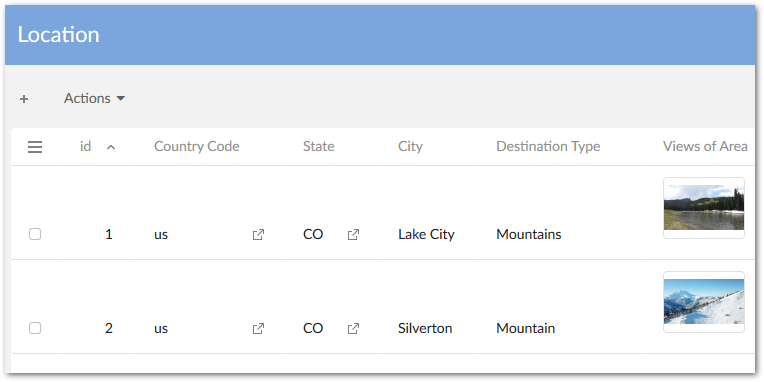
An asset thumbnail can now be displayed in EBX® tables. See Enabling thumbnail display in tables for more information. The following image shows an example of this feature:
API updates
The API now includes the following; please refer to the Java API documentation for additional information and samples:
-
The API now permits assets managed by third-party tools to be linked to data model fields.
-
A custom filter can now be implemented that determines the assets displayed when users enter the Editor.
-
Sample code has been added to demonstrate implementing cloud storage for assets.
-
The Digital Asset
UIBeanhas been replaced byCustomWidget.
Bug fixes
This release contains the following bug fixes:
Release Notes 1.6.0
Release Date: March 25, 2019
New features and updates
The following sections highlight the new features and updates for this release:
General updates
This release contains the following new features and updates:
-
The add-on now supports TIBCO EBX® restriction policy functionality for user permissions.
-
A programmatic filter can now be used to filter assets displayed in the editor.
-
The
baseURLparameter has been removed from theDigitalAsset.getURL()method. -
A public REST service has been provided to upload an asset.
-
Documented code samples have been updated.
-
Support has been added to take into account the new version of the TIBCO EBX™ Information Search Add-on (2.4.0).
Updates to the UI
-
The Manage digital assets UI has been updated.
-
The following updates were made to the Editor UI:
-
The UI is now responsive and automatically resizes based on the window or screen size.
-
Infinite scroll has been added to the Editor for assets and tags.
-
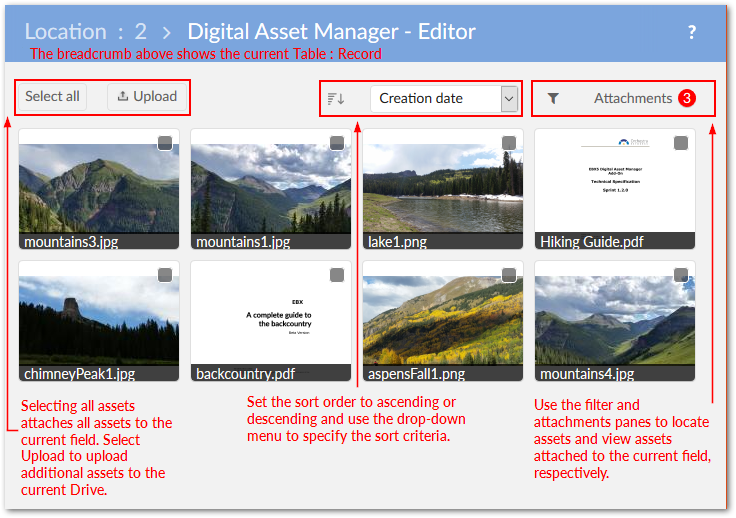
As highlighted in the image below, the UI layout has also been updated:
-
Bug fixes
This release contains the following bug fixes:
Release Notes 1.5.1
Release Date: December 14, 2018
Featured updates
The Creative Commons license has been moved from ECI to BAS.
Bug fixes
Release Notes 1.5.0
Release Date: October 26, 2018
New features and updates
This release contains the following new features and updates:
-
The new Change physical root path service allows you to update a Drive's storage location. Once updated all add-on related assets are migrated to the new location.
-
REST services for TIBCO EBX™ GO Add-on have been implemented.
-
Significant updates have been included to ensure compatibility with the EBX® 5.9.0 GA release.
Bug fixes
This release contains the following bug fixes:
Release Notes 1.4.3
Release Date: November 29, 2018
Featured updates
The Creative Commons license has been moved from ECI to BAS.
Bug fixes
Release Notes 1.4.2
Release Date: September 13, 2018
Featured updates
The Digital Asset Manager Add-on has undergone updates to ensure compatibility with the EBX® 5.8.1 fix M release.
Release Notes 1.4.1
Release Date: June 22, 2018
Bug fixes
Release Notes 1.4.0
Release Date: May 2, 2018
New features
The following sections describe new features for the GA 1.4.0 release:
Previewing assets
The add-on now includes the ability to preview additional types of assets. See Previewing assets for more detailed information. The newly supported types are:
-
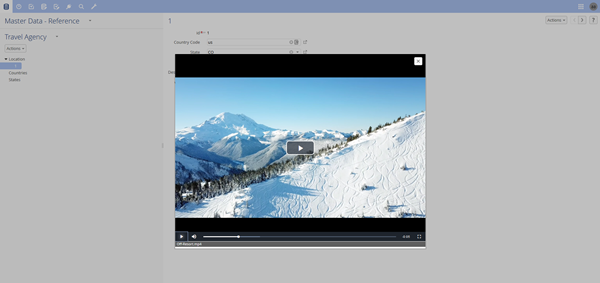
MP4 files: When previewing, the add-on automatically starts the video and enables basic playback control.
-
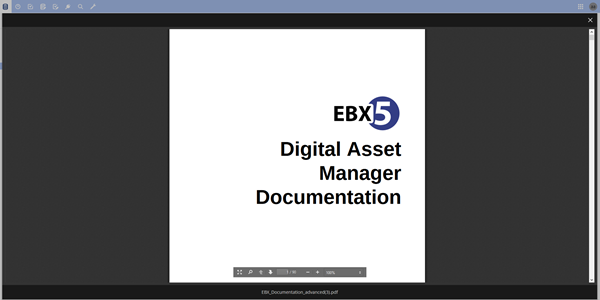
Document files: When previewing PDF, DOC, DOCX, PPT, or PPTX assets you can use standard document viewer features, such as zoom, navigation, and search.
Importing assets in bulk
Administrators now have the option to perform a bulk upload of assets by importing a ZIP file. After import, the Result page's Actions menu enables:
-
Download of a log file if the import failed.
-
Comparison of two or more imported assets.
-
Export of the report in CSV or XML format if the import was successful.See Performing a bulk upload for more information.
Record filtering
The add-on now provides the ability to filter the following types of records:
-
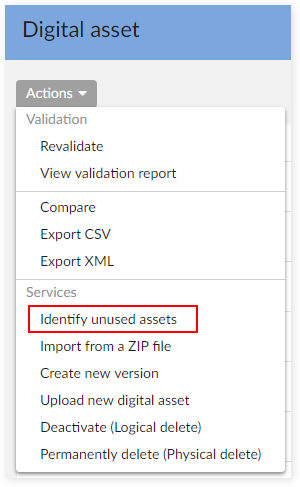
Asset records that are not attached to a field. The new Identify unused assets service locates and displays all assets not attached to a field. From this view you can compare assets and export reports in CSV and XML formats. For more information, see Finding and removing unused assets .
-
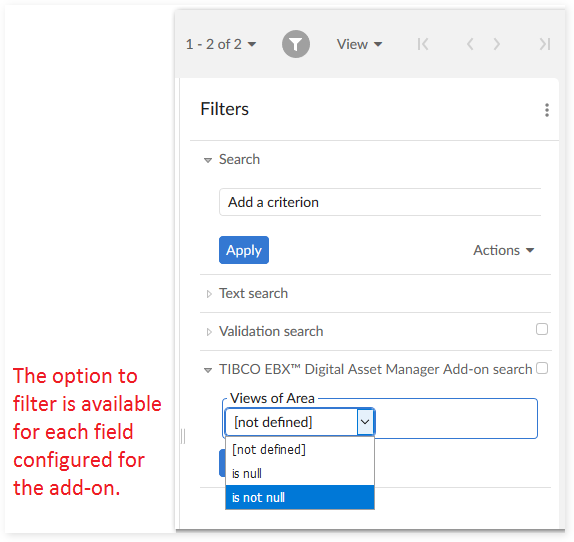
Table records with no attached assets. The EBX® filter now contains the Digital Asset Manager Add-on search filter. The filter can be used to show/hide records that have attached assets. For more information, see Configuring asset filters .
REST services
REST services are now available to:
-
Get all digital assets from a Drive.
-
Attach and detach assets from a field.See REST service operations for examples.
Known limitations
This release contains the following limitations:
-
A JavaScript error is raised in Internet Explorer when canceling an upload.
-
The progress bar does not work properly when importing from a ZIP file.
-
Document previews cannot display Vietnamese text.
-
The video seek bar does not work properly when a user previews MP4 files in Google Chrome.
Bug fixes
This release contains the following bug fixes:
Release Note 1.3.0
Release Date: December 15, 2017
Overview of features and enhancements
-
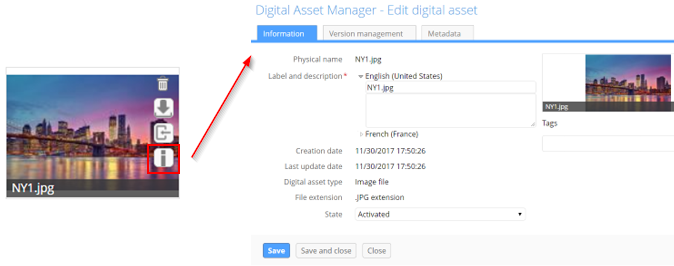
A new Information icon is available on asset thumbnails. Clicking this icon opens the Edit digital asset screen where you can view detailed information about the asset, its versions, and its metadata.
-
You now have the option of determining whether quick action icons always display on assets, or only when users mouse over the asset.
-
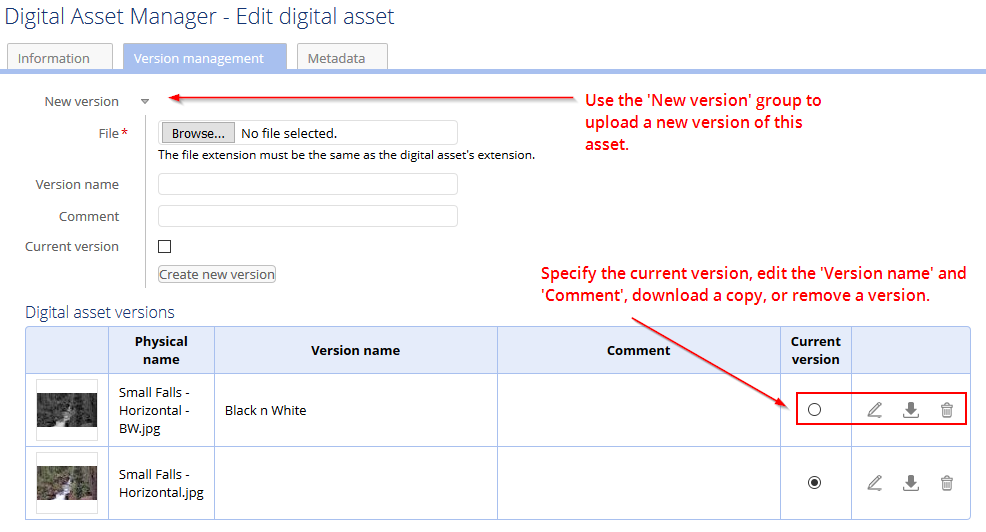
When viewing asset versions, you can now download individual versions for comparison.
-
New REST services are available that allow you to:
-
Retrieve an asset's URL.
-
Get all mediaType fields registered in Digital Asset Manager Add-on.
-
Get information about assets attached to a mediaType field.
-
Usability improvements
A large portion of the asset management process involves getting your assets into the manager. With this in mind, the latest version of the Digital Asset Manager Add-on provides the following usability improvements focused on helping you during the upload process (see Uploading and attaching assets for more information):
-
Instead of bringing in assets individually, you can now upload and attach more than one asset at a time.
-
A new quick-upload mode allows users to bypass pop-up dialogs and directly upload and attach assets. This mode integrates well with workflows.
-
In addition to browsing to select files, drag-n-drop functionality is now included in the upload screen.
-
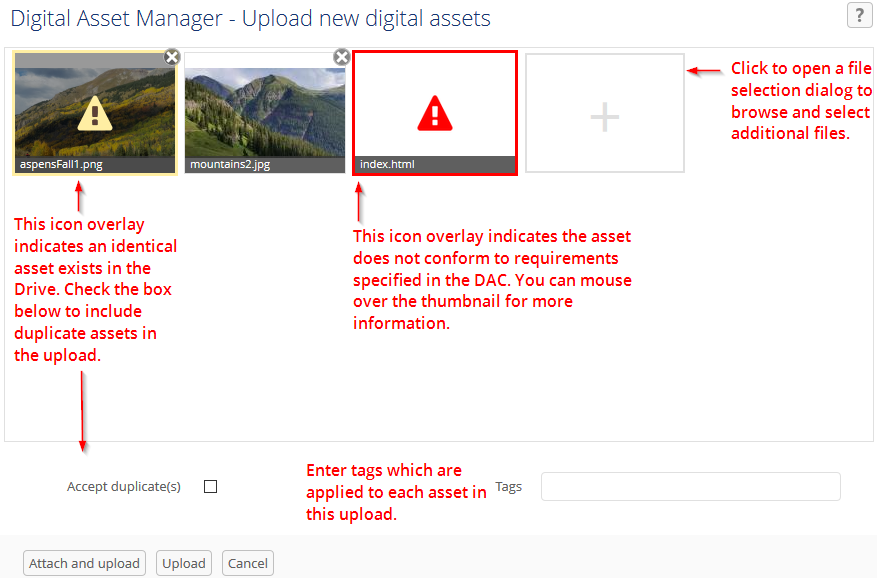
Duplicate asset management during upload has been improved. The upload screen now indicates which assets are duplicate and you can choose whether to keep, or remove these assets during upload.
-
When browsing for files to select during upload, the add-on applies a filter and only displays those extensions supported by the current D.A.C. configuration.The following image highlights some of the aforementioned features:
Bug fixes
Release Note 1.2.2
Release Date: November 7, 2017
New features
-
You can now download assets contained in read-only records.
-
It is now possible to upload a new asset version from the list view.
-
A new REST service is available to retrieve a digital asset's URL.
Release Note 1.2.1
Release Date: October 16, 2017
New features
-
Take into account the new version of TIBCO EBX™ Information Search Add-on (2.0.0).
Release Note 1.2.0
Release Date: September 6, 2017
New features
UI updates and improvements
-
The Editor layout has been improved.
-
Assets can be displayed in fields using a combination of settings that include using thumbnails, or icons and using a list, or tiled mosaic view.
-
Display of asset thumbnails has been improved and also retains an image's original aspect ratio.
Functionality improvements
-
User permissions have been expanded and can now be set at the Drive and D.A.C. levels.
-
In the Editor, assets can be selected to shown an expanded view. Several options for downloading, editing, and sharing are available from the expanded view.
-
Search, sort, and filter options available in the Editor have been updated.
-
An asset's label description, version name and comments, and tags can be modified during upload.
-
The following actions can be performed when mousing over an asset thumbnail: detach, download, or import of a new version.
-
Tag domains have been replaced with tag clouds. Tag clouds can be used to organize tags and display them in the Editor.
-
Duplicate assets can now be uploaded.
-
Uploaded assets are saved in sub-folders so that the limitations of certain file systems don't prevent the upload of additional assets.
Bug fixes
Release Note 1.1.1
Release Date: August 16, 2017
Bug fixes
Release Note 1.1.0
Release Date: April 18, 2017
New features
-
A new public API is available to create, update, and delete digital assets and versions. It also allows connection to additional types of drives.
Bug fixes
Warnings
-
Customers are strongly advised to upgrade to the latest version which patches the security issue.
Release Note 1.0.2 fix 001
Release Date: April 18, 2017
Bug fixes
Warnings
-
Customers are strongly advised to upgrade to the latest version which patches the security issue.
Release Note 1.0.3
Release Date: April 3, 2017
Bug fixes
Release Note 1.0.2
Release Date: January 23, 2017
New features
-
When specifying a Drive's storage location using the 'Physical root path' property it is now possible to use a relative path.
Bug fixes
Release Note 1.0.1
Release Date: October 28, 2016
New features
-
Images that use the CMYK color space can be managed with the Digital Asset Manager Add-on.
Release Note 1.0.0
Release Date: October 12, 2016
New features
-
A 'Media-type' field can be added to a data model to enable digital asset management.
-
Assets can be uploaded using the add-on's services supplied at the administrative, dataset and field levels.
-
An editor is available that allows you to perform the following actions on digital assets: upload, select, deselect, search, filter, edit, preview, download, share, deactivate and delete.
-
Several custom services are available that allow you to perform asset management-specific actions in. The services are covered in more detail in the main documentation.
-
It is possible to create a backup of, and restore the Digital Asset Manager Add-on's configuration settings and assets.