Appendix
Related information
Report data structures
Global view
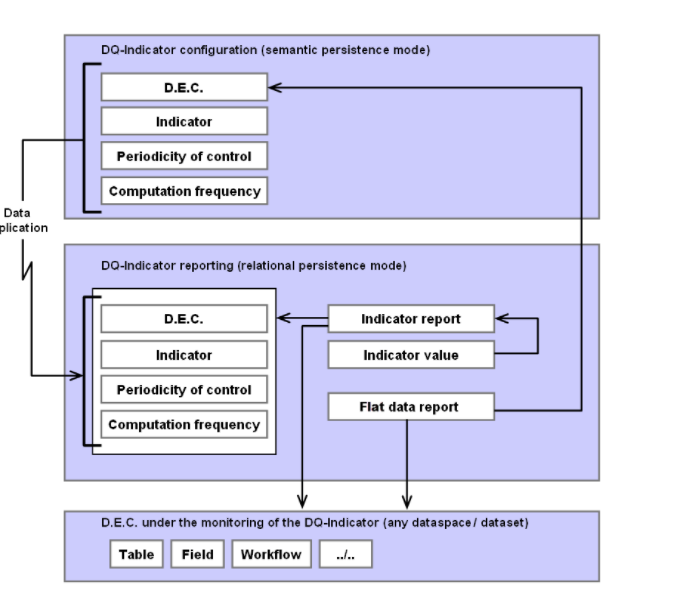
Two data structures are used to store indicator results. They are compliant with the relational persistent mode in EBX®:
-
Indicator report and Indicator value can store any type of indicator results. These tables can be used by any third party SQL tools to generate reports. The storage of a result is based on a neutral data type (string) with additional information that specifies the actual data type to allow an external data cast, if needed.
-
Flat data report (or Big data report in versions prior to v2.0.0) is a unique table that fully de-normalizes the storage of the indicator results in order to generate reports directly in EBX® without any use of external SQL third party tools. This de-normalization no longer requires the table to be extended whenever a new type of result is introduced. The same type of result can be shared by an infinite number of indicators. For instance, a date and time field can be used to store the date of a table modification, a field modification, a workflow modification, etc.
These two data structures share some reference data that is also compliant with the EBX® relational persistence mode. The reference data is synchronized from the semantic configuration data model in real-time as well as through a refresh service (see the Results storage section above in this user guide).
Reference data
D.E.C. table
| Property | Definition |
|---|---|
| D.E.C. code | Code of the Data Element Concept. |
| Last modification | Timestamp of the last modification of the record. |
| D.E.C. type | Value of the D.E.C. type. |
| Table code | Value of the business table code. |
| Table link | Link to the table in the dataspace and dataset configured at D.E.C. definition. |
| Group code | Value of the business group code. |
| Field code | Value of the business field code. |
| Field link | Link to the table in the dataspace and dataset configured at the time of the D.E.C. definition. |
| Language 1 | First EBX® locale. |
| Label 1 | Label in language 1. |
| Language 2 | Second EBX® locale. |
| Label 2 | Label in language 2 |
| Language 3 | Third EBX® locale. |
| Label 3 | Label in language 3. |
| Removed | Boolean If set to 'True': the D.E.C. has been deleted from the configuration. If set to 'False': the D.E.C. exists in the configuration. |
| Validity status | Value of the validity status. |
| Owner's email | List of emails configured at the administrator level and owner fields in the D.E.C. definition. |
Table 51: Reporting - D.E.C.
Indicator table
| Property | Definition |
|---|---|
| Indicator code | Code of the indicator. |
| Last modification | Timestamp of the last modification of the record. |
| Language 1 | First EBX® locale. |
| Label 1 | Business label of the indicator in the language 1. |
| Language 2 | Second EBX® locale. |
| Label 2 | Business label of the indicator in the language 2. |
| Language 3 | Third EBX® locale. |
| Label 3 | Business label of the indicator in the language 3. |
| Removed | Boolean If set to 'True': the indicator has been deleted from the configuration. If set to 'False': the indicator exists in the configuration. |
Table 52: Reporting - Indicator
Periodicity of control table
| Property | Definition |
|---|---|
| Code | Code of the periodicity of control. |
| Language 1 | First EBX® locale. |
| Label 1 | Business label of the periodicity of control in the language 1. |
| Language 2 | Second EBX® locale. |
| Label 2 | Business label of the periodicity of control in the language 2. |
| Language 3 | Third EBX® locale. |
| Label 3 | Business label of the periodicity of control in the language 3. |
Table 53: Reporting - Periodicity of control
Computation frequency table
| Property | Definition |
|---|---|
| Code | Code of the computation frequency. |
| Language 1 | First EBX® locale. |
| Label 1 | Business label of the computation frequency in the language 1. |
| Language 2 | Second EBX® locale. |
| Label 2 | Business label of the computation frequency in the language 2. |
| Language 3 | Third EBX® locale. |
| Label 3 | Business label of the computation frequency in the language 3. |
Table 54: Reporting - Computation frequency
Indicator report tables
Indicator report table
| Property | Definition |
|---|---|
| Oid | Automatic assigned primary key. |
| Indicator | Foreign key to the 'Indicator' reference table. |
| Dataspace | Dataspace in which the indicator has been executed. |
| Dataset | Date set in which the indicator has been executed. |
| Table path | Path of the table in the data structure. |
| Group path | Path of the group in the data structure. |
| Field path | Path of the field in the data structure. |
| Workflow publication key | Workflow identification |
| Operation key | Operation identification |
| Business rule key | Business rule identification |
| Permission rule key | Permission rule identification |
| Record predicate | Full link to the record including the primary key value. |
| D.E.C. | Foreign key to the reference table D.E.C. (in the relational model). |
| Timestamp | Timestamp of the indicator execution. |
| Is automatic | If set to 'True': execution is performed by the system either in real-time or through a scheduler. If set to 'False': execution is performed by a human user ('on demand' computation frequency). |
| User | User that executed the indicator. |
| Periodicity of control code | Foreign key to the periodicity of control. |
| Minimum threshold | Minimum threshold of the indicator when a watchdog is defined Integer type. |
| Maximum threshold | Maximum threshold of the indicator when a watchdog is defined Integer type. |
| Minimum threshold | Minimum threshold of the indicator when a watchdog is defined Decimal type. |
| Maximum threshold | Maximum threshold of the indicator when a watchdog is defined Decimal type. |
| Tolerance number | Tolerance number of the indicator when a watchdog is defined. |
| Execution id | A string that uniquely identifies all result records from the same execution of one or multiple indicators. |
Table 55: Reporting - Indicator report
Indicator value table
| Property | Definition |
|---|---|
| Oid | Automatically assigned primary key. |
| Indicator report | Foreign key to the 'Indicator' report table. |
| Timestamp | Timestamp of the 'Indicator' report table. |
| Sequence number | If the indicator can store a list of results, the sequence number gives the current iteration number in the list. When no list is used, the sequence number is always '1'. |
| Order in the sequence | In a sequence, one to multiple outputs can be saved by an indicator. If only one output is possible, then the value of the order is always '1'. |
| Value | Value of the output is stored in a neutral data type (string). |
| Output description | Name of the output parameter. |
| Type | Data type of the parameter to allow external data casts if needed. |
Table 56: Reporting - Indicator value
Flat reporting tables
Flat data report table
Since the GA 2.0.0 release, this table replaces Big data report as the main flat reporting table supported by the add-on. It has the same structure as the Big data report table but offers more generic output fields for indicator results based on data types to avoid requiring future extension.
Common fields: List of fields for indicator execution and general analytics. These fields are recreated from the Big data report table.
| Property | Definition |
|---|---|
| Oid | Automatically assigned primary key. |
| Execution identifier | A string that uniquely identifies all result records from the same execution of one or more indicators. |
| Execution date | Time-stamp of the indicator execution. |
| Sequence number | If the indicator can store a list of results, the sequence number gives the current iteration number in the list. When no list is used, the sequence number is always '1'. |
| Operation | Not used for reporting. This field allows you to manage a pop-up menu at the record level to include certain business operations in the UI report. |
| Watchdog raised | Boolean |
| Automatic email sent | Boolean |
| Indicator code | Value of the indicator code. |
| Indicator name | Value of the indicator name in the language used when the indicator was executed. |
| D.E.C. | Foreign key to the definition of the D.E.C. in the configuration data model (in the semantic model). |
| D.E.C. code | The value of the D.E.C. code. |
| Dataspace | Dataspace in which the indicator has been executed. |
| Date set | Dataset in which the indicator has been executed. |
| Table path | Path of the table. |
| Table code | Value of the business table code. |
| Table name | Name of the table in the language used when the indicator was executed. |
| Table link | Link to the table in the dataspace and dataset where the indicator was executed. |
| Table filter predicate | The predicate used to filter the table. |
| Group path | Path of the group. |
| Group code | Value of the business group code. |
| Group name | Name of the group in the language at the time the indicator was executed. |
| Field path | Path of the field. |
| Field code | Value of the business field code. |
| Field name | Name of the field using the language when the indicator was executed. |
| Record predicate | Full link to the record including the primary key value. |
| Record link | Holds a value function used to build the link to the record by using the 'Record predicate'. |
| Workflow publication | The name of the workflow publication in the language when the indicator was executed. |
| Workflow publication key | Holds the name of the key that identifies the workflow publication on which the indicator was executed. |
| User task key | Holds the name of the key that identifies the user task on which the indicator was executed. |
| Operation key | Holds the name of the key that identifies the operation on which the indicator was executed. |
| Operation name | The name of the operation as referenced in the TIBCO EBX® Activity Monitoring Add-on. |
| Business rule key | Holds the name of the key that identifies the business rule on which the indicator was executed. |
| Business rule label | The name of the business rule as referenced in the TIBCO EBX® Rules Portfolio Add-on. |
| Permission rule key | Holds the name of the permission rule that identifies the user task on which the indicator was executed. |
| Permission rule label | The name of the permission rule as referenced in the EBX® Rules Portfolio Add-on. |
| User | User at the time the indicator was executed. |
| Language | Language at the time the indicator was executed. |
| Periodicity of control | Code of the periodicity of control. |
| Periodicity of control name | Label of the periodicity of control in the language of the current locale (computed value). |
| Minimum threshold | Minimum threshold of the indicator when a watchdog is defined Integer data type. |
| Maximum threshold | Maximum threshold of the indicator when a watchdog is defined Integer data type. |
| Minimum threshold | Minimum threshold of the indicator when a watchdog is defined Decimal data type. |
| Maximum threshold | Maximum threshold of the indicator when a watchdog is defined Decimal data type. |
| Tolerance | Tolerance number of the indicator when a watchdog is defined |
Generic output fields for indicator results: Their labels and descriptions will be replaced with those from an indicator's output parameters in the EBX® Insight Add-on services.
| Property | Definition |
|---|---|
| Integer 1 | Generic integer field. |
| Integer 2 | Generic integer field. |
| Integer 3 | Generic integer field. |
| Integer 4 | Generic integer field. |
| Integer 5 | Generic integer field. |
| Integer 6 | Generic integer field. |
| Integer 7 | Generic integer field. |
| Integer 8 | Generic integer field. |
| Integer 9 | Generic integer field. |
| Integer 10 | Generic integer field. |
| Big decimal 1 | Generic decimal field. |
| Big decimal 2 | Generic decimal field. |
| Big decimal 3 | Generic decimal field. |
| Big decimal 4 | Generic decimal field. |
| Big decimal 5 | Generic decimal field. |
| Big decimal 6 | Generic decimal field. |
| Big decimal 7 | Generic decimal field. |
| Big decimal 8 | Generic decimal field. |
| Big decimal 9 | Generic decimal field. |
| Big decimal 10 | Generic decimal field. |
| Short string 1 | Generic string field. Max length: 255 characters. |
| Short string 2 | Generic string field. Max length: 255 characters. |
| Short string 3 | Generic string field. Max length: 255 characters. |
| Short string 4 | Generic string field. Max length: 255 characters. |
| Short string 5 | Generic string field. Max length: 255 characters. |
| Short string 6 | Generic string field. Max length: 255 characters. |
| Short string 7 | Generic string field. Max length: 255 characters. |
| Short string 8 | Generic string field. Max length: 255 characters. |
| Short string 9 | Generic string field. Max length: 255 characters. |
| Short string 10 | Generic string field. Max length: 255 characters. |
| Long string 1 | Generic string field. Max length: 2000 characters. |
| Long string 2 | Generic string field. Max length: 2000 characters. |
| Long string 3 | Generic string field. Max length: 2000 characters. |
| Long string 4 | Generic string field. Max length: 2000 characters. |
| Long string 5 | Generic string field. Max length: 2000 characters. |
| Boolean 1 | Generic Boolean field. |
| Boolean 2 | Generic Boolean field. |
| Boolean 3 | Generic Boolean field. |
| Boolean 4 | Generic Boolean field. |
| Boolean 5 | Generic Boolean field. |
| Boolean 6 | Generic Boolean field. |
| Boolean 7 | Generic Boolean field. |
| Boolean 8 | Generic Boolean field. |
| Boolean 9 | Generic Boolean field. |
| Boolean 10 | Generic Boolean field. |
| Date 1 | Generic date field. |
| Date 2 | Generic date field. |
| Date 3 | Generic date field. |
| Date 4 | Generic date field. |
| Date 5 | Generic date field. |
| Date 6 | Generic date field. |
| Date 7 | Generic date field. |
| Date 8 | Generic date field. |
| Date 9 | Generic date field. |
| Date 10 | Generic date field. |
| Date and time 1 | Generic date and time field. |
| Date and time 2 | Generic date and time field. |
| Date and time 3 | Generic date and time field. |
| Date and time 4 | Generic date and time field. |
| Date and time 5 | Generic date and time field. |
| Date and time 6 | Generic date and time field. |
| Date and time 7 | Generic date and time field. |
| Date and time 8 | Generic date and time field. |
| Date and time 9 | Generic date and time field. |
| Date and time 10 | Generic date and time field. |
| Percentage 1 | Generic percentage field. |
| Percentage 2 | Generic percentage field. |
| Percentage 3 | Generic percentage field. |
| Percentage 4 | Generic percentage field. |
| Percentage 5 | Generic percentage field. |
| Interval 1 | Generic interval field. See 'Interval format' for more information. |
| Interval 2 | Generic interval field. See 'Interval format' for more information. |
| Interval 3 | Generic interval field. See 'Interval format' for more information. |
| Interval 4 | Generic interval field. See 'Interval format' for more information. |
| Interval 5 | Generic interval field. See 'Interval format' for more information. |
| User profile 1 | Generic field for EBX®'s users. |
| User profile 2 | Generic field for EBX®'s users. |
| User profile 3 | Generic field for EBX®'s users. |
| User profile 4 | Generic field for EBX®'s users. |
| User profile 5 | Generic field for EBX®'s users. |
Big data report table
| Property | Definition |
|---|---|
| Oid | Automatically assigned primary key. |
| Indicator code | Value of the indicator code. |
| Indicator name | Value of the indicator name in the language at the time the indicator was executed. |
| Operation | Not used for reporting. This field allows managing a pop-up menu at the record level to include certain business operations in the UI report. |
| Dataspace | Dataspace in which the indicator has been executed. |
| Date set | Dataset in which the indicator has been executed. |
| Table path | Path of the table. |
| Group path | Path of the group. |
| Field path | Path of the field. |
| Record predicate | Full link to the record including the primary key value. |
| Execution date | Time-stamp of the indicator execution. |
| Watchdog raised | Boolean |
| Automatic email sent | Boolean |
| Sequence number | If the indicator can store a list of results, the sequence number gives the current iteration number in the list. When no list is used, the sequence number is always '1'. |
| User | User at the time the indicator was executed. |
| Language | Language at the time the indicator was executed. |
| D.E.C. | Foreign key to the definition of the D.E.C. in the configuration data model (in the semantic model). |
| D.E.C. code | The value of the D.E.C. code. |
| Table D.E.C. | Foreign key to the configuration of the D.E.C. (in the semantic model). |
| Table code | Value of the business table code. |
| Table name | Name of the table in the language at the time the indicator was executed. |
| Table link | Link to the table in the dataspace and dataset where the indicator was executed. |
| Filter predicate | The predicate used to filter the target table. |
| Group D.E.C. | Foreign key to the configuration of the D.E.C. (in the semantic model). |
| Group code | Value of the business group code. |
| Group name | Name of the group in the language at the time the indicator was executed. |
| Field D.E.C. | Foreign key to the definition of the D.E.C. in the configuration data model (in the semantic model). |
| Field code | Value of the business field code. |
| Field name | Name of the field in the language at the time the indicator was executed. |
| Workflow D.E.C. | Foreign key to the configuration of the D.E.C. (in the semantic model). |
| Workflow publication | The name of the workflow publication in the language at the time the indicator was executed. |
| Workflow publication key | Holds the name of the key that identifies the workflow publication on which the indicator was executed. |
| User task key | Holds the name of the key that identifies the user task on which the indicator was executed. |
| Operation key | Holds the name of the key that identifies the operation on which the indicator was executed. |
| Operation name | The name of the operation as referenced in the EBX® Activity Monitoring Add-on. |
| Business rule key | Holds the name of the key that identifies the business rule on which the indicator was executed. |
| Business rule label | The name of the business rule as referenced in the EBX® Rules Portfolio Add-on. |
| Permission rule key | Holds the name of the permission rule that identifies the user task on which the indicator was executed. |
| Permission rule label | The name of the permission rule as referenced in the EBX® Rules Portfolio Add-on. |
| Record link | This field holds a value function used to build the link to the record by using the "Record predicate". |
| Periodicity of control | Code of the periodicity of control. |
| Periodicity of control name | Label of the periodicity of control in the language of the current locale (computed value). |
| Minimum threshold | Minimum threshold of the indicator when a watchdog is defined Integer data type. |
| Maximum threshold | Maximum threshold of the indicator when a watchdog is defined Integer data type. |
| Minimum threshold | Minimum threshold of the indicator when a watchdog is defined Decimal data type. |
| Maximum threshold | Maximum threshold of the indicator when a watchdog is defined Decimal data type. |
| Tolerance | Tolerance number of the indicator when a watchdog is defined |
| Date of last update | Result of the indicator Data type: Date |
| Table updated | Result of the indicator Data type: Boolean |
| Field updated | Result of the indicator Data type: Boolean |
| Field empty | Result of the indicator Data type: Boolean |
| Golden when creation | Result of the indicator. True when the new record is a golden one. Data type: Boolean |
| Golden when modification | Result of the indicator. True when the modified record becomes a golden one. Data type: Boolean |
| Table completeness rate | Result of the indicator. Percentage of completeness of a table based on the completeness of every records (fields empty or not). Data type: Decimal |
| Above max. highest frequency | Data type: Boolean |
| Below min. highest frequency | Data type: Boolean |
| Above max. lowest frequency | Data type: Boolean |
| Below min. lowest frequency | Data type: Boolean |
| Most frequent value | Most frequent value of a field in a table. Data type: String |
| Most frequent frequency | Frequency of the most frequent value of a field in a table. Data type: Decimal |
| Most frequent number records | Number of records of the most frequent value of a field in a table. Data type: Integer |
| Least frequent value | Least frequent value of a field in a table. Data type: String |
| Least frequent frequency | Frequency of the least frequent value of a field in a table. Data type: Decimal |
| Least frequent number of records | Number of records of the least frequent value of a field in a table. Data type: Integer |
| Number of creation(s) | Number of creation operation(s) on a table. Data type: Integer |
| Number of users for creation | Data type: Integer |
| Number of modification(s) | Number of modification operation(s) on a table. Data type: Integer |
| Number of user for modification | Data type: Integer |
| Number of deletion(s) | Number of deletion operation(s) on a table. Data type: Integer |
| Number of user for deletion | Data type: Integer |
| Total number of creation(s) | Total number of creation operation(s) on all tables of a dataset. Data type: Integer |
| Total number of modification(s) | Total number of modification operation(s) on all tables of a dataset. Data type: Integer |
| Total number of deletion(s) | Total number of deletion operation(s) on all tables of a dataset. Data type: Integer |
| Average number of creation(s) | Average number of creation operation(s) on all tables of a dataset. Data type: Decimal |
| Average number of modification(s) | Average number of modification operation(s) on all tables of a dataset. Data type: Decimal |
| Average number of deletion(s) | Average number of deletion operation(s) on all tables of a dataset. Data type: Decimal |
| Table freshness (in days) | Freshness of a table in number of days. Data type: Decimal |
| Most active user | User the most active |
| Number of operations of most active | Data type: Integer |
| Least active user | User the less active |
| Number of operations of least active | Date type: Integer |
| Value outside the limit | Boolean True: the value is outside False: the value is not outside |
| Field value | Data type: Decimal |
| Field value | Data type: String |
| TRUE | Data type: Boolean |
| FALSE | Data type: Boolean |
| Undefined | Data type Boolean |
| Number of 'True' | Data type: Integer |
| Number of 'False' | Data type: Integer |
| Number of 'Undefined' | Data type: Integer |
| Group of fields completeness rate | Data type: Decimal |
| Missing pattern value | Result of the indicator |
| Number of records | Result of the indicator Data type: Integer |
| Below min modification | Boolean value |
| Above max. modification | Boolean value |
| Number of modifications during the period | Result of the indicator |
| Oversee check | Boolean |
| Oversee value | String |
| Oversee value | Date |
| Oversee value | Decimal |
| Number of missing value | Integer |
| Percentage of missing value | Decimal |
| Is missing time series in the future | Boolean value |
| Missing time record in the future | String |
| Exceeded time in the future | Integer |
| Exceeded time in the past | Integer |
| Is missing time series in the past | Boolean |
| Missing time record in the past | String |
| Dataset completeness rate | Decimal |
| Dataset freshness | Decimal |
| Number of open dataspaces | Integer |
| Number of close dataspaces | Integer |
| Number of open version (snapshot) | Integer |
| Number of close versions (snapshot) | Integer |
| Date difference (in days) | Result of the indicator Data type: Integer |
| Validity status | Value of the validity status of the indicator at the time of its execution. |
| Number of records | Result of the indicator Data type: Integer |
| Nb. of active publications | Result of the indicator Data type: Integer |
| Nb. of inactive publications | Result of the indicator Data type: Integer |
| Nb. of open workflow instances | Result of the indicator Data type: Integer |
| Nb. of allocated workitems | Result of the indicator Data type: Integer |
| Nb. of offered workitems | Result of the indicator Data type: Integer |
| Nb. of started workitems | Result of the indicator Data type: Integer |
| Nb. of completed workitems | Result of the indicator Data type: Integer |
| Nb. of error workitems | Result of the indicator Data type: Integer |
| Nb. of completed instances | Result of the indicator Data type: Integer |
| Average processing time | The processing time is the difference between the started date and the completed date. |
| Nb. of started task | Data type: Integer |
| Nb. of not completed task | Data type: Integer |
| From date | Use for indicators: W-I04, W-I05, W-I06 |
| To date | Use for indicators: W-I04, W-I05, W-I06 |
| Workflow user | A user is assigned for one task in specified workflow. |
| Matching state | Matching states defined in the TIBCO EBX® Match and Cleanse Add-on.The possible states are: Definitive golden, Golden, Pivot, Suspicious, Suspect, Merged, Deleted, Unmatched, and To be matched. |
| Nb. of records per state | Number of records for each matching state. |
| Percentage per state | Percentage of records for each state over all records in a table. |
| Number of errors | Number of errors in the a table. |
| Number of warnings | Number of warnings in the a table. |
| Translation rate | The average result of translation rate between languages of localized labels in a table. |
| Product name | The name of the product to which an operation belongs. |
| Number of operation execution | The number of time an operation has been started. |
| Operation average execution time (in minutes) | The average execution time of an operation. |
| Nb. of snapshots without description | Data type: Integer |
| Nb. of dataspaces without description | Data type: Integer |
| Nb. of created child dataspaces | Data type: Integer |
| Nb. of created snapshot | Data type: Integer |
| Lifetime of dataspace | The duration between the creation time and the closure time of a dataspace represented through the 'Interval format' (see next properties). Data type: Decimal |
| Dataspace name | Data type: String |
| Owner's email | List of emails configured at the administrator level and owner fields in the D.E.C. definition. Data type: String |
| Interval format | Duration formats such as: x weeks - y days, x days - y hours - z minutes - w seconds, etc. Data type: String |
| Task name | A workflow task name. Data type: String |
| Task duration of a workflow instance | The duration between the start time and end time of a workflow instance's task represented through the 'Interval format'. Data type: Decimal |
| Task average duration of all workflow instances | The average duration between the start time and end time of a task of all workflow instances represented through the 'Interval format'. Data type: Decimal |
| Number of values | Data type: Integer |
| Number of null/ empty values | Data type: Integer |
| Number of different values | Data type: Integer |
| Number of unique values | Data type: Integer |
| Number of duplicate values | Data type: Integer |
| Number of values equal to a value | Data type: Integer |
| Highest length | Data type: Integer |
| Lowest length | Data type: Integer |
| Average | The average value of a numeric series. Data type: Decimal |
| Median | The median value of a numeric series. Data type: Decimal |
| First quartile | The first quartile value of a numeric series. Data type: Decimal |
| Third quartile | The third quartile value of a numeric series. Data type: Decimal |
| Range | The difference between the highest value and the lowest value of a numeric series. Data type: Decimal |
| Number of valid values | Data type: Integer |
| Number of invalid values | Data type: Integer |
| Number of invalid dates | Data type: Integer |
| Nb. of start dates not before end date | Data type: Integer |
| Nb. of values under the minimum | Data type: Integer |
| Nb. of values above the maximum | Data type: Integer |
| Nb. of values in the interval | Data type: Integer |
| Nb. of null relations | Number of records with empty foreign key. Data type: Integer |
| Nb. of broken relations | Number of records with invalid foreign key. Data type: Integer |
| Nb. of normal relations | Number of records with valid foreign key. Data type: Integer |
| Percentage of fulfillment | The percentage of completeness of a field against all records in table. Data type: Decimal |
| Nb. of records with null or empty value | Data type: Integer |
| Execution identifier | A string that uniquely identifies all result records from the same execution of one or multiple indicators. |
| Linked record | Allows the user to get the list of linked records that are saved in the 'Linked record' table. |
| Watchdog indicator results | A link to display all the watchdog indicator reports evaluated against this big data record. |
| Removed | 'True': The record is marked as deleted. Default value: False |
Table 57: Reporting - Big data report
Record linked
Linked record table
| Property | Definition |
|---|---|
| Oid | Automatic primary key. |
| Indicator | Foreign key to the 'Indicator' reference table. |
| D.E.C. (Data element concept) | Foreign key to the reference table D.E.C. |
| Dataspace | Dataspace containing the reference records. |
| Dataset | Date set containing the reference records. |
| Table | The table containing the reference records. |
| Linked record | Not used for reporting. This field allows you to manage a pop-up menu at the record level to show the referenced record. |
| Execution time | Time-stamp of the indicator execution. |
| Refers to big data report | To know at least one record in 'Big data report' table refers to this record. |
Table 58: Reporting - Linked record
Linked item table
| Property | Definition |
|---|---|
| Oid | Automatic assigned primary key. |
| Linked record | Refers to table "Linked record". |
| Record predicate | Predicate of a reference record. |
| Reference fields | The big data paths related to this record.If the value is empty, all result fields are considered. Otherwise, this record is associated to those specific paths. |
Table 59: Reporting - Linked item
Watchdog report
Watchdog indicator report table
| Property | Definition |
|---|---|
| Oid | Automatic primary key. |
| Execution date | Time-stamp of the watchdog indicator execution. |
| Watchdog | Foreign key to the definition of watchdog indicator in the configuration data model (in the semantic model). |
| D.E.C. (Data element concept) | Foreign key to the reference table D.E.C. |
| Watchdog threshold | The threshold on which the watchdog indicator has been evaluated. |
| Result | Indicates whether the watchdog indicator has been raised. |
Table 60: Reporting - Watchdog indicator report
Watchdog indicator report - Flat data report table
| Property | Definition |
|---|---|
| Watchdog indicator report | Foreign key to the watchdog indicator report. |
| Flat data report | Foreign key to the flat data report. |
Table 61: Reporting - Watchdog indicator report - Flat data report
Watchdog indicator report - Big data report table
| Property | Definition |
|---|---|
| Watchdog indicator report | Foreign key to the watchdog indicator report. |
| Big data report | Foreign key to the big data report. |
Table 62: Reporting - Watchdog indicator report - Big data report
Correlated watchdog indicator report table
| Property | Definition |
|---|---|
| Oid | Automatic primary key. |
| Execution date | Time-stamp of the watchdog indicator execution. |
| Correlated watchdog | Foreign key to the definition of correlated watchdog indicator in the configuration data model (in the semantic model). |
| Correlated watchdog threshold | The threshold on which the correlated watchdog indicator has been evaluated. |
| Result | Indicates the correlated watchdog indicator has been raised or not. |
| Watchdog indicator results | A link to display all the watchdog indicator reports of the correlation. |
Table 63: Reporting - Correlated watchdog indicator report
Correlated watchdog indicator report - Watchdog indicator report table
| Property | Definition |
|---|---|
| Correlated watchdog indicator report | Foreign key to the correlated watchdog indicator report. |
| Watchdog indicator report | Foreign key to the watchdog indicator report. |
Table 64: Reporting - Correlated watchdog indicator report - Watchdog indicator report
API to draw charts
Description
The EBX® Insight Add-on provides a chart framework that allows the creation of various chart types. The provided API allows developers to create charts that are similar to the ones used in the analytics service but allowing custom data and options, therefore being independent of the add-on's scope.
The API allows the creation of the following chart types: line chart, bar charts, category bar charts, area charts and pie charts.
Example
The following image shows an example of a chart created using the API.
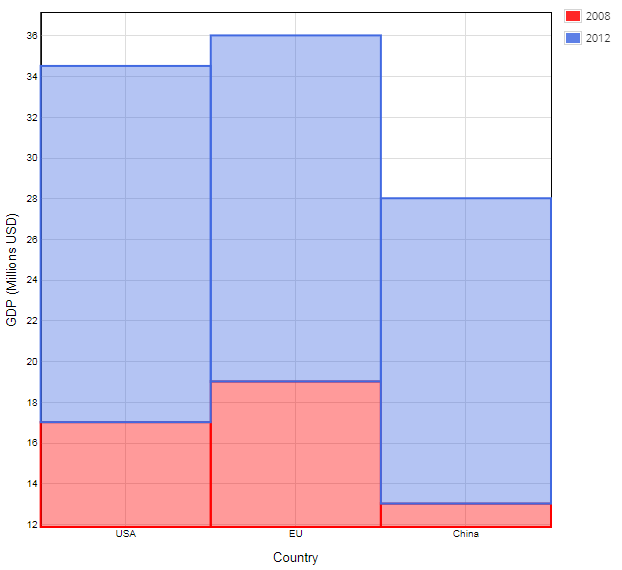
You can refer to the provided java documentation for details about how to use the API.
Correlated watchdog use case
This appendix presents watchdog indicators and correlated watchdogs using several use cases.
Watchdog indicators based on threshold statements
Watchdog indicators can evaluate indicator results using watchdog thresholds, which give you the flexibility to define your own logic that compares any output parameter with a pre-defined value.
The example below shows how you can use the Field value outside a limit ( - FI06) indicator to monitor salary values:
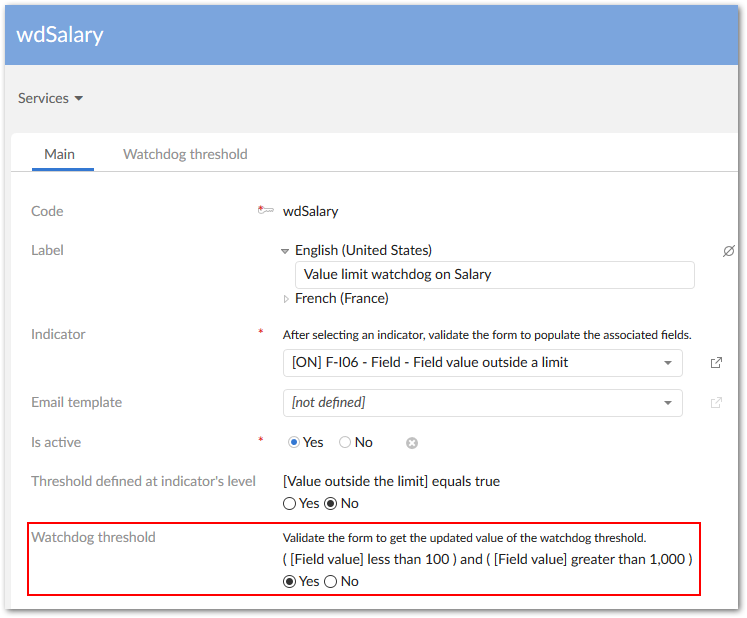
The indicator's watchdog configuration raises an alert when a salary value falls out of the specified range of . The watchdog threshold raises an alert when a value falls within the range of . Using a watchdog threshold to create an alert allows you to keep and enrich existing indicators without having to modify their settings. Correlations between watchdog indicators will be illustrated later.
As shown below, you can define two watchdog threshold records to create a range value:
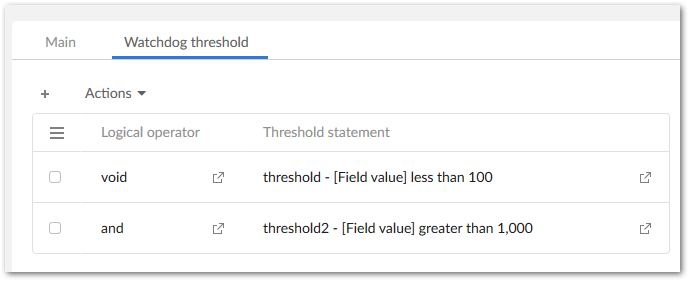
Each watchdog threshold is built on a logical operator and a threshold statement:
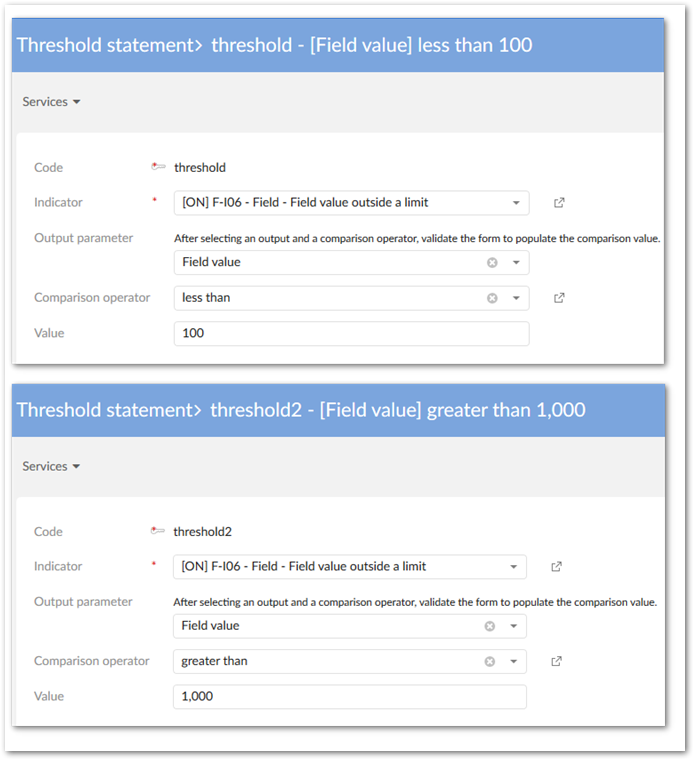
You can also define more complex logic between indicator outputs. See the example in the Correlated Watchdog indicators section.
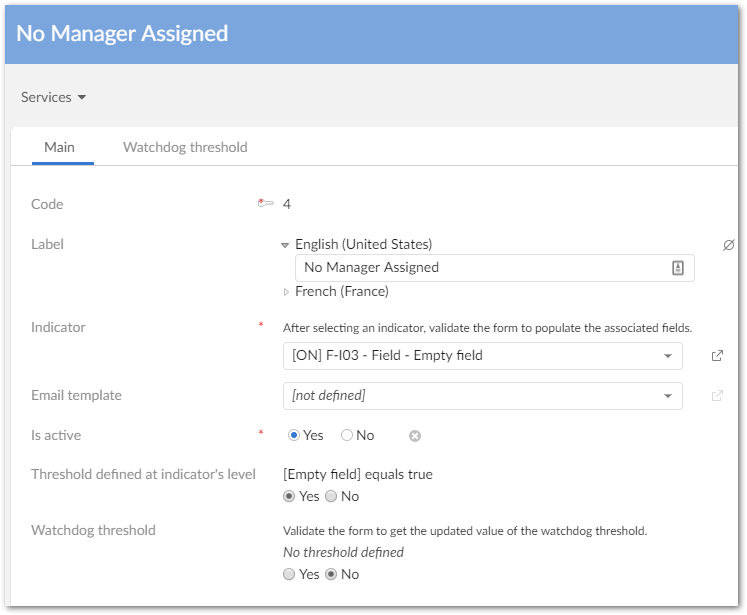
Watchdog indicators based on the indicator's threshold
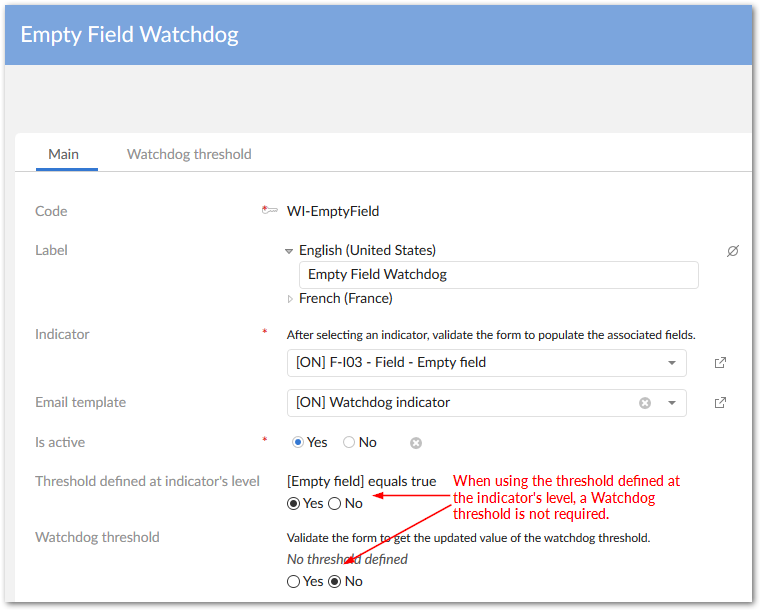
You can also configure a watchdog indicator that works on the threshold defined at indicator's level. By doing this, you can monitor that watchdog indicator together with other watchdog indicators in the same result UI, or use it as a part of a correlated indicator.
Correlated watchdog indicators
You can create a correlation between watchdog indicators to monitor multiple indicator results. In the following example, an alert is raised when an employee is added or updated and:
After configuring the above indicators on the appropriate fields, and setting up watchdog indicators, the correlation between the watchdogs can be created. The following image highlights the settings:

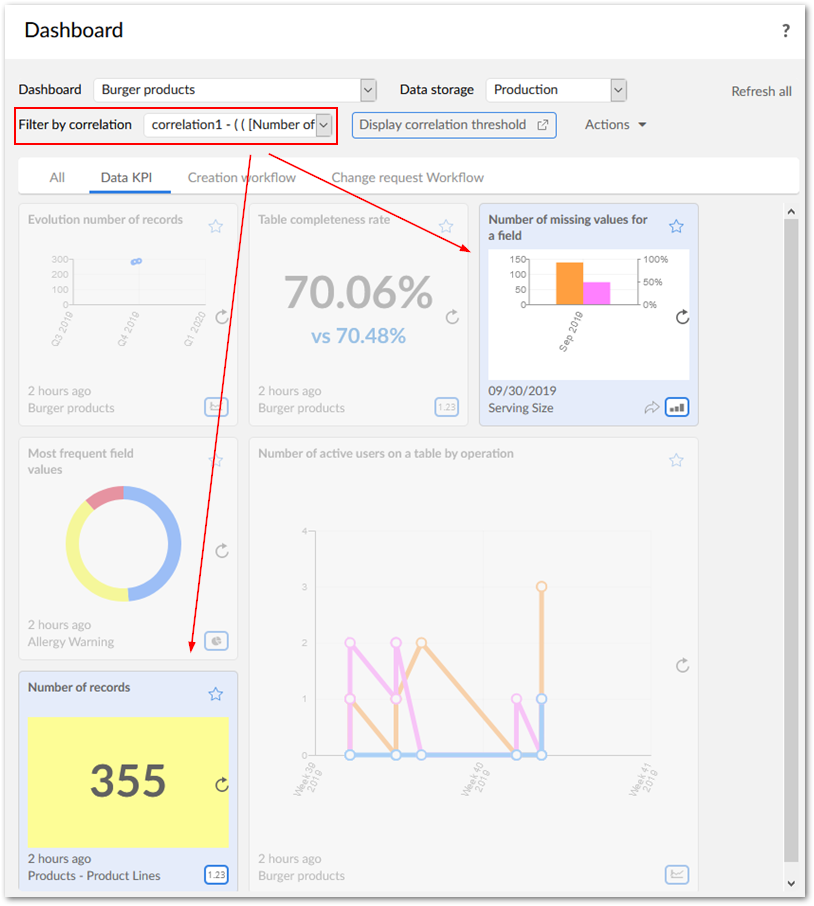
When you add correlated watchdogs to dashboard sections, you can use the filter to highlight the related tiles: