
Administrative operations
Related information
Types of administrative operations
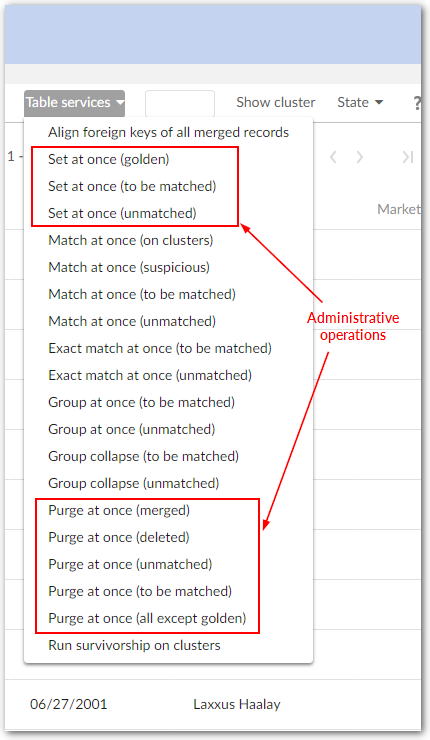
The add-on supplies two types of administrative operations to initialize records in a table, and to purge them.
Initialization of a table
These operations are not available if the process policy is incorrectly configured. They still remain available when 'On matching Process' is set to 'No'.
|
Operation
|
Description
|
|---|---|
|
Set at once (unmatched)
|
Applied on a table directly and for all its content.
State values to reset can be selected. 'Unset' value takes undefined record state only.
Matching metadata are initialized without any matching execution:
|
|
Set at once (to be matched)
|
Applied on a table directly and for all its content.
State values to reset can be selected. 'Unset' value takes undefined record state only. Matching metadata are initialized without any matching execution:
|
|
Set at once (golden)
|
Applied on a table directly and for all its content.
State values to reset can be selected. 'Unset' value takes undefined record state only. Matching metadata are initialized without any matching execution:
|
Table 57: Services applied to initialize a table under the matching
Purge of a table
These operations are not available if the process policy is incorrectly configured. They still remain available when 'On matching Process' is set to 'No'. When applied to the relational persistence mode, the purge stops if there are referential integrity constraints against records to delete.
| Service | Description |
|---|---|
| Purge at once (merged) | Applied on a table directly and for all its content. Every 'merged' record is physically deleted by EBX®. Every golden record alone in its cluster moves to the '001' cluster. |
| Purge at once (unmatched) | Applied on a table directly and for all its content. Every 'unmatched' record is physically deleted by EBX®. |
| Purge at once (to be matched) | Applied on a table directly and for all its content. Every 'to be matched' record is physically deleted by EBX®. |
| Purge at once (deleted) | Applied on a table directly and for all its content. Every 'deleted' record is physically deleted by EBX®. |
| Purge at once (all except golden) | Applied on a table directly and for all its content. Every record is physically deleted by EBX® except golden records. Definitive golden records stay in the '003' cluster. All other golden records move to the '001' cluster. |
Table 58: Services applied to purge a table under the matching
Refreshing relationships
When you save a Table configuration record, the add-on automatically builds and saves relationship data in a Relationship table. You can access this information by selecting a Table record's Relationships tab.
For some actions, the add-on dynamically updates the Relationship table's data. For example, when you delete a record, the add-on automatically deletes affected relationships. However, if you make modifications to a data model that impact stored relationship data, you should run the Refresh relationships service. Changes that could require a refresh include updates to the model's structure, or import of a previous add-on configuration. Depending on the changes made to the data model, this service may insert or delete records in the Relationship table.
Note:
Only relationships included in the same data set as the configured table display in the Relationship table.
The Refresh relationships service can be run from the location shown in the following image: