
Matching strategies
Related information
Types of matching strategies
The add-on provides two strategies for finding duplicates: phonetic and distance. An additional configuration allows you to mix these two strategies, which improves the quality of matches.
It is possible to extend these strategies by implementing any other form of matching. The add-on accepts custom matching algorithm configuration.
Phonetic matching
The phonetic matching relies on how words are pronounced. When pronunciation is similar, the match score is higher.
For example, phonetic matching will provide a high score for the following:
-
Billie (pivot)
-
Beellie
-
BillyHowever, for these values, phonetic matching fails to find a match:
-
Billie
-
Bellie
-
MillieMoreover, the language used influences the matching sensitivity. For instance, depending on whether the language used is English or French, the matching results are different for the following:
-
Billie (pivot)
-
Beellie - not considered a suspect in French, as it is in English
The language used by the matching process is a property in the 'Table configuration'.
When terms to match are not names but phone numbers, email addresses, codes, etc., phonetic matching is likely not the best strategy. In such cases, using a distance matching strategy is generally preferable.
Distance matching
Distance matching computes the distance, or number of differences, between two terms. When the terms to compare are long (that is, more than 30 characters) or have varying sizes, distance matching may not be suitable.
Distance matching is a highly efficient method of comparing terms such as phone numbers, email addresses and business codes. Moreover, since distance matching is not language-specific, it can be more efficient for multilingual terms.
For example, distance matching provides correct outcomes for the following case:
-
marie.haady@gmail.com (pivot),
-
parie.haady@gmail.com (one distance)For the same example, phonetic matching fails to find a match.
Using a double matching strategy
Deciding which matching strategy to apply depends on the data being compared. It may be helpful to test different strategies before launching the matching process over the scope of the entire database. Even with the most suitable matching strategy, 'false negative' records may occur.
A 'false negative' record is a record that should have been identified as a suspect record by the matching procedure, but was not. This situation is problematic because it marks records as golden even though potential suspect records still exist in the database. To fix this issue, the EBX® Match and Merge Add-on can be configured to apply two levels of matching using different strategies.
-
The first level applies the best matching strategy to each field to be matched. For instance, a phonetic matching can be used for a name, or distance matching for a postal code.
-
To catch 'false negative' records, a second level matching strategy can be configured using a different matching strategy. This means that all 'negative' scores for the name are recomputed automatically using distance matching. When a record is marked as a suspect by the second level strategy, its score is set as the 'minimum score stewardship + '0.1' by the add-on ('StewardshipMinScore' property in the 'Process Policy' table.).
The second level matching strategy is optional.
Matching algorithms by strategy
The table below highlights the most popular matching algorithms used by the phonetic and distance matching strategies.
| Matching algorithm | Phonetic | Distance | Use context |
|---|---|---|---|
| NY SIIS | X | Better for European and Hispanic name | |
| Double metaphone | X | More generic than Soundex and NY SIIS | |
| Levershtein, Jaro Winker, Fuzzy Full text | X | For short string, not reliant on language, best applied to password, email, business code, phone number, postal code, etc. |
Table 55: Matching algorithms by matching strategy
Implementing a custom matching algorithm
Besides the predefined matching algorithms, you also can create a matching algorithm as your desire. The following section describes in detail step by step on how to implement a custom matching algorithm.
-
Extend SearchDistance API
-
Export this class to a jar file ,then put this jar file to the same location as 'ebx.jar'.
-
In Administration → Matching reference data → Matching algorithm' table, create a new record with path to the extended Java class.

Once you finish, this custom algorithm will be displayed in the list of available algorithms.

Using matching algorithms with the add-on
The EBX® Match and Merge Add-on manages matching scores formatted as similarity percentages. The highest similarity is 100% (equality).
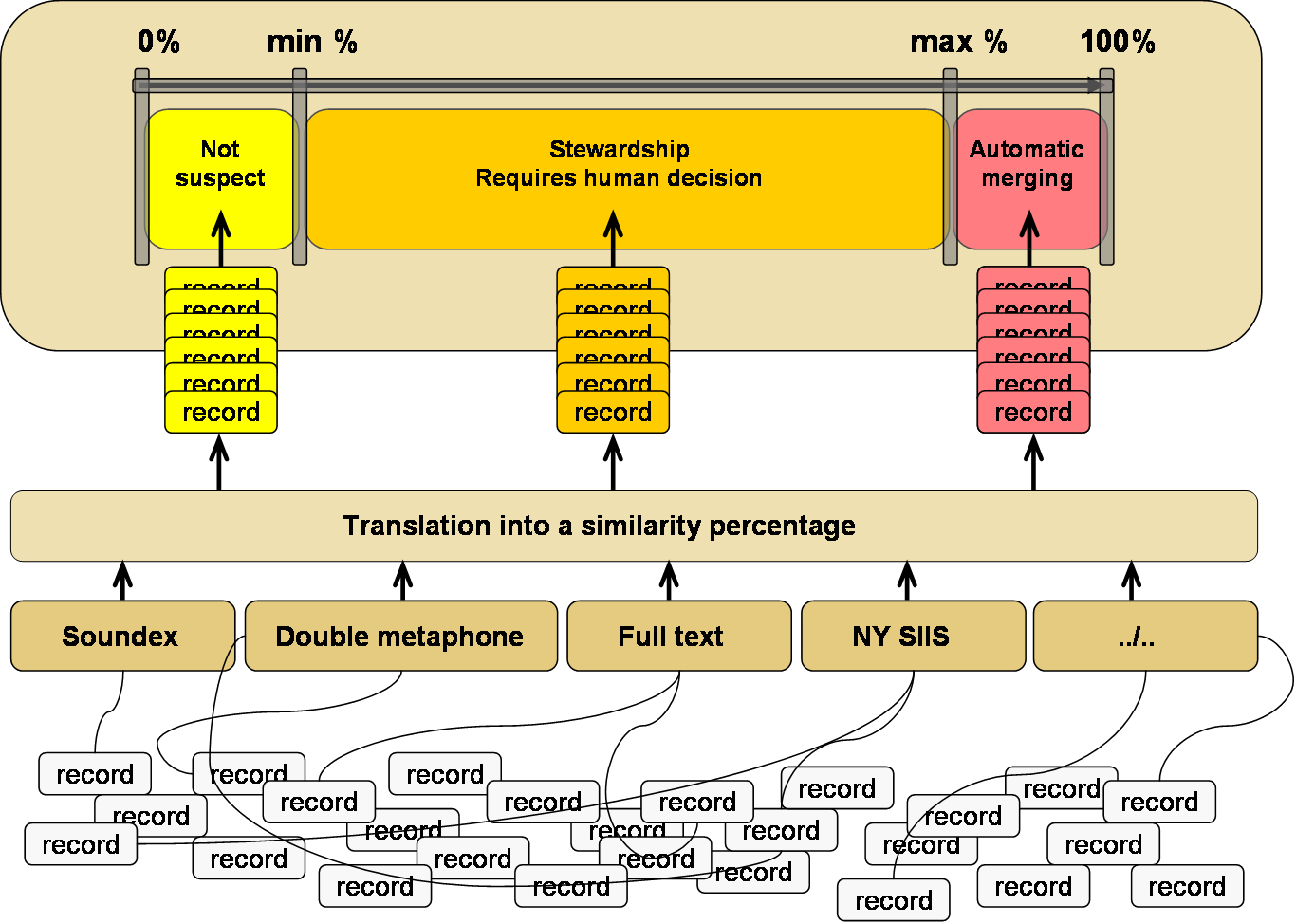
Depending on a matching process policy's configuration, the similarity percentage is used by the add-on to decide whether the record is a suspect or not. The figure above highlights this decision process.
The minimum and maximum percentages are the 'stewardship min score' and 'stewardship max score' properties, respectively in the 'Process policy' table.
The matching algorithms integrated into the add-on translate their scores into a similarity percentage. When configuring new matching algorithms, the score must always be translated into a similarity score.