
Installation and first configuration
Related information
Environment
-
EBX® 5.5.1 or higher.
-
The add-on war package must be set up.
-
Copy 'ebx-addons.jar' into 'catalina.base/shared/lib' folder (same location with 'ebx.jar').
-
When an official EBX® license is used you must get a license key for the add-on.
Add the add-on metadata type to a table
To be known by the TIBCO EBX® Match and Merge Add-on, a table must be enriched with a matching metadata type that is provided with the add-on.
In the DMA:
-
In Configuration => Included Data Models => you must declare the 'ebx-addon-daqa-types.xsd' schema from the 'ebx-addon-daqa' module.
-
In ComplexData Types => On your table => add a group with the name 'DaqaMetaData' from the type 'Inline Match and Merge data' stemming from the included schema. The name of this data type 'DaqaMetaData' cannot be modified.
-
Move this group just after the primary key of the table.
-
Publish and create a dataset if needed.
| Special notation: | |
|---|---|
 |
See Uninstallation section to remove the matching metadata type from a table. |
Creation of indexes on the table
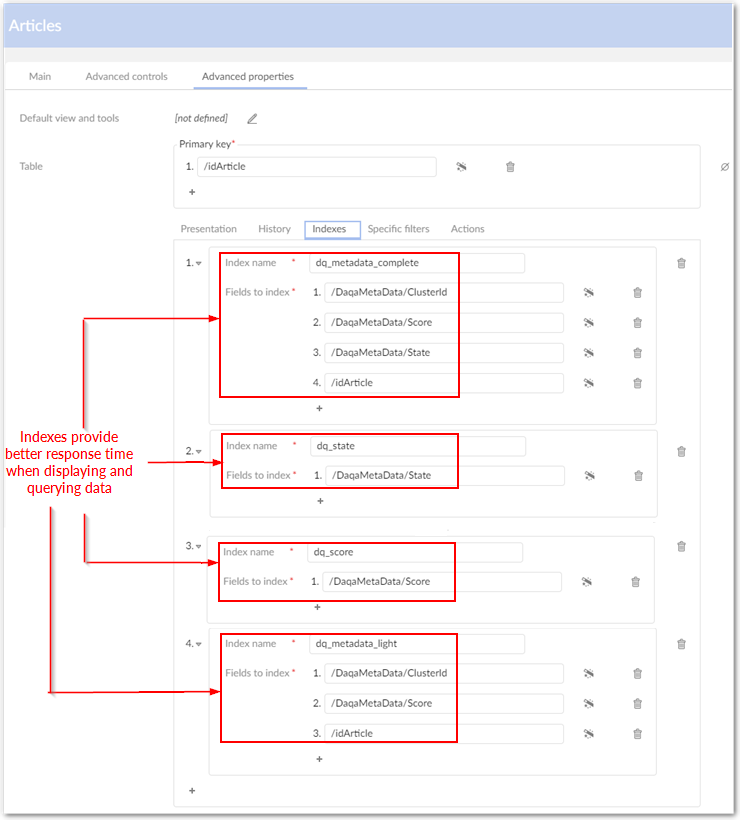
Indexing will optimize the response time when displaying or querying data. The following sections indicate how to create indexes on a table.
| Special notation | |
|---|---|
|
You should define indexes on Source field and all Filter by fields. |
Basic indexing
Indexing for the operation 'Exact match at once'
Regarding the particular case of the 'Exact Match at once' operation, a dedicated index must be created for fields of the matching policy in the exact same order. This step must be done for each matching policy that can be executed in an exact match at once operation.