
Cluster management
Related information
Definition
When the system searches for duplicate records, one or multiple records can be found. All these records are grouped under a unique identifier to form a cluster of potentially related records. The add-on automatically adds this identifier to the record as metadata. The following are some example clusters:
| Cluster | Record |
|---|---|
| Cluster 020 | Bonnet, pivot, 100% Ponnet, suspect, 80% Monney, suspect, 70% |
| Cluster 023 | Helen, golden, 100% Halen, merged, 85% Bellen, merged, 80% Heelen, merged, 91% |
| Cluster 024 | Durand, pivot, 100% Dupand, suspect, 60% |
| Cluster 025 | Lapetina, golden, 100% Labetina, merged, 90% |
Each table has its own cluster management. In other words, a cluster is limited to the scope of a table and remains fully autonomous from relationships between tables. A record is attached to one cluster only and can move from one to another depending on matching procedures executed on the table.
Note:
Each cluster can only have one auto-created record.
When using matching for bulk data imports, the add-on creates as many clusters as necessary to put all duplicate records into groups. This allows you to manage each cluster independently when human decisions are required. Each cluster's identifier is automatically computed by the add-on. The first eleven clusters are reserved by the add-on (000 to 010).
| Cluster ID | Definition |
|---|---|
| 000 | Groups all unmatched records not integrated in a group (Groups are created when the service Group at once (unmatched) is used). These records have not yet undergone matching so do not yet belong to a cluster of suspects. |
| 001 | Groups all golden records that are not attached to clusters. These records appear in two situations: when a golden record is created without any suspect records, or after all merged records in a cluster have been purged, which moves the golden record to this cluster. |
| 002 | Groups all records that are 'to be matched'. These records are waiting to be matched as a batch. This record state is used during bulk data import. |
| 003 | Groups all records that are 'Golden' and stated as definitive golden. These records are no longer used when matching is executed. |
| 004 | Groups all records that are 'Suspicious'. |
Table 52: Predefined cluster ID
| Special notation: | |
|---|---|
 |
Cluster 005 for record in failure |
Cluster life cycle
When matching a record against the table, the cluster identifier computation can fall into one of two scenarios:
-
All suspect records are located in the same cluster. By default, this cluster is then reused and all existing records are kept even though there are no longer any suspect records for new matching. The score of these records is set to '-1'. The add-on applies a retention strategy on the existing cluster. This strategy can be changed by setting the 'On suspect record retention' property to false in the process policy. With this configuration, the suspect records that no longer be matched with the pivot record move to the 'unmatched' state in the '000' cluster.
-
Suspect records are located in different clusters. In this case, a new cluster is created to group all suspect records. In such a cluster, there are no records with a score set to '-1'.
| Step | Record, state, cluster, score → Action | Description |
|---|---|---|
| 1 | R3, pivot, 298 R1, suspect, 298 R2 golden, 1 → Action: create R4 | A number of records exist in the table when the record R4 is created. |
| 2 | R1, suspect, 298, -1 R4, pivot, 299 R3, suspect, 299 R2, suspect, 299 → Action: make record R1 pivot, match it against table | Record R4 matches with records located in two different existing clusters. Thus, a new cluster ('299') is created to group all suspect records. |
| 3 | R1, pivot, 299 R3, suspect, 299 R2, suspect, 299, -1 R4, suspect, 299, -1 | Record R1 then matches with records that are all located in the same cluster. The existing cluster ('299') is reused. R2 and R4 are former suspect records. Since they no longer match against the new pivot R1, their scores are set to '-1' |
Table 53: Cluster life cycle
Reinitialization of the latest cluster number
Every table under the add-on control holds a 'Latest cluster number' property. This value is shared by all instances of a table located in different dataspaces and datasets.
This value is incremented by one when the add-on needs to use a new cluster. The clusters empty out when certain matching procedures are executed, such as a purge of records, a 'set definitive golden' or in a cluster with one record. In these types of cases it can be useful to reinitialize the latest cluster number value to get a fresh start. For instance, if the last value is '1,200' and after a purge only a few clusters are used, then it could be useful to reinitialize the latest cluster number to get, for instance, the value '20'. It can be easier for a user to handle clusters from '20' rather than from '1,200'.
This reinitialization is not mandatory, but it is helpful and makes using the cluster numbering easier. If you have administrative privileges, you can run the service from the location shown in the image below:
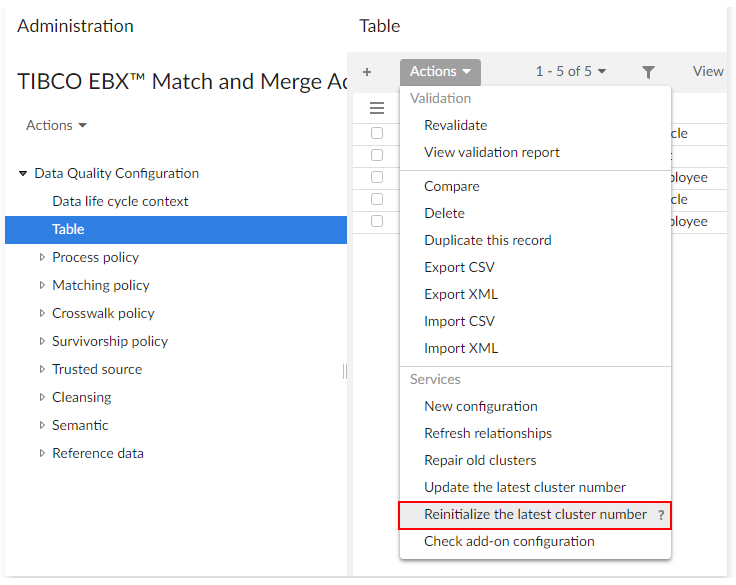
Updating the latest cluster number
It can be important to keep cluster numbers up-to-date to avoid any numbering conflicts. When updating the latest cluster number, the add-on loops through all datasets that contain the selected table and locates the largest cluster number. The table's 'Latest cluster number' property is then updated to this cluster number. This happens automatically when importing a matching configuration.
To manually update the cluster number:
-
Navigate to Administration > Data quality & analytics > TIBCO EBX® Match and Merge Add-on > Data quality configuration > Table.
-
From the Actions menu, select Update latest cluster number.